This year I am trying a more transparent and strategic approach to my technology integration. I've always been mindful of the purpose of the tool, but I wonder if I've consistently conveyed that purpose to my students and colleagues. I have a plan. I know what I'm doing, but do others see it?
So, to get things started, I created a Digital Dashboard Google Document on which my students will see what sites we will be using consistently, the rationale for using that site, and an area in which they will type in login information---not their actual password, but hints or clues in case they forget. There are important class links to district sites, as well as extra rows for students to add additional sites they may choose to frequent.
Both Edmodo and Google Classroom give users the ability to generate an editable copy for each student with the file name and sharing permissions, so in the event that someone does not remember his/her password, the student can access the doc or I can offer clues. Many of the tools we will employ in class allow the teacher to reset passwords, but I want students to be responsible for their accounts before I access my dashboard.
If you like this design, go ahead and snag a copy, customizing it for your students. In the comments for this blog post, please share how you convey the purpose of technology integration to your staff and students.

Showing posts with label digital citizenship. Show all posts
Showing posts with label digital citizenship. Show all posts
Sunday, September 3, 2017

Saturday, July 11, 2015
Link to Posts in Edmodo
Every post in Edmodo has an unique URL. Grabbing the link to a post in Edmodo is a simple process as shown in the video below.
Why would you want to grab a link to a post? This is an easy way to track student participation in a group. Rather than trying to tally up how many times a student posted or replied in a group, create an assignment where the student turns in the links to either the posts they created or replied to. I use this method to keep track of participation in our Scribe City writing group.


If you notice in the above assignments, the students are posting their writing/replies publicly to the group AND turning in a 5-10 sentence reflection on the process which only I will read. This step helps to build metacognitive thinking skills. Using this process of turning in a link to a post saves me time with assessing student participation and keeps the students writing.
Why would you want to grab a link to a post? This is an easy way to track student participation in a group. Rather than trying to tally up how many times a student posted or replied in a group, create an assignment where the student turns in the links to either the posts they created or replied to. I use this method to keep track of participation in our Scribe City writing group.


If you notice in the above assignments, the students are posting their writing/replies publicly to the group AND turning in a 5-10 sentence reflection on the process which only I will read. This step helps to build metacognitive thinking skills. Using this process of turning in a link to a post saves me time with assessing student participation and keeps the students writing.
Friday, July 10, 2015
Remind-- Class Announcements & Benedictions
Remind has been a very useful tool for keeping my parents and students up to date on class announcements. The one-direction text messaging makes it easy for me to blast out class room changes, reminders to study, or general messages.

My senior students especially appreciated the text messages I sent the night of their prom. Many came in to class the following Monday after prom and said, "I got your text, Mrs. Baker. We behaved ourselves."

This small gesture of sending a text to let them know I cared and was worried about their safety and well-being helped to solidify our working relationship in the classroom. When students know teachers care about them as people, students will work harder for their teachers.This got me thinking, now that my seniors have graduated and my former freshmen are growing up and will someday leave the nest, how can I let them know that I still think about them?
At the end of every year I've been teaching, I give my students a parting gift of thoughtfulness. I create business-size cards that on each have an inspirational quote. I find the quotes on the internet, paste them into a Word doc, play with the fonts, print, laminate, and cut the pages down to business-size cards. On the last day before exams, I walk around the room and with the cards facing down, ask each student to pick a card. They keep the card putting it in their wallet, phone case, sock drawer, etc. The cards have a funny way of finding the right person-- granted this is akin to reading one's horoscope in the newspaper, but I play up the magic of the card and make sincere statements, "Oh! That quote is soooo good for you! ... Wow, that one is spot on!" I also create a stack of cards for my swim team before each big meet. Former students and swimmers will stop by and visit to say HI and let me know, "I still have my cards!"

So this got me thinking, what if I combined the two? What if I still do the quote cards, but now have a digital version too? I could repurpose Remind to text out an inspirational quote once a day, twice a week, holidays.... whenever! I can do the same thing on Twitter or Instagram, but I want the messages to go to my students (and whoever else wants to follow) without having all the other issues with social media. I don't have to worry about following/friending students. The messages are one directional and, as long as I send them appropriately, there should be no issue.
So, if you would like to receive a sometime daily, sometime weekly, whenever inspirational thought, subscribe to my KBaker's Benedictions group on Remind following the directions below.


My senior students especially appreciated the text messages I sent the night of their prom. Many came in to class the following Monday after prom and said, "I got your text, Mrs. Baker. We behaved ourselves."

This small gesture of sending a text to let them know I cared and was worried about their safety and well-being helped to solidify our working relationship in the classroom. When students know teachers care about them as people, students will work harder for their teachers.This got me thinking, now that my seniors have graduated and my former freshmen are growing up and will someday leave the nest, how can I let them know that I still think about them?
At the end of every year I've been teaching, I give my students a parting gift of thoughtfulness. I create business-size cards that on each have an inspirational quote. I find the quotes on the internet, paste them into a Word doc, play with the fonts, print, laminate, and cut the pages down to business-size cards. On the last day before exams, I walk around the room and with the cards facing down, ask each student to pick a card. They keep the card putting it in their wallet, phone case, sock drawer, etc. The cards have a funny way of finding the right person-- granted this is akin to reading one's horoscope in the newspaper, but I play up the magic of the card and make sincere statements, "Oh! That quote is soooo good for you! ... Wow, that one is spot on!" I also create a stack of cards for my swim team before each big meet. Former students and swimmers will stop by and visit to say HI and let me know, "I still have my cards!"

So this got me thinking, what if I combined the two? What if I still do the quote cards, but now have a digital version too? I could repurpose Remind to text out an inspirational quote once a day, twice a week, holidays.... whenever! I can do the same thing on Twitter or Instagram, but I want the messages to go to my students (and whoever else wants to follow) without having all the other issues with social media. I don't have to worry about following/friending students. The messages are one directional and, as long as I send them appropriately, there should be no issue.
So, if you would like to receive a sometime daily, sometime weekly, whenever inspirational thought, subscribe to my KBaker's Benedictions group on Remind following the directions below.

Thursday, July 9, 2015
Creating Student Community Writing Spaces
Using Kidblog, I tried blogging with my students during the 2013-14 school year, and while they did fine writing, we struggled with finding an authentic audience to comment on the 130 individual blogs. I wanted to generate traffic with #comments4kids, but my district was very leery of having student writing set free in the wilds of the internet. I understood the administrations skepticism and kept my students in a walled garden. So our blogs became nothing more than online journals.
I know there are teachers and classes out there who are very successful at blogging, but for me it just could not continue outside of the classroom. Quadblogging with other classes was out because I couldn't guarantee consistent access to computers for my students. I entered the 2014-15 school year with PARCC looming and defeatist attitude towards blogging with my students.
But I did spy a certain kind of hope: my ELAFlip Voxer group is ever the wealth of ideas and support. And I asked the group if they would be willing to create an Edmodo writing group. Sticking with the theme of gamification for one of the teachers, we named the group Scribe City. In this group, students post drafts of their work and receive feedback from students. The group is very organic. Teachers assign tasks as they align with their lesson plans. We don't have a set schedule for posting writing or giving feedback, and even when PARCC acquired all technology in my building, we could keep participating in Scribe City because students could access Edmodo on the phones or at home.

In Scribe City, students post writing as either part of the Edmodo Note or an attached Google Doc any time, and anyone in the group can comment. We encourage the students to comment on content, grammar, diction, style etc by providing constructive criticism--something that will make the writing better and not just confirm (ie "good job!")--even suggesting resources that would help. We also tell the writers that they are to provide an explanation of the task/assignment and state what they specifically would like feedback on or help with. We want students to engage in a conversation with the others about writing. General digital citizenship rules apply as students demonstrate collegial communication skills. Teachers monitor the group to make sure everyone is appropriate. To make sure the group is active, we let each other know when our students are posting assignments.
Scribe City has also become a haven for my artistic, introverted students, with one student making it her writing residence. Maddy was an Honors student in my 8th period 2013-14 freshmen class. Gifted writer, she was painfully shy and never spoke up in class. When I started Scribe City in 2014-15, I sought Maddy out in the halls and told her about the group. Giving her the join code, I encouraged her to jump in and share her writing even though she was no longer a freshmen. Without any additional prompting, Maddy posted her poetry and short stories. She engage in conversations with the other students without trepidation.
No matter what tools we share or strategies we devise, as educators we are constantly seeking out what works for our students and ourselves. While blogging didn't quite work as well as I hoped, Scribe City has been success. If you are interested in join the group, please contact me. I also welcome any comments on how you've implemented blogging or created other places for students to write for an audience.
I know there are teachers and classes out there who are very successful at blogging, but for me it just could not continue outside of the classroom. Quadblogging with other classes was out because I couldn't guarantee consistent access to computers for my students. I entered the 2014-15 school year with PARCC looming and defeatist attitude towards blogging with my students.
But I did spy a certain kind of hope: my ELAFlip Voxer group is ever the wealth of ideas and support. And I asked the group if they would be willing to create an Edmodo writing group. Sticking with the theme of gamification for one of the teachers, we named the group Scribe City. In this group, students post drafts of their work and receive feedback from students. The group is very organic. Teachers assign tasks as they align with their lesson plans. We don't have a set schedule for posting writing or giving feedback, and even when PARCC acquired all technology in my building, we could keep participating in Scribe City because students could access Edmodo on the phones or at home.

In Scribe City, students post writing as either part of the Edmodo Note or an attached Google Doc any time, and anyone in the group can comment. We encourage the students to comment on content, grammar, diction, style etc by providing constructive criticism--something that will make the writing better and not just confirm (ie "good job!")--even suggesting resources that would help. We also tell the writers that they are to provide an explanation of the task/assignment and state what they specifically would like feedback on or help with. We want students to engage in a conversation with the others about writing. General digital citizenship rules apply as students demonstrate collegial communication skills. Teachers monitor the group to make sure everyone is appropriate. To make sure the group is active, we let each other know when our students are posting assignments.
Scribe City has also become a haven for my artistic, introverted students, with one student making it her writing residence. Maddy was an Honors student in my 8th period 2013-14 freshmen class. Gifted writer, she was painfully shy and never spoke up in class. When I started Scribe City in 2014-15, I sought Maddy out in the halls and told her about the group. Giving her the join code, I encouraged her to jump in and share her writing even though she was no longer a freshmen. Without any additional prompting, Maddy posted her poetry and short stories. She engage in conversations with the other students without trepidation.
 |
| Maddy's identity has been protected by a disguise. |
Friday, October 31, 2014
In the Teacher's Lounge: Using Edmodo to Teach Digital Literacy
I had the pleasure on Tuesday last week to give a webinar on how I use Edmodo to teach my students digital literacy skills and help prepare them for digital assessments. My students piloted the PARCC last Spring and it became clear that knowing how to effectively navigate through a website will impact student scores on the Common Core assessment. Not only are my students being assessed on reading and writing literacy skills, but they are also being evaluated on understanding how to navigate and use a website.
Watch the webinar to see what I do and how I do it.
Here is a copy of my Google Slides so that you can access the resources linked in the presentation. There are lots of Easter eggs hidden in the slides, so use your digital literacy skills and explore!
Interested in crowd-sourcing a catalog of digital tools that target specific skills? Add your favorite tools here!
Watch the webinar to see what I do and how I do it.
Here is a copy of my Google Slides so that you can access the resources linked in the presentation. There are lots of Easter eggs hidden in the slides, so use your digital literacy skills and explore!
Interested in crowd-sourcing a catalog of digital tools that target specific skills? Add your favorite tools here!
Sunday, May 25, 2014
Film & the Back Channel
My classes are wrapping up the year reading Shakespeare's Romeo and Juliet which includes viewing the 1968 Zeffirelli film version. While the acting leaves much to be desired, there is merit in showing this version because it provides students with a view of the time period and it is used in various critical thinking activities.
We compare and contrast the cinematography of Zeffirelli's R&J (1968) with West Side Story (1961) in the opening brawl sequence--there really is no comparison, WSS is amazing-- and focus on how the filmmakers used the source material of Shakespeare's play, meeting Common Core Standard 9-10.9. Students point out similarities in camera shots and staging of the opening brawl sequence. They notice the use of high angle shots to showcase the chaos of the fighting, as well as the use of close-up shots to highlight specific characters. They even recognized the actor who played Tybalt as the same one who played Basil Exposition in the Austin Powers series.

After the opening sequence and the Prince's yelling at all parities about having started another civil brawl, the next scenes in the 1968 film that correspond with Act I of the play are rather boring for modern teenage audiences. Whereas I stopped and replayed all the scenes of WSS ad nausem to point out the cinematography and framing, I refuse to stop the 1968 version--like ripping off a band-aid, the quicker we view it, the quicker we will be done. To keep them enthralled, students participate in a class back channel discussion using TodaysMeet.com.
On our class set of Chromebooks, students join the TodaysMeet room that I created and I go over the ground rules for the period:
- Students must use their real names. I give students a participation score for the period, so no name equals no credit.
- Students must demonstrate digital citizenship and use school appropriate language. I don't mind if they misspell or abbreviate, but no profanity or sexually explicit posting is allowed.
- Students are to comment on what they see AND answer the questions as they are posted to the room.
- Students type in all lower-case letters, while the teacher types in all caps.
I don't follow a Q1/A1 format for posting questions during this activity, instead I post using all caps. Since the conversation is very fast paced, I keep my caps-lock on for faster typing and so students can differentiate my questions and comments from the rest of the group. There is always a bit of silliness that occurs, but I remind the students about the purpose of this activity: to have a scholarly discussion. There is a time and place for comedic conversations and blurt-out posting, but this is not it.
To archive each period's chat session, I make a quick screencast using Screencastomatic. I turn off the microphone and record scrolling through the chat so that the video archive is about 5 minutes long, as opposed to a full 43 minute period. After uploading the screencast directly to YouTube, I use YouTube's edit features and add music. I then post each period's video to our Edmodo group where students can compare and contrast the conversations from the various periods.
Take a look at the archives from Friday's back channel discussion of the 1968 Zeffirelli version of Act 1, scenes 1-5 of Romeo and Juliet.
Saturday, November 30, 2013
Animoby: Animated Learning for Anybody
For those of you looking for a whiteboard video creation tool to use on any tablet, check out Animoby.
Android App
Apple App
Similar to other whiteboard screencast tools, Animoby lets users create multipaged screencasted videos.
Take a look at this demonstration from Animoby:
Features:
Android App
Apple App
Take a look at this demonstration from Animoby:
Features:
- Use on Apple or Android devices
- Variety of tools and colors
- Connects to Dropbox
- Import PDF's from email or Dropbox
- Able to insert images
- Able to zoom in and out
- Save as compact files
- Share and email projects
- Various background templates
- Share to Facebook, Twitter, Google+
New users will appreciate the extensive video tutorial menu on Animoby's website. The videos are easy to understand and demonstrate use of the app. While the interface is intuitive and easy to navigate, having the tutorials available is a positive. Also, visit Animoby's homepage to view what other users have created.
Students could use Animoby to demonstrate understanding of concepts taught in class. Imagine screencasts of students solving equations-- talk about showing your work! Students could also demonstrate active reading skills by recording themselves talking through reading a text on a PDF or picture taken of an excerpt from a book. Music and Math teachers will appreciate the preloaded backgrounds available: from blank sheet music to various styles of graph paper, subject area teachers will easily be able to create screencasts to use in their classes. I'm partial to the white lined paper background, as you will see in this example I created: http://www.animoby.com/a/3214
I used the Animoby app on my iPad to create this screencast of the literary device, Personification. I did a quick Google search for images, saved them in my camera roll, and added them to the presentation, cropping the images as needed. Animoby's save feature allows me to start a project, save it unfinished, and return to as needed before recording and publishing it to the web.
Recording was simple, and the quality is excellent. I really like that I was able to zoom in and out of each image while recording. You'll hear my dog Charlie barking at the neighborhood cat in the background, but I can still be easily heard over the noise. I could have deleted it and re-recorded the audio, but I chose not to for the sake of demonstration. After the final product is published, I emailed it to rmyself to generate a URL from which I can get the embed code or share to Facebook, Twitter, or Google+. The embed code could also be used for adding the Animoby projects to blogs or Edmodo posts.
Recording was simple, and the quality is excellent. I really like that I was able to zoom in and out of each image while recording. You'll hear my dog Charlie barking at the neighborhood cat in the background, but I can still be easily heard over the noise. I could have deleted it and re-recorded the audio, but I chose not to for the sake of demonstration. After the final product is published, I emailed it to rmyself to generate a URL from which I can get the embed code or share to Facebook, Twitter, or Google+. The embed code could also be used for adding the Animoby projects to blogs or Edmodo posts.
What I would like to see is Animboy be able to connect to Google Drive. I use Google Drive more so than Dropbox, and having this option would be a major plus. It would also be nice to have the option to include background music. While Animoby works great on tablets, I wonder if a paired down version could be available for smartphones. Teaching in a BYOD district with most of the students using smartphones, having a screencasting tool for a smartphone would be an asset.
Animoby is versatile and easy, and I'll be sure to recommend it to colleagues and students.
Animoby is versatile and easy, and I'll be sure to recommend it to colleagues and students.
Tuesday, November 5, 2013
Voki: A Tool for Bringing Characters to Life
Voki is a free web 2.0 tool used to create talking avatars. Characters can be customized to look like historical figures, animals, cartoons, and even one's self. For a fee, users can join Voki Classroom for more access to options and the ability to control privacy settings. Vokis are limited to 60 second recordings of either a user's voice or a computer generated voice, so I use Voki for quick assignments or part of a larger project.
 Creating a Voki is very easy and can be done quickly. Even in the free version there are a plethora of options and characters to choose from. Users can change the background image and customize the look of the stock characters. Publishing Vokis is easy too and users can publish directly to sites as well as copy/paste a hyperlink or embed code.
My 9th grade Honors students incorporated Voki as part of their Create a Hero Project, creating a profile of their hero character and give him/her life using Voki. Students provided an overview or teaser for their hero's journey stories and published the Vokis on their student blog pages by embedding the Voki into their Hero Stories. I was able to show my students how to embed in HTML without having to go over the basics of coding-- something I have yet to learn. Students also shared their Voki with others in their Edmodo small groups.
Here are some examples from my students. Click on the PLAY icon in the bottom left corner of each one to hear a preview of their stories.
My students could also create Vokis of characters explaining concepts taught in class or summarizing chapters in a novel. World Language teachers could use Voki for recording students speaking short passages. History teachers could have students bring historical figures to life. Voki is an easy to use and versatile classroom tool for any subject area. For other lesson ideas, visit Voki's Lesson Plan Page.
Creating a Voki is very easy and can be done quickly. Even in the free version there are a plethora of options and characters to choose from. Users can change the background image and customize the look of the stock characters. Publishing Vokis is easy too and users can publish directly to sites as well as copy/paste a hyperlink or embed code.My 9th grade Honors students incorporated Voki as part of their Create a Hero Project, creating a profile of their hero character and give him/her life using Voki. Students provided an overview or teaser for their hero's journey stories and published the Vokis on their student blog pages by embedding the Voki into their Hero Stories. I was able to show my students how to embed in HTML without having to go over the basics of coding-- something I have yet to learn. Students also shared their Voki with others in their Edmodo small groups.
Here are some examples from my students. Click on the PLAY icon in the bottom left corner of each one to hear a preview of their stories.


Sunday, November 3, 2013
Tell Me All About it with Tellagami
Tellagami is a mobile app that lets users create a short animated video using any mobile device. This is a cool tool for BYOD students and teachers to use for animated project videos.
In three easy steps, users create a "Gami" animated avatar by customizing their character, selecting a background image, adding dialogue, and sharing it. Once you have the app, there is no account log in information to worry about. Students and the teacher could share devices to use Tellagami.
Sharing Created Gamis
While not having to worry about log in information is a plus and sharing is easy, there is not currently a way to see a library of the Gamis one makes when in the app. Once a Gami is created, select share via email to grab the URL hyperlink or save in the camera roll/ video/Tellagami folder of a device. Teachers could have students turn in their Gami by submitting the URL on a class Google form or turning the URL in via an assignment on Edmodo. Students could also embed the Gami in a digital portfolio such as a Google Site or a blog. While archiving created Gamis via email isn't ideal, I can't complain when considering the cost (FREE) and ease of use.
If you are having trouble locating the embed code, first send yourself the URL via sharing through email. Go to your email, then click on the URL and return to the Gami created. Click on the share icon in the upper right corner and the embed code will appear. I don't know why the embed code doesn't automatically appear in the app, but I'm hopeful that the Tellagami developers will remedy this soon.
Ideas for Use
For use in the classroom, students could take a picture of a project with their mobile device and upload the picture as their background image. Adding dialogue students could record their voice or type in text that explains their project. The student could then share the link to the Gami via email, Twitter, Facebook, or copy/pasting the link to a learning management system such as Edmodo. An embed code is also provided for posting the Gami to a blog.
Tellagmi could be used for mini-virtual field trips. Students could search and select a background image of a location significant to the content being studied and record a message about the location.
For #flipclass teachers, Tellagami for quick delivery of content. Upload a picture of a diagram, equation, or any other pictorial information and record a Gami explaining the concept then share.
This easy to use tool has a plethora of uses for the classroom. From classroom presentations to delivery of content, Tellagami will allow students and teachers to tell viewers all about any concept.
Here are two examples I made: one has a computer generated voice with an uploaded background and the other has a Tellagmi provided background using my voice for the avatar. You can customize and select the options that fit your project.
In three easy steps, users create a "Gami" animated avatar by customizing their character, selecting a background image, adding dialogue, and sharing it. Once you have the app, there is no account log in information to worry about. Students and the teacher could share devices to use Tellagami.
Sharing Created Gamis
While not having to worry about log in information is a plus and sharing is easy, there is not currently a way to see a library of the Gamis one makes when in the app. Once a Gami is created, select share via email to grab the URL hyperlink or save in the camera roll/ video/Tellagami folder of a device. Teachers could have students turn in their Gami by submitting the URL on a class Google form or turning the URL in via an assignment on Edmodo. Students could also embed the Gami in a digital portfolio such as a Google Site or a blog. While archiving created Gamis via email isn't ideal, I can't complain when considering the cost (FREE) and ease of use.
If you are having trouble locating the embed code, first send yourself the URL via sharing through email. Go to your email, then click on the URL and return to the Gami created. Click on the share icon in the upper right corner and the embed code will appear. I don't know why the embed code doesn't automatically appear in the app, but I'm hopeful that the Tellagami developers will remedy this soon.
Ideas for Use
For use in the classroom, students could take a picture of a project with their mobile device and upload the picture as their background image. Adding dialogue students could record their voice or type in text that explains their project. The student could then share the link to the Gami via email, Twitter, Facebook, or copy/pasting the link to a learning management system such as Edmodo. An embed code is also provided for posting the Gami to a blog.
Tellagmi could be used for mini-virtual field trips. Students could search and select a background image of a location significant to the content being studied and record a message about the location.
For #flipclass teachers, Tellagami for quick delivery of content. Upload a picture of a diagram, equation, or any other pictorial information and record a Gami explaining the concept then share.
This easy to use tool has a plethora of uses for the classroom. From classroom presentations to delivery of content, Tellagami will allow students and teachers to tell viewers all about any concept.
Here are two examples I made: one has a computer generated voice with an uploaded background and the other has a Tellagmi provided background using my voice for the avatar. You can customize and select the options that fit your project.
Sunday, October 27, 2013
Hey Edmodo Users, Are Your Groups Secure?
With the start of the school year off to a running start, it is important to address some key items that will insure success of your groups and prevent some not so nice things from occurring. I'm an avid Edmodo with Edmodo serving as the hub of my virtual classroom, but I learned a valuable lesson two weeks ago concerning the security of my groups and the trustworthiness of my students.
As an Edtech advocate, I'm always willing to try out new tools and I'm adamant about teaching digital citizenship. My students learn long before they enter my classroom what is appropriate online behavior, but I'm guilty of being too trusting and assuming that my students know one basic rule about digital citizenship: don't share passwords, or in the case of Edmodo, group codes.
Two weeks ago, one of my student shared the code to one of my Edmodo groups with his friend. This friend decided it would be funny to make a fake Edmodo account, join my group, and post very inappropriate items to my class. Edmodo Support was lightning fast in deleting the offensive postings and disabling the fake account, but some parents and students saw the items. Long story short, Edmodo Support traced the fake account to an IP address used by a real student, and my administration was able to suspend the student for breaking the district's acceptable use policy. While this story has somewhat of a happy ending with the perpetrator getting caught and punished, the inappropriate posting could have been prevented by me with just two quick clicks in Edmodo group settings.
Please heed my advice and make sure your groups are secure. By locking group codes and moderating posts, we can make sure that one bad apple won't spoil the entire barrel. To learn how, view this quick screencast. In less than one minute, you can prevent inappropriate use.
As an Edtech advocate, I'm always willing to try out new tools and I'm adamant about teaching digital citizenship. My students learn long before they enter my classroom what is appropriate online behavior, but I'm guilty of being too trusting and assuming that my students know one basic rule about digital citizenship: don't share passwords, or in the case of Edmodo, group codes.
Two weeks ago, one of my student shared the code to one of my Edmodo groups with his friend. This friend decided it would be funny to make a fake Edmodo account, join my group, and post very inappropriate items to my class. Edmodo Support was lightning fast in deleting the offensive postings and disabling the fake account, but some parents and students saw the items. Long story short, Edmodo Support traced the fake account to an IP address used by a real student, and my administration was able to suspend the student for breaking the district's acceptable use policy. While this story has somewhat of a happy ending with the perpetrator getting caught and punished, the inappropriate posting could have been prevented by me with just two quick clicks in Edmodo group settings.
Please heed my advice and make sure your groups are secure. By locking group codes and moderating posts, we can make sure that one bad apple won't spoil the entire barrel. To learn how, view this quick screencast. In less than one minute, you can prevent inappropriate use.
Friday, August 30, 2013
EdmodoCon 2013 Guest Post #7: L. Neumann from SWEDEN!
Guest post #7 is from Lotta Neumann, a teacher of Swedish and English language and language arts at Falkenbergs gymnasieskola in Falkenberg, Sweden, instructing 16-19 year old students. The school has been 1:1 since 2010, and Lotta is fortunate enough to be able to work with the finding and implementation of digital resources and best practices. Lotta has been using Edmodo since May 2012, and really appreciates "the global teachers' lounge" that Edmodo creates.
Here is her recap of Edmodocon 2013:
I connected with Lotta via Twitter during EdmodoCon, and, as you can see, good teaching and effective learning practices are universal, no matter the language spoken.
Thank you, Lotta!
+on+Twitter.png)

Here is her recap of Edmodocon 2013:
In Sweden Edmodo Con started at 4pm. I had already declined one party invitation and told my family that I would be indisposed during the evening. I hadn’t really bothered to look at the program, partly because even if my English is good, I still find it hard coping with the special lingo from the various curricula. I have started to get my head around the British school system and think I might understand what the Common Core is, and Stibaly Johnson’s talk about how to use Edmodo definitely inspired me anyway.
The program seemed more airy than last year - there was time to make cups of coffee and my husband even managed to time dinner, not in the lunch break (that would have been at 10pm, Swedish time) but in between Patrick Fogarty and the Classroom Gymnastics. I missed the first couple of minutes of that and dropped in on the two very wise ladies Kate Baker and Liz Calderwood juggling the BOYD, blended learning and flipping, aided by Edmodo.
I never tweeted much, but these guys kept delivering one-liners that I’m considering printing and putting up on my office walls, and I wanted the few people that for some reason follow me to hear!
At about midnight, when Kevyn Klein did a brilliant run-through of my favourite Edmodo functions, I felt like it was time to call it a day, and a brilliant PD day it had been! I even said my thank yous and goodbyes in the backchannel group on Edmodo, and got some friendly waves back. But then I was just slightly curious about the Digital Citizenship talk, and got stuck in the interesting discussion. It got me thinking about how I could make use of the mentoring time when I get a new class this year...
Bijal Damani was amazingly inspiring! Her talk would restore the faith in humanity for most people; Yes, kids CAN do amazing things, and love to help others. Not every school may have the same support from the students’ parents, but we should certainly not hesitate to encourage and believe in the ability of young people to complete complex projects. And I was wide awake again.
Anna Davila’s thoughts on building leadership skills in the classroom was well in line with my own, and I found myself not nodding off, but nodding in agreement to everything she said. But now my contacts was really almost falling out of my eyes and I decisively closed my laptop, after saying good night.
Feeling I was missing out a bit, I crept into my bedroom, thinking about all the lovely people I had met and chatted with during the evening; learning so much and getting so much inspiration. I was already longing for the next EdmodoCon. And the participation badge....
And I had finally seen the point of Twitter!
P.S.
Next year, I’m going to host a EdmodoCon party! With nibbles.
I connected with Lotta via Twitter during EdmodoCon, and, as you can see, good teaching and effective learning practices are universal, no matter the language spoken.
Thank you, Lotta!
+on+Twitter.png)

Tuesday, August 27, 2013
EdmodoCon 2013 Guest Post #5: J. Karabinas
Guest post #5 is written by Jaclyn Karabinas, a 3rd and 4th grade looping teacher from Hampton Falls, NH. Jaclyn started using Edmodo 1.5 years ago and has been busy getting other staff members on board. According to Jaclyn, "The possibilities with Edmodo are endless. This was my first ever post about Edmodo, reflecting on what I started to notice about how it joined my students together and helped students to communicate..." As you read, think about how Edmodo can fuel your classroom.
 Can you think of a time when you had a question? Of course you can—

HOW EDMODO FUELED DIFFERENTIATION IN MY CLASSROOM
Can you think of a time when you had a question? Of course you can—
Can you think of a time when you had a question but:
A. Couldn’t get a word in edgewise
B. Weren’t quite sure how to word it
C. Thought someone might judge you
D. You actually didn’t have one- but now you do- and it is too late!!!
Questioning. Hands-down the most important skill that will further our learning at any given point in time, yet some learners may have barriers. Consider the pace of thinking among learners in your classroom. Teachers know that students need “wait time” and while that can be challenging to remember sometimes, wait time is only one management strategy. We can have students turn and talk, we can have them journal their current thinking and questioning- but what if the question happens at home? Or interrupts the creative process during an assignment? Asking parents is not always helpful, no matter how willing and intelligent they may be, because the parents were not in the class that day- they have not been read-in on the experiential details!
For us as humans, thoughts can appear and disappear in seconds, no matter our age. Young learners do not necessarily have all the access and all the tools that we have. So let’s give them what they need. Read the following plea of questions, and pause to absorb the imagery it provides:
Mrs. K I am stuck writing about the adveture from the point- of- view of [Sacajawea] . I have no clue I really have no clue. I guest that I have writers block. What should I do about it . I wiil try to thing about what I can do about it. I don’t what I should now. Should I justdo or not. Should I holed off from it or not. I have no clue what to do . Can you please help me please.
A handful of very important things have happened:
First, she is clearly trying to do her best, yet feels stuck, so she aims her question to a trusted source. Second, she thought to USE that source, or was encouraged to-and did-despite struggles with writing. (This probably took her 10 minutes to write.) Third, she didn’t have to cry to a parent to get them to write a note, just to hand it to me the next day with a defeated look. Finally, and most importantly, she could get it off her chest so that the next morning I could greet her and say, “Hey! I got your message. Let me help you later today during Writer’s Workshop.” I mean, it’s one assignment and it’s about the learning, wherever it happens!
How does this happen?
Edmodo is a Social Learning Platform- think secure Facebook for classes/schools Carefully instructing students how to use this platform is key. Knowing that is a learning tool for communication and information sharing is central to its success. Creating a space where teachers and learners can share information in an asynchronous (without time constraints) environment allows process time for ALL. Whether you are the student that is still gaining the confidence to speak up or the student who process at a much slower pace than your peers, you get the benefit of sharing your thinking in your time. Of course, establishing guidelines for appropriate use is extremely important, especially so students and teachers have an understanding about the platform’s purpose and that you will not be sitting at your computer all night at the students’ disposal! The nuts and bolts of use are for another day- today I want to talk about the power it hands to kids by placing this tool in their kit.
What else?
A few students have posted questions on the weekend, and perhaps I didn’t see them until Monday, but again- I can still let them know that they have been heard. The few kids on my mind would not necessarily remember the question come Monday morning, for a variety of reasons. But posting it to me on Edmodo gets it in print and in my hands- no strong memory needed! Students with anxiety? This helps in numerous ways! Another student began to find links that enhanced our study of Biographies. He was able to post these so others could benefit. When one girl accessed these sites, she was extremely thankful to the fellow student. I replied, “I am so glad you like information sharing!” She responds, “I don’t just like it, I LOVE it!”
I can post sites for all students to access and catalog in personal libraries called “backpacks” but most importantly I can directly and privately post sites and information to differentiate for individuals. No more asking, “What was that site?” or wondering “I think I typed it in wrong!” However, individuals with “student status” can only post to the whole class. The latter is a feature that is really important for security and teacher monitoring. During an intense class project, I was able to post a poll asking if they felt prepared to move forward, which gave me clear information about their perception of confidence. Edmodo became a home base, teaching us as a class its power for the remainder of the year.
Not all of my students are into it. And that is the best part, because that makes it truly a differentiated tool. We still have a lot to learn, but for now, I will add it to my toolkit.
*question mark image retrieved from likeable.com
*Edmodo logo retrieved from edmodo.com
If you would like to contribute and share a EdmodoCon 2013 post, please submit!
Saturday, August 17, 2013
EdmodoCon 2013 Guest Post #4: D. Easterling
Our fourth guest blog post is written by Dara Easterling, a Catholic elementary school teacher from Philadelphia, Pennsylvania. Dara has been teaching for almost 14 years and loves helping young children to learn about and use technology in a productive and creative way.
Hello all,
I want to share one experience in particular while watching an EdmodoCon session online. The one experience was with a session called "Classroom Gymnastics"presented by Kate and Liz. First, let me just say the presenters were phenomenal. Second, the resources provided in the presentation and in the folders associated with the Edmodo group are very easy to understand and will help me in my flipping.
I want to share one experience in particular while watching an EdmodoCon session online. The one experience was with a session called "Classroom Gymnastics"presented by Kate and Liz. First, let me just say the presenters were phenomenal. Second, the resources provided in the presentation and in the folders associated with the Edmodo group are very easy to understand and will help me in my flipping.
Lastly, that there is not just a one size fit all model to communication, collaboration, and instruction within learning. It takes flexibility and a willingness to attempt new things in order to move forward.
When you think of gymnastics, particularly women's gymnastics there are the following elements. I am using these elements to outline what I got from watching and listening to the session.
Rounds
- preparation is key (lesson template along with timing of lesson; gathering of resources)
- student participation is key no matter how limited it may be
- working technology is important
Apparati
- Edmodo
- equipment (iPad, laptop, etc.)
- classroom or other learning environment
- apps or Web 2.0 tools
Scoring
- built in assessment tool with Edmodo
- ability to complete a skill in the routine
Completion of Skill
- video clips or other presentation to show what was learned and how growth came about
- collaboration
All of these things I plan to meld together during the upcoming school year and hopefully end up with my students and I earning a perfect "10" for our routine.
Thank you, Dara, for attending EdmodoCon 2013 and the compliments! I anticipate the you and your students will be Olympians in the sport of learning!
You can read about Dara's adventures in elementary education on her blog, Kontemporary Kreations.
If you would like to contribute and share a EdmodoCon 2013 post, please submit!
Wednesday, August 14, 2013
EdmodoCon Guest Post #2: N. Dale
Our 2nd guest blog post in the series is by Nira Dale, a 9th grade English teacher in Florence, Alabama, and a very active member of the Language Arts community on Edmodo. You can follow Mrs. Dale's educational adventures on her very impressive blog: Mrs. Dale is a whiz with implementing tech tools in her classroom. Take a look at what she learned during EdmodoCon 2013.
from EdmodoCon 2013
- Create CCSS Edmodo quizzes that strategically tie standards to each question for even more comprehensive feedback.(Stibaly Johnson)
- Navigate and utilize the Common Core Consortium website.(Stibaly Johnson)
- Attempt to "Meyerize" my English class--Not sure exactly how yet...But I'm determined... (Kim McMonagle)
- Flip the learning inside out by assigning my students a block of time to create "30 sec. Lessons" (Patrick Fogarty)
- Organize my lessons and relative resources into eTexts --iBook Author (Patrick Fogarty)
- BACK CHANNELING (Edmodocon.)
- "Let students digitize their work samples by having them take a picture of their written work for assessment.( Kate Baker/ Liz Calderwood)
- Use Mp3 apps for students who are not as comfortable with video presentations. Audio podcast allow students to focus mainly on speaking and listening--CCSS :-) (Kate Baker/ Liz Calderwood)
- Set a goal to go paperless! (Melissa Butler/ Kate Baker)
- Have students create a fictitious commercial in a project-based learning activity to support their conclusions/ stand on the given issue--Make it very real-world. (Bijal Damani)
- COLLABORATION STATIONS~ Use physical space and available devices for "collaboration stations" (Denise Yamashita)
I hope to apply these strategies as soon as my school year begins.
--Nira Dale English 9
Mrs. Dale also curated on her site session videos from EdmodoCon. For impatient participants (read: me) anxiously waiting for the release of the archives, Mrs. Dale's videos were very helpful! I'm so impressed with Nira Dale that I gave her a shout out during EdmodoCon.
Nira ROCKS, so be sure to connect with her!
If you would like to contribute and share a EdmodoCon 2013 post, please submit!
Friday, August 9, 2013
COMING ATTRACTIONS! Edmodocon Recaps! Guest Posts!
 I am so awed, overwhelmed, and overjoyed with presenting at Edmodocon 2013 and meeting phenomenal, inspiring educators. Let me just say, I am BEAMING and get GOOSEBUMPS every time I talk about it with my home PLN.
It was just...yeah... No words, just beaming smiles and goosebumps. Mind has been blown and Baker can't talk--as Liz and anyone else who has worked with me can attest, this is a miracle!
 |
| Screenshot of Liz & I at EdmodoCon. Photo Credit: N. Dale |
In the meantime, I'd like to put a call out to all you wonderful and amazing readers...
For those of you who attended the conference, virtually or in person, please share your experiences as a guest post on my blog. I'd love to hear from you, the audience, about your experience with Edmodocon! Great take-aways? Favorites? Recaps? Share, share share! Your submission can be in written, audio, or video form.
Just complete the form below and provide a link to where I can find your submission and I will copy/paste into a post here. For those of you who don't have your own blog or are unsure, this is super easy because you don't have to worry about design: I'll do that for you! And if you already published it on your blog, I don't mind! Posts will go up ASAP. You keep 'em coming, I'll keep posting them! My only stipulation is that you demonstrate appropriate and professional digital citizenship. #JustSayin'
There is one very important thing that was evident during Edmodocon that I can put into words right now:
Using Edmodo as a management and communication system has transformed my teaching, learning, and connectivity, but it is the PEOPLE who created, maintain, and use Edmodo that make all this magic happen. The tool is leverage to lift the load of learning. No matter the tool you use, it is the PEOPLE who matter most.
We make each other better, together.
Sunday, July 14, 2013
Enough Time for Two
So it is summer time and I'm supposed to have lots of time to do lots of things: blog, write content, create presentations, read, catch up on laundry, organize closets, clean those not regularly cleaned areas, watch movies, go on vacation... As I'm sure for many of us, there is struggle between devoting enough time to work, home, and self. So rather than wallowing in not enough time (here's a conundrum: how can I wallow when there is no time to wallow?), here are two tools to help organize our time while on the computer--whether it be at home or work.
This nifty tool can be found in the Chrome Web Store and allows users to create a list of tasks with time goals in hours. Create your list and set your time, then hit the icon to start recording the time spent completing the task. For those of us who multi-task, multiple tasks can be timed at the same time (say that 10 times fast). Current features include task descriptions, progress bars, desktop notifications, pie charts, and CSV exporting. This tool could be used by teachers for in-class monitoring of time spent on aspects of a lesson as well as keeping track of how much time spent on housework at home. Just type in the task, click start, do what you have to do, then hit stop when done. By taking inventory of how long tasks take, we may find that certain tasks can be truncated to free up time for others.


Task Timer
This nifty tool can be found in the Chrome Web Store and allows users to create a list of tasks with time goals in hours. Create your list and set your time, then hit the icon to start recording the time spent completing the task. For those of us who multi-task, multiple tasks can be timed at the same time (say that 10 times fast). Current features include task descriptions, progress bars, desktop notifications, pie charts, and CSV exporting. This tool could be used by teachers for in-class monitoring of time spent on aspects of a lesson as well as keeping track of how much time spent on housework at home. Just type in the task, click start, do what you have to do, then hit stop when done. By taking inventory of how long tasks take, we may find that certain tasks can be truncated to free up time for others.

Web Timer
Web Timer is aptly named for this Chrome extension keeps track of the time spent on the tab you are actively using. Features include a pie chart for visualizing data, stops counting if idle for more than 30 seconds, easily share stats with others. For time management, students and teachers could use this in class for keeping track of time spent on a particular website, and for those of you who are Pinners, this extension can track your time spent on Pinterest--although ignorance may be bliss in this case. Wanting to keep to a schedule while working online, this extension is very useful.

Out of Time
While I would have liked to find and post more tools, I'm out of time! I only had 30 minutes to get a post out and both of these tools kept me to my schedule by allowing me to see how much time I wanted to spend and actually spent. Time to log off and get outside!
Let him who would enjoy a good future waste none of his present.
What are your favorite time management tips, apps, and extensions?
Thursday, May 30, 2013
May this Gobstopper (Now Called Curriculet) be Ever Lasting!

UPDATE AS OF 1/15/14:
The company Gobstopper has changed its name to Curriculet, but this update hasn't changed how I use Curriculet with my students. The stories and information in the below post still hold true despite the change in company name.
While I've written quite a bit about assessing writing (ad nauseum) via digital means, reading instruction and assessment have remained a primarily paper-based enterprise in my class. While students can create projects, take quizzes, write responses digitally via BYOD and 1:1 using Google forms and docs, I've been missing a digital method for close reading of texts in my bag of instructional tricks. I've tried incorporating e-texts, PDF's, Google doc versions of texts and encouraged my students to use the Kindle Cloud Reader app on their devices and home computers, but I've been lacking a method for reading to be interactive as a whole class. I could not figure out a way to accomplish close textual analysis in an efficient and digital manner... UNTIL NOW!
Seriously?! YES! JACK.... POT!!! Don't believe me? Try out the student demo.
AND THERE IS MORE.... Gobstopper also offers a summer reading program. Available texts are already embedded with annotations, quizzes, and questions. The content creation is already done; all the teacher has to do is assign the books. No wonder Gobstopper's name alludes to Charlie and the Chocolate Factory, because this is SWEET!
From Flowergirl to Dutchess
Appropriate, considering the themes of identity and transformation in the play, I first used Gobstopper with Shaw's Pygmalion. While on the public domain, Pygmalion was not listed as a text in the Gobstopper store, with an email request to Gobstopper support, the text was quickly added and I could begin customizing the "curriculet" with my own annotations and questions. The process was fairly simple: highlight the text, choose the option, enter the content. Questions, annotations, and quizzes can be loaded anywhere in the text and the teacher can choose to have the corresponding excerpt highlighted as well as select the appropriate Common Core Curriculum Reading Standard for each question. For annotations, I embedded screencasts I've created, links to Librivox recordings,YouTube videos, Google Forms, Google Docs, webpages, Edcanvas ... the list is never ending; anything living on the web can be linked in an annotation. Quizzes for each reading section were also easy to create. Students received their reading assignment and due dates, and I would check on their progress and accuracy.
In addition to Pygmalion, my students also read Romeo and Juliet via Gobstopper. My instruction for both texts though differed: Pygmalion was read independently out of class while we watched excerpts of My Fair Lady and West Side Story in class, and Romeo and Juliet was read synchronously as a whole class.
Prior to Gobstopper, the students were given a packet of worksheets and materials for understanding Shaw's play and we focused more so on projects that connected to the theme of the play as opposed to close textual analysis. I was never really sure if the students actually read, truly understood Shaw's play or just opted for reading the Sparknotes and viewing the film online. Pairing the Librivox recording of Pygmalion with the enhanced Gobstopper text, I had clear indicators for student performance and understanding. By hearing the text, they were able to better read along and understand, and with the Gobstopper curriculet, they could demonstrate understanding while reading instead of having to answer questions on a worksheet at the end of each act.
"Never was a story of more woe..."
For Romeo and Juliet, prior to using Gobstopper, students read the text that I put in a Word doc with arrows and boxes pointing to what I wanted the students to know. Students would pick parts (aka me coerce students into volunteering). We'd read together in class; I'd try to get students to act their parts, and stop every page and scene to go over the answers to the questions in the boxes, as well as explain to them the nuances and artistry of the language. While we got through the reading, it wasn't until that I would show the movie clips that students "got it" and understood the language. WHY? Because Shakespeare is meant to be performed not read statically sitting in an uncomfortable student desk, and seeing the actors' movements solidified understanding. While I would encourage students to act their parts out, what that really amounted to was them standing in the front of the room reading monotonously from the text. I was asking them to do too much at once: read, comprehend, and synthesize into a performance. We were also taking at least 1 week to get through each act. With 5 acts in R&J, that amounts to 5 weeks of reading-- in case you didn't know, the play is only 2 hours long.... 5 weeks vs 2 hours: no wonder students couldn't remember the opening brawl scene when we finally got to end, we were reading slower than Friar John riding a donkey in the Zeffirelli version.
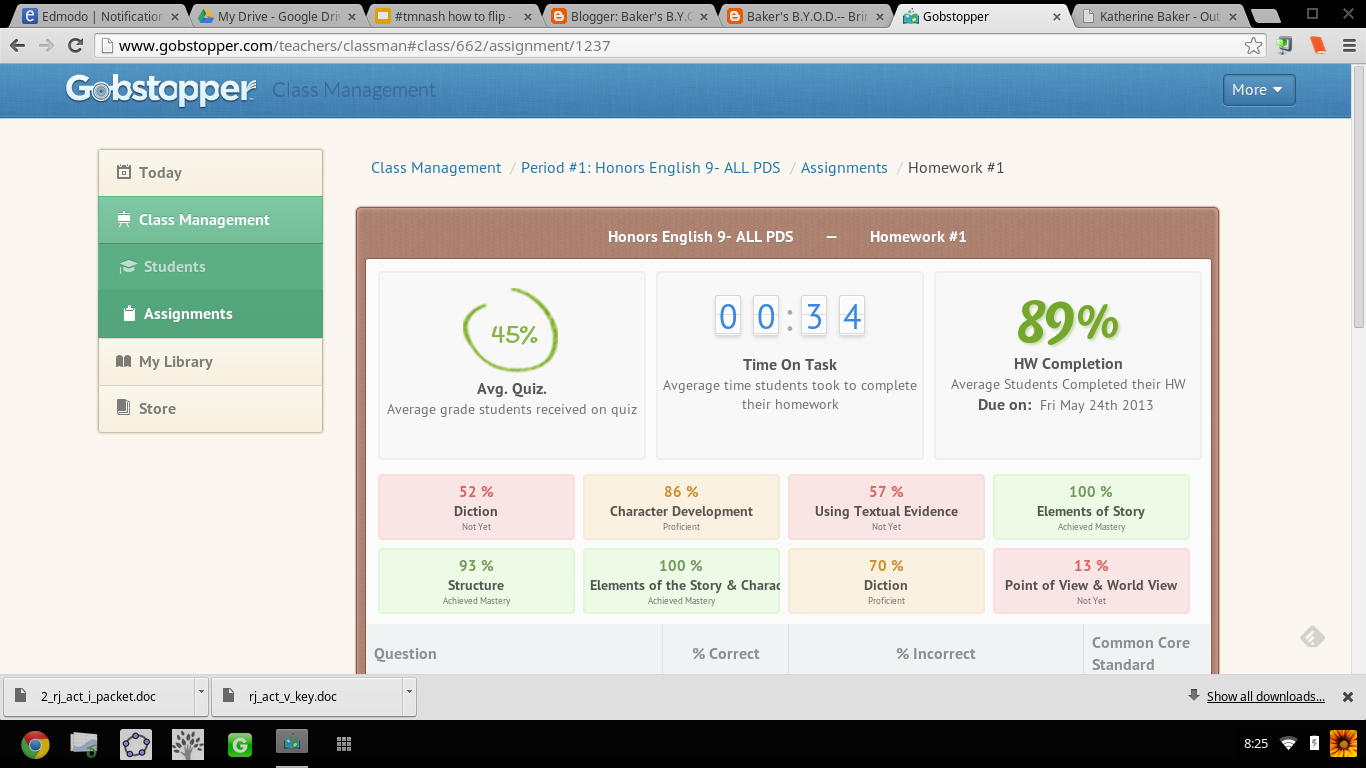
Flipping the reading of Romeo and Juliet using Gobstopper and Librivox, students read asynchronously in class. I signed out the mobile lab and a class set of headphones, and assigned an act a day. What was not finished in class was for homework. I reviewed the class report the day at the beginning of the next class and clarified any misunderstandings, then let them return to reading independently. If a student had a question in class, I was able to speak to him/her one on one and address his/her concerns as needed. This process was much more successful then demanding students to be compliant and pay attention as we read together. No longer did I hear complaints of "you're going too fast!" or "can't we just move on already?!" Now that the reading of the play took only a week, we had time for creative projects that included group performances of chosen scenes and skyping with an author (that's for another blog post!).
Gobstopper allows me to efficiently and effectively flip reading instruction from synchronous and static instruction to asynchronous, supported, and student paced. By embedding instructional elements in the text and linking it to an audiobook, students can listen to people read who already understand the text and control the pace of their learning while reading. Independent and whole-class reading of complex texts while aligning with Common Core Standards is no longer a Sisyphean endeavor when using Gobstopper.
 |
| I like Gobstopper so much, I shared it at #EdCampPhilly. Photo credit: K.Jarrett |
-----------------------------------------------------------------------------------------------------
UPDATE UPDATE UPDATE UPDATE as of 8/8/2013
I will be writing more about using Gobstopper in the very near future, but I couldn't wait to share this...
Curriculets are now share-able Let me SHOW YOU!
Sign up/in to Gobstopper first, then click on this link, and you can see the curriculet I made for A Midsummer Night's Dream.
...AND, the feature I have been waiting for! Gobstopper is MOBILE!
That is some sweet candy to have in your pocket!
That is some sweet candy to have in your pocket!
#edmodocon On @Gobstopper students can read on a tablet, smartphone or laptop. Engaging reading experience everywhere they go!
— Gobstopper (@gobstopper) August 7, 2013
Gobstopper employs some awesome people, too! I got to meet Jason, Sean, and Marika at EdmodoCon 2013. A highlight of my experience!
 |
| From Left to Right: Sean, Marika, and I at the EdmodoCon after party. Where's Jason? |
Subscribe to:
Posts (Atom)