Showing posts with label edtech. Show all posts

Sunday, March 31, 2019

Collaborating with Maslow

When I was in teacher prep classes 20 years ago, I remember being frustrated with the focus on philosophy and educational psychology without understanding the practical applications. I remember thinking, "This is great Skinner and Maslow, but HOW do I implement this in the classroom? HOW do I teach a novel? HOW do I teach grammar? HOW DO I TEACH?" Now, 20 years later, I understand the foundation educational psychology serves for instructional practices.

When a student acts out in class, I return to Maslow's Hierarchy of Needs and ask: what is this student lacking? What does the acting-out student need?  Educators cannot expect students to to put aside their basic needs for the sake of today's worksheet or test. Poor performing students do not have the capacity to set aside their basic needs so that they can focus on higher-order thinking tasks. And those same students may also lack the capacity to advocate for themselves and state what they need. While the teacher in me may initially want to reprimand the acting-out student and unnecessarily escalate the situation, the mom in me recognizes the opportunity to diffuse it with a question to the student: "Are you cranky because you are hungry?" There's granola bars in my desk drawer for that reason.

As I integrate technology in my classroom, I again return to Maslow. Akin to a checklist, my adaptation of Maslow's hierarchy looks at it with a digital lens. Without meeting the physical needs of hardware, wifi, and battery, educators cannot integrate technology. Without addressing the safety needs of digital citizenship, filters, and firewalls, educators and students cannot safely interact in a digital realm.  But where educators primarily need to focus their energy in effectively integrating technology is using technology so that the needs of belonging and esteem are met. Students need to feel that they belong to something greater than themselves, and they need to feel good about the learning that is happening in that space. Educators can leverage the power of learning management systems such as Edmodo and Google Classroom to create online learning communities, and use badges, comments, and awards to positively reinforce, a la Skinner, the interactions that occur in the learning community (badging will be another blog post coming "soon"). All of this is so that students will become self-actualized, intrinsically motivated learners who realize the strength and aptitude of their talents.


This will sound repetitive (which it is), but Maslow's Hierarchy is also foundational for collaboration. What do people need in order to be proficient and effective collaborators? Look to Maslow for the answer:


This is a no-brainer. In order for effective and efficient collaboration to occur, first, physical needs of people, equipment, and resources need to be met. Then training, certification, and group norms will aid creating a safe and prepared space for collaboration. So that individuals feel that they belong to something greater than themselves, leaders need to allow for team building activities and mentorship. And throughout this how process, feedback, affirmations, and accolades will build the esteem of the group. Google's study on the effectiveness of teams revealed that the single most important factor in determining team success was trust. In order for team members to trust one another, their needs, as identified above, must be met.

I posit that we take Maslow for another spin (he is probably rolling in his grave right now) and examine how the meeting of needs can also expand our sphere of influence by pairing the Hierarchy of Needs/Collaboration with a hierarchy of choice and decision making.


As a person's needs are met and they move up the hierarchy to expand their focus from self to group, the person is also increasing their sphere of influence. Whereas basic, physical needs were initially decided and completed by others, as people and teams move up the hierarchy they can begin to shift from a position of passive consumer to active decision maker for not just themselves, but also the greater group. Albert Bandura's Social Learning Theory also plays a part as individuals move the self space to the group and society realms.

If you would like to learn more and take inventory of your own needs and the needs of your organization for collaboration, take a stroll through the slides below.


Thursday, March 21, 2019

Screencasting: Pick the Right Tool for the Job

Screencasting is an integral part of my flipped classroom as I can record videos for a variety of purposes that include (but certainly not limited to) informing parents and students about class expectations, providing answer key videos, documenting directions and the steps of a project, and informing support staff of technical glitches, but I recognize that I am not a Hollywood cinematographer. So, the screencasting tool I choose depends on the type and length of video I need to create.

Screencastify

Screencastify is a Chrome extension that I use for quick recording of videos that are saved to my Google Drive or uploaded to YouTube. As editing capabilites are limited in the free version, I record quick, raw videos on the fly with Screencastify. If I need to quickly record the steps for using a specific edtech tool or need to record a quick video documenting a technical glitch, I will use Screencastify and share the Google Drive link to the video in an email, Edmodo post, or support help ticket. While I can upload Screencastify videos to YouTube, it is quicker and easier to just send the videos to Drive for fast distribution.

For screencasting with students who use G Suite for Education and for schools that block YouTube, Screencastify is the easiest edtech tool for students to use to create their own screencasts as the video can remain in the walled garden space of Google Drive and shared with those who need access. Videos can be embedded in Google Slides or the links turned in to assignments for quick assessments.


Screencast-O-matic

I love Screencast-O-matic for making longer demonstrations or informational videos that are under 15 minutes. To mitigate the need for post-production editing, I will have open on my desktop or browser all materials I plan on recording.  Every video will begin with a title slide and a short introduction ("Hi, this is Mrs. Baker and today I will show you..."), and as I record, I will hit the pause button and switch tabs as needed. The video may conclude with a closing slide or a simple statement, "Thanks for watching! Please contact me if you have additional questions." Videos are uploaded to YouTube and later pulled into Edpuzzle, Actively Learn, or posted in Edmodo and Google Classroom. 


Camtasia

If you are serious about video production and need advanced editing tools, then Camtasia is worth the $$$ investment, but be ware, videographers, that post-production editing can take up more time than the actual filming. There are some great flipping educators out there who can quickly whip up a screencast with cool transitions and special effects, but I haven't built up that level of proficiency with using Camtasia.


Interesting in Learning More?

Recognizing that we do not have Hollywood's budget nor the equipment to create a blockbuster screencast, I created this self-paced lesson embedded below which is modeled off of the Explore-Flip-Apply instructional method of Flipped Learning. Navigate through the slides, examine the examples provided, accesss the resources, and take a spin at creating your own. If you send me your creation, I'll add it to examples provided.


Sunday, March 10, 2019

Teaching (Digital) Literacy: Driving Students to the Intersection of Reading, Writing, & Discussion

Part of my job as an English teacher is to teach students how to read, analyze, talk, and write about texts in both paper-based and digital formats. According to the American Psychological Association (APA) in article published in August of 2018, "In recent years, less than 20 percent of U.S. teens report reading a book, magazine or newspaper daily for pleasure, while more than 80 percent say they use social media every day." Furthermore, “Compared with previous generations, teens in the 2010s spent more time online and less time with traditional media, such as books, magazines and television,” said lead author Jean M. Twenge, PhD, author of the book iGen and professor of psychology at San Diego State University, “Time on digital media has displaced time once spent enjoying a book or watching TV.” While students are reading plenty of digital texts, I wonder how well they are able to analyze, talk, and write about them.  By integrating such edtech tools as Edpuzzle, Formative, Actively Learn, and the G Suite for Education in to teaching practices, we can drive students to the intersection of reading, writing, and discussion so that they can practice skills that they can use both in and out of the classroom.

I had the opportunity to collaborate with the venerable and uber-intelligent Natalie S., the senior researcher from Actively Learn on a workshop session that we gave at CUE and NCTE-CEL in 2017. The above linked article from APA reinforces the importance of teaching digital literacy skills to my students. We cannot assume that student are proficient digital natives.  The activities showcased in the slides provide teachers with lesson examples that cover a range of assignments:

  • Quick, Do Now annotation of an image with Formative
  • Flipped Learning style audiobooks that include checks for understanding with Edpuzzle
  • Daily reading lessons that include checks for understanding and opportunities for annotation and digital discussion with Actively Learn
  • Extended writing tasks that integrate annotated texts with Google Docs


Check out our slides and learn how you, too, can drive learners to the intersection of reading, writing, and discussion.


Saturday, November 1, 2014

Flipped Learning Podcast: Tools for Assessment

I had a great conversation with Troy Cockrum and Joan Brown about tech tools for assessment on the Flipped Learning Network's Podcast. I look at edtech as a vehicle for learning and a way to leverage the workload for teachers.

Check out the conversation:


Sunday, August 24, 2014

Driving over Tukey's Bridge

This summer I spent time with family and wrote content for titles that will appear in Curriculet's premium store.  One such title was the young adult novel Delirium by Lauren Oliver where love is considered a disease in a dystopian future. 

I greatly enjoyed working on creating questions, quizzes, and annotations for a young adult title, applying all that I've learned from teaching canonical texts like A Tale of Two Cities, Great Expectations, Romeo & Juliet, Young Adult literature should have a place in the academic classroom.  Young adult literature is the bait and hook for reading.  Dr. Jung Kim from Lewis University makes the case here for young adult literature in the classroom. There are also some examples of canonical and young adult pairings. In creating the curriculet layer for Delirium, I examined the text just as I would with a canonical text: narration, structure, diction, plot, setting, etc.  

While the syntax of Delirium is not difficult, I targeted Common Core Standard CCSS.ELA-LITERACY.RL.9-10.9 in the creation of the questions and annotations: Analyze how an author draws on and transforms source material in a specific work.  Through out the novel, author Lauren Oliver makes allusions to Romeo & Juliet and sets the story in Portland, Maine. While author Lauren Oliver doesn't exactly copy the story of Romeo & Juliet, she does emphasize similar themes and conflicts: forbidden love, man versus society, and personal growth. The main character, Lena, begins to question the restrictive society in which she lives as she develops a relationship with another character, Alex. Not only can I have students make connections between Delirium and Romeo & Juliet, but also to 1984 and any other text where a character realizes that the world in which he/she has lived is not as it seems. If I want my students to be independent and analytic thinkers, I need them to have opportunities to do so by giving them texts that connect to them FIRST and then using the young adult text as a bridge to understand and connect with the canonical texts. 

I applaud Curriculet for working to evolve reading in the digital era and making ALL texts more accessible for readers.  Renting publisher-controlled digital texts for my classroom will be much more budget-friendly than asking my supervisor to purchase class-set paperback copies-- and I don't have to worry about collecting and replacing paperback copies over time. While I could send students to the library to check out individual copies of the book, I would not have enough books for the whole class to read, and even though I could have students choose their own books for independent reading,  what I want is to have students reading more of the same books together.

So back to Tukey's Bridge.... Delirium is set in Portland, Maine, and Oliver continually references real locations found in the city, in addition to adapting them to suit the vision of the dystopic future. The statue of the Governor that Lena and Hana run past in Delirium is really Our Ladies of Victories statue in Monument Square. This connection provides opportunity to discuss how societies memorialize heroes and students can explore the monuments in their hometowns. In addition, if students traveled to locations mentioned in the text, they can walk in the shoes of characters. 

As my family traveled to Maine for a week-long summer vacation in Bar Harbor, following 295 North through Portland, we drove over Tukey's Bridge and past Back Cove.  I craned my next to spot the Promenade and envisioned Lena swimming with Alex on East End Beach. I had a moment of double vision as we rocketed along at 70 miles per hour, I imagined that we were really travelling in to the Wilds.


Saturday, July 5, 2014

#ISTE2014 Use Twitter & Voxer when Travel Plans Go Awry

My #ISTE2014 trip with Liz and Kyle Calderwood and Michelle Wendt was supposed to begin in Atlantic City with a flight on Spirit Airlines to Atlanta, Georgia, but after a cancelled flight and an unexpected roadtrip, we eventually reached our destination, 12 hours after our expected arrival time.

There are two tech tools that were essential for transforming this ordeal into an adventure: Twitter and Voxer.  Using our smartphones, our group made a concerted effort to devise a new flight plan, all which would not have been accomplished had we not been able to use real-time communication.

Using Twitter, I shared our plight of a flight with my PLN, documenting the experiencing and encouraging Spirit Airlines to notice the issue. Even my #FlipCon14 buddy, Ken Bauer, who lives in Mexico made sure to make some noise. While many businesses use Twitter to blast out deals and connect with customers, it is evident that Twitter is a one-way street with Spirit Airlines. We received absolutely no replies from the Spirit Airlines Twitter account.

Plane Problems:


Humorous Shenanigans from the PLN:

Twitter also provided an avenue for adding humor to the situation. My buddies in elsewhere in the country provided me with comic relief with their sad-faced pictures. Knowing that I wasn't alone helped me stay objective and not react emotionally to the situation. When my frustration level would reach atomic level, my PLN made me laugh and stay focused on problem-solving the situation. Can you stay mad looking at these faces???  Thank you Jason & Steve!


Voxer:

Voxer is a walk-talkie app that allows for quick, realtime communication.  I know quite a few educators are using Voxer as a podcast tool for group chats with participants sharing philosophical ideas in a group conversation, but in this situation we were focused on practical applications. Our group relied on Voxer to keep all members in the know as we talked to Spirit ticket folks, located baggage, and made alternative travel arrangements.

Kyle was on the phone talking directly to Spirit Airlines.  Liz was in line at the Spirit ticket counter making arrangements with one of the employees-- Patty was amazing calm and professional the entire time despite facing an angry and impatient mob. Michelle and I were running from the gate to the ticket and baggage areas, all the while making sure our adopted travel partner, Amy B. was involved in our plans. Without Voxer, we would not have been able to coordinate and would have wasted valuable time and energy running back and forth through the airport. With Voxer, we stayed focused on solving the problem and making new travel arrangements with each person doing his/her part.

Serendipity is something that can be found in any situation, no matter how dire. Sitting near us at the gate as we learned about the delayed plane was Amy B., a first-time solo flyer and recent high school graduate who was visiting friends in NJ and now trying to make her way home. Not knowing what to do once the flight was cancelled, Amy followed me as we made our way from the gate to the Spirit ticket area. Our group quickly adopted her and made it our mission to get Amy home.

As a mother, I can only hope that if my daughters were in a similar situation, that they would find caring folks to help.  So often the news is filled with horror stories, but I know that there are good folks out there who do the right thing for strangers.  I wish the news would promote the positive instead of always sensationalizing the negative-- but that is a post for another day.  Amy stayed in contact texting with her mom in Georgia and her mom followed us via Twitter.  Modern communication systems and social media provided transparency to our travels, reassuring a nervous mother that her daughter was in good hands as we left Atlantic City to catch a flight out of Philly.


Roadtrip Tweets:


At the Airport AGAIN


Amy's Angels

After arriving at Atlanta, a very grateful and relieved mother met us and transported us each to our prospective hotels.  Amy's mom dubbed us "Amy's Angels" through out the trip. While her mom may say we were heaven sent, I'd like to think we were just doing what we, as teachers and good human beings, naturally do: take care of each other.


Sunday, May 25, 2014

Film & the Back Channel


My classes are wrapping up the year reading Shakespeare's Romeo and Juliet which includes viewing the 1968 Zeffirelli film version.  While the acting leaves much to be desired, there is merit in showing this version because it provides students with a view of the time period and it is used in various critical thinking activities.

We compare and contrast the cinematography of Zeffirelli's R&J (1968) with West Side Story (1961) in the opening brawl sequence--there really is no comparison, WSS is amazing-- and focus on how the filmmakers used the source material of Shakespeare's play, meeting Common Core Standard 9-10.9. Students point out similarities in camera shots and staging of the opening brawl sequence.  They notice the use of high angle shots to showcase the chaos of the fighting, as well as the use of close-up shots to highlight specific characters. They even recognized the actor who played Tybalt as the same one who played Basil Exposition in the Austin Powers series. 


After the opening sequence and the Prince's yelling at all parities about having started another civil brawl, the next scenes in the 1968 film that correspond with Act I of the play are rather boring for modern teenage audiences.  Whereas I stopped and replayed all the scenes of WSS ad nausem to point out the cinematography and framing, I refuse to stop the 1968 version--like ripping off a band-aid, the quicker we view it, the quicker we will be done. To keep them enthralled, students participate in a class back channel discussion using TodaysMeet.com. 

On our class set of Chromebooks, students join the TodaysMeet room that I created and I go over the ground rules for the period:
  1. Students must use their real names. I give students a participation score for the period, so no name equals no credit.
  2. Students must demonstrate digital citizenship and use school appropriate language.  I don't mind if they misspell or abbreviate, but no profanity or sexually explicit posting is allowed.
  3. Students are to comment on what they see AND answer the questions as they are posted to the room.
  4. Students type in all lower-case letters, while the teacher types in all caps.
I don't follow a Q1/A1 format for posting questions during this activity, instead I post using all caps.  Since the conversation is very fast paced, I keep my caps-lock on for faster typing and so students can differentiate my questions and comments from the rest of the group. There is always a bit of silliness that occurs, but I remind the students about the purpose of this activity: to have a scholarly discussion.  There is a time and place for comedic conversations and blurt-out posting, but this is not it. 

To archive each period's chat session, I make a quick screencast using Screencastomatic.  I turn off the microphone and record scrolling through the chat so that the video archive is about 5 minutes long, as opposed to a full 43 minute period.  After uploading the screencast directly to YouTube, I use YouTube's edit features and add music.  I then post each period's video to our Edmodo group where students can compare and contrast the conversations from the various periods. 

Take a look at the archives from Friday's back channel discussion of the 1968 Zeffirelli version of Act 1, scenes 1-5 of Romeo and Juliet.


Thursday, March 27, 2014

GUEST POST: Team Tournaments HS Gamification Using Class Dojo


This is a guest post from Mrs. Marynn Dause, an English teacher at King George High School in King George, Virginia, who is using Class Dojo to gamify her class. I'm fascinated with gamification and using Edmodo to gamify my Odyssey unit, but Mrs. Dause's approach has got me thinking. Using Class Dojo, her method is something we all can learn from and with Class Dojo's BIG ANNOUNCEMENT, staying in contact with parents and students just got easier. Learning can and should be fun!


This year, I’ve experimented with what feels like a vast array of educational technology and strategies.  My goal was simple: find one or two things that work and stick with them.  The trouble is, there’s such a smorgasbord of awesome teaching tools and techniques that I couldn’t “just have one!”  I have, however, limited the scope of my in-class application down to a few favorites, and two of those are gamification and a lovely app called ClassDojo.  This free classroom management tool allows teachers to easily track student behaviors and actions in real-time from any web-enabled device, and it got me thinking: how can I use this data to create positive reinforcement in my classroom?  Could data translate to gamification?  Yes, I thought, it could!  So, the Team Tournament was born.

The Tournament is, at heart, a fairly simple process.  Students form teams, and then earn classroom rewards for good behavior, teamwork, and productivity.  It’s an age-old model that I’ve used without tech enhancement for several years.  With the addition of ClassDojo, though, the positive reinforcement model takes on a new sense of immediacy for students.  Here’s how I’ve used it in my elective Science Fiction and Fantasy Literature course for upperclassmen this semester:

Running a Tournament


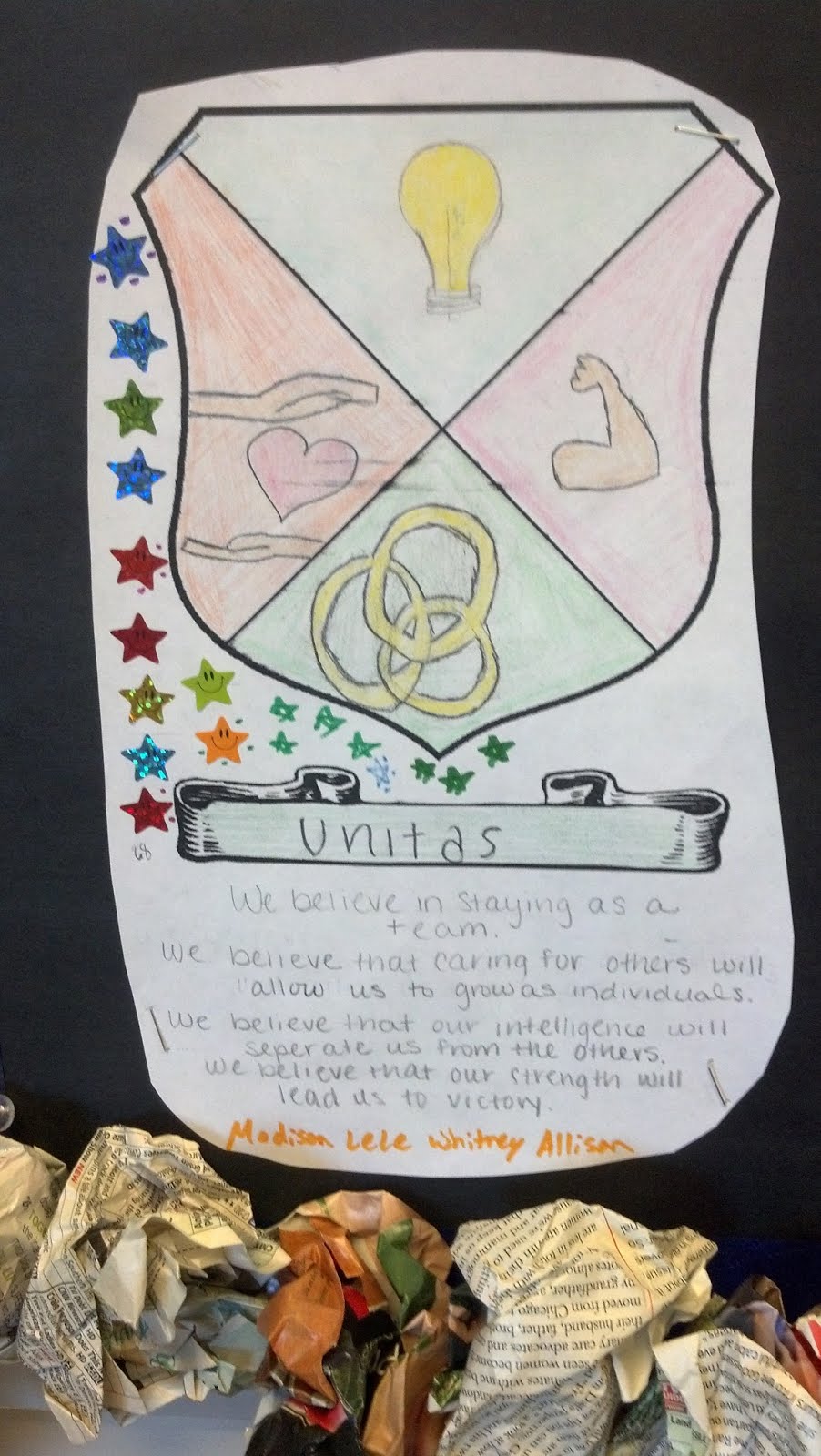
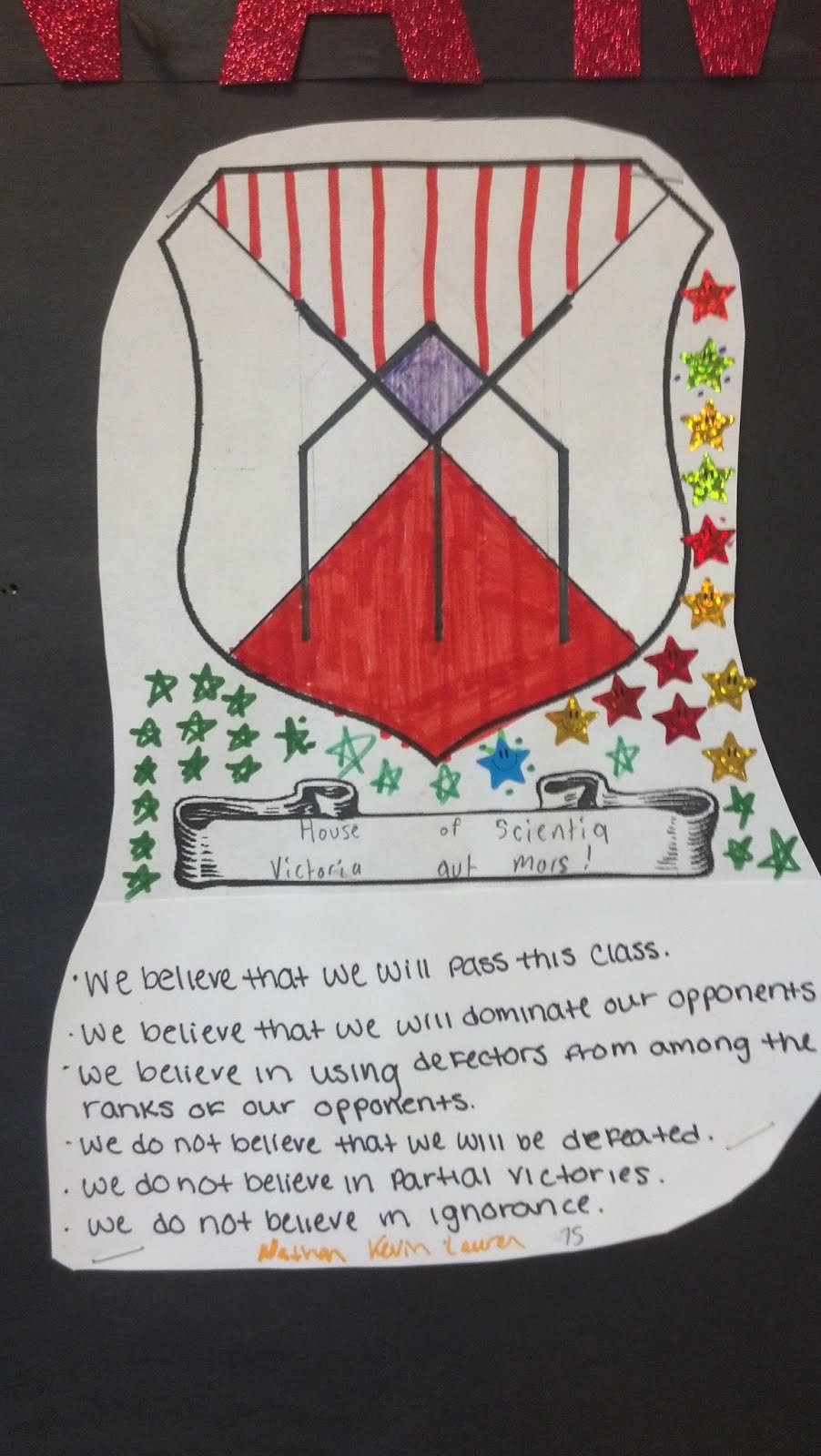
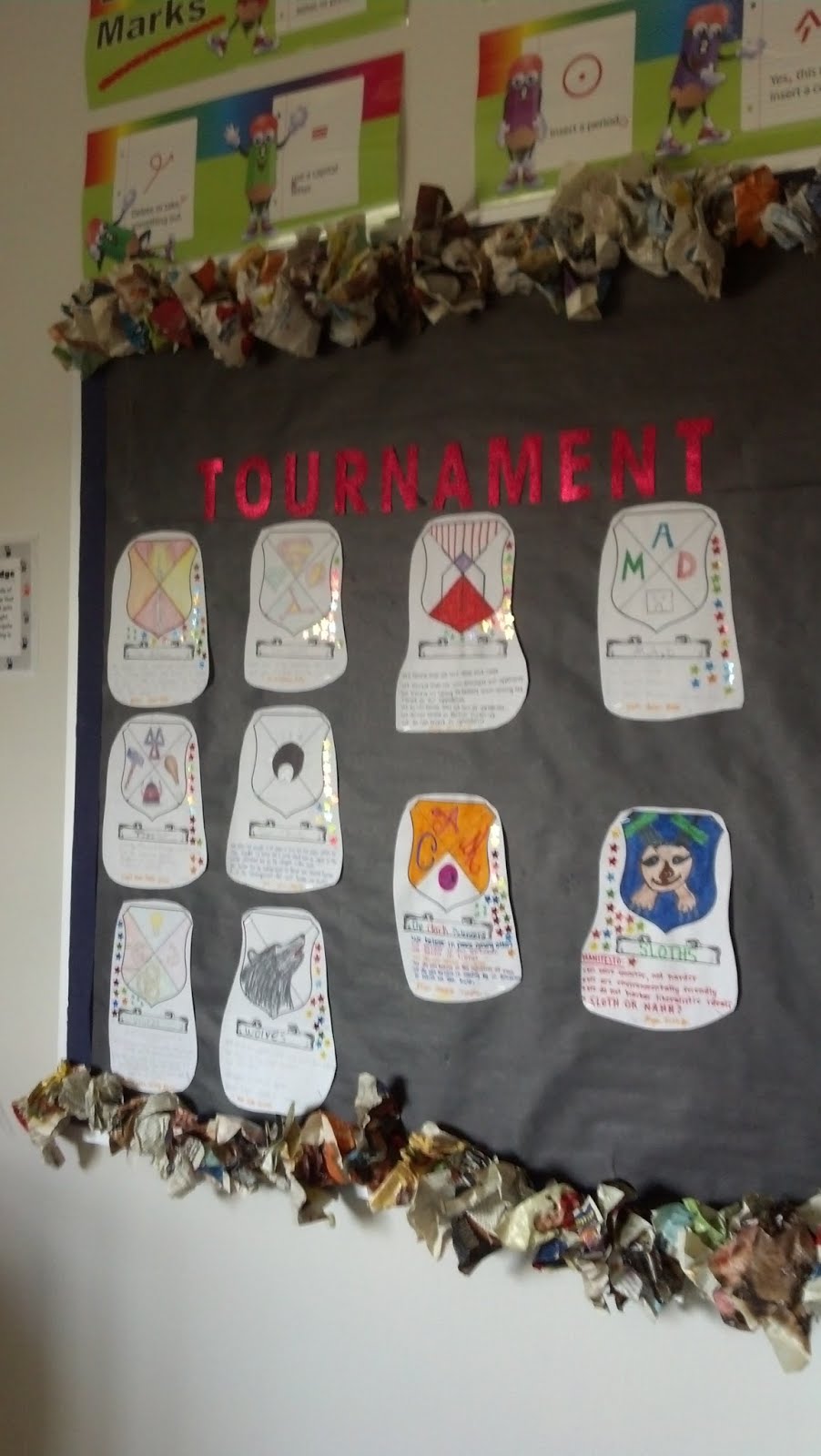
1.   Form Teams: During the first three days of class, students get to know one another and then form teams.  Teams then work together to create a coat of arms and to write a manifesto. (We used the ones from Veronica Roth’s Divergent series as examples.)  The completed team “shields” and manifestos are attached to a bulletin board at the front of the room.    


IMG_20140320_163118_255.jpg  IMG_20140326_092633_958.jpg  IMG_20140326_092711_696.jpg

2.   Earn Points and Set a Goal: Teams begin earning points in the tournament by correctly completing warm up challenges like word puzzles, critical thinking challenges, and the like.  Students are made aware of the tournament prize: the top ranking team at the end of 9 weeks will receive a pizza party which they may choose to share with one of their allies, if they wish.


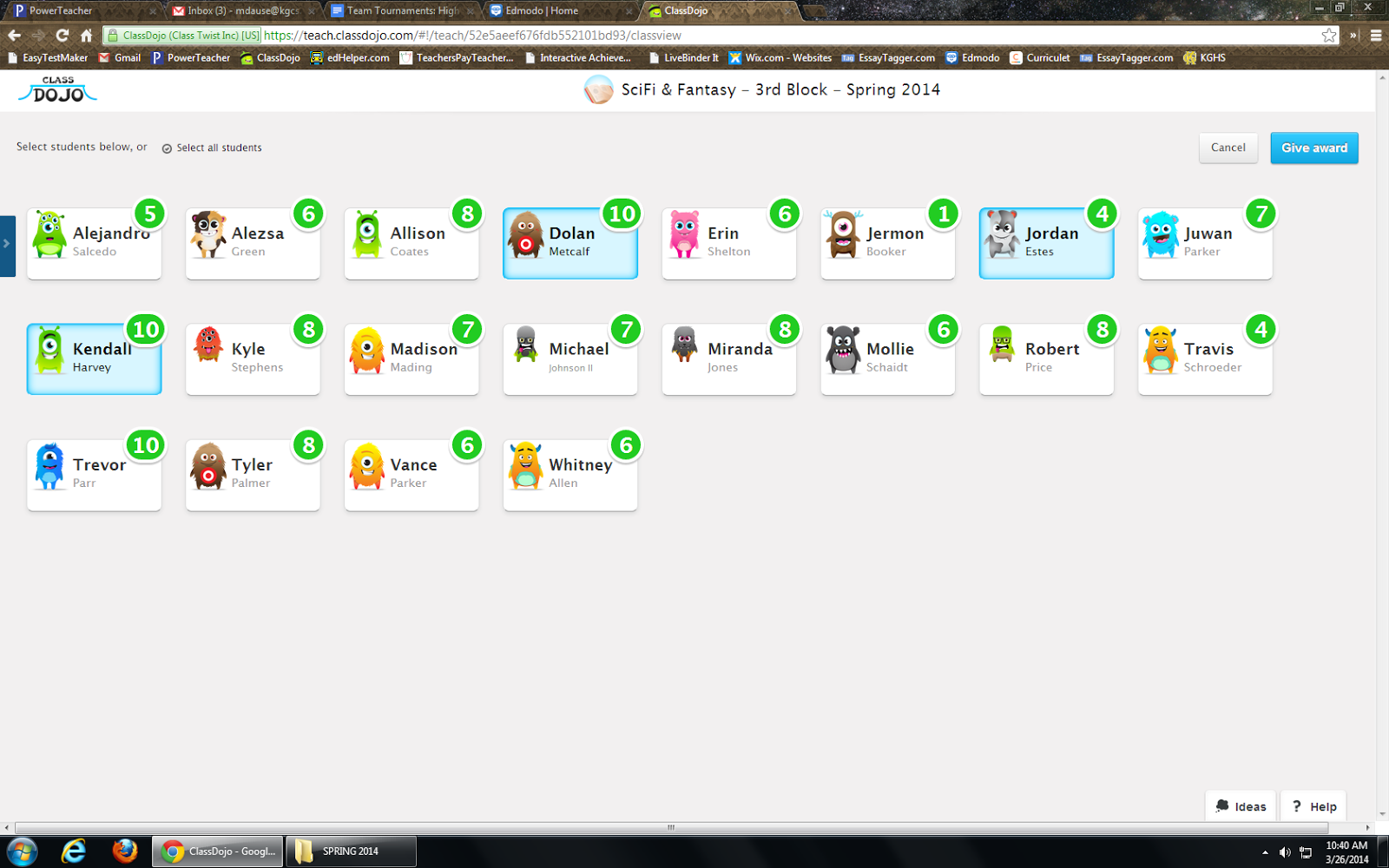
3.   Use ClassDojo: At the end of the first week, I introduce ClassDojo.  Students are permitted to log on and change their avatars to suit their tastes, and we play around with the program to see and hear what earning and losing points sounds like.


4.   Utilize competition/positive peer pressure: From the second week onward, I enter points in ClassDojo while students work on in-class assignments and projects.  Every other day or so, I display the “points board” so that students may see how many points they (and their teammates) have earned.  This usually leads to some good-natured nagging from team leaders and members, who push each other to do better and earn more points without any instruction from me to do so.


5.   Total points: At the end of each week, I total the points earned by the members of each team and award stickers to represent the progress made that week.  In the screenshot below, for example, the members of a student team called “Tiza” have earned a combined total of 24 points.  With stickers representing 5 points each, that’s 4 stickers plus 4 tick marks on the team’s shield.  


When students come to class on Fridays, they know that all of the team shield totals will be up to date, and that gets them extraordinarily excited for…


6.   Head to Head Challenges: This is our chance to be silly together, as well as incredibly competitive.  On Fridays, the team that is in the lead challenges one other team to a head to head competition.  The rules for our class are that each team must send up one representative (sometimes I let them send up two, or call for help from a team they choose as an ally that week), and no student may compete in a Head to Head two weeks in a row.  Head to Heads are worth anywhere from 10-30 tournament points for the winning competitors’ teams.  Also, the teams never have any idea what the challenge will be.  I try to switch back and forth between mental and physical challenges, so one week might be a Jeopardy or Family Feud-style contest, while the next week might be thumb wrestling, hula hooping, or a staring contest.  We play games from Whose Line Is It, Anyway? and do silly stunts from Jimmy Kimmell Live.  The kids LOVE it, and I really think that it is the Head to Heads, more than the promised pizza party, that keeps them engaged with earning points on Dojo during the week.  Of course, you could make your Head to Head challenges address specifically academic content; I would still suggest adding a large dose of “silly” or “game” to those curriculum-driven contests, though.  Students of all ages will go a mile in exchange for an inch of teacher-encouraged silly or fun time.  (Just make sure they go the mile before rewarding them with the inch!)


7.   Ultimate Reward:  At the end of the nine weeks, I do follow through with my promise of a pizza party during lunch for the winning team and their chosen ally.  Limiting the number of students who are directly rewarded maintains the competitive drive for the rest of the semester (we reboot the tournament in the middle of the semester with new teams and different types of challenges), and it also saves me a good bit of cash.  The key, though, is to manufacture the amount of points available to be earned each week and especially the number of points earned in Head to Heads so that every team has a fair shot and winning up until the very last few weeks of the tournament.  Students will always know exactly who’s in the lead, but it helps keep them interested in the competition if they know that there will be a chance for them to “rebound” and catch up on Fridays.


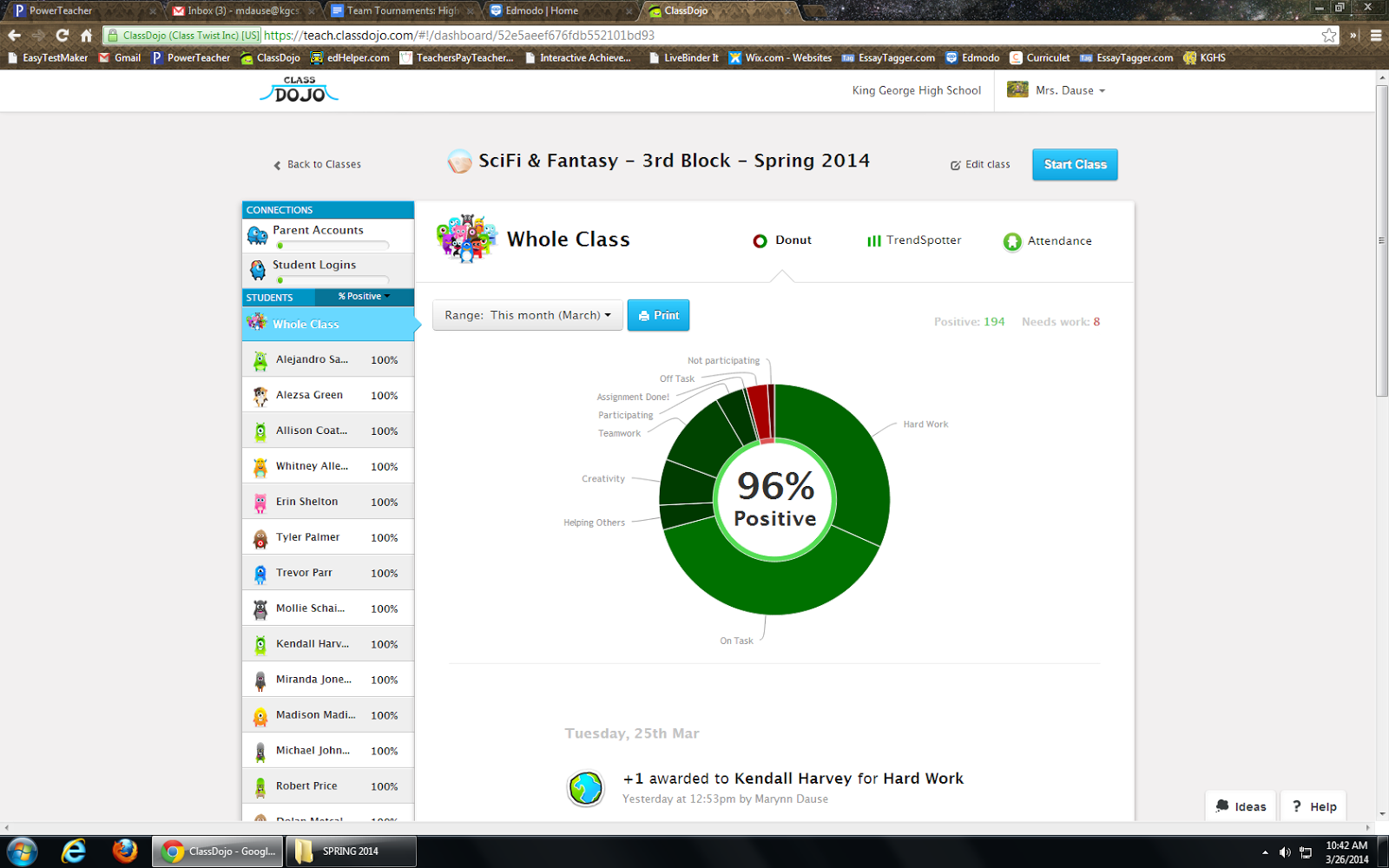
With the Tournament Team structure in place, it’s very easy for me to motivate my students to do practically everything that is needed in class!  ClassDojo keeps track of points earned over time and provides me with neat charts that show general trends in the classroom, so I’ve been able to watch our classroom behavior and engagement patterns trend upward as the Tournament continues.  At this point in the semester, I almost never have to “write up” or punish students in these classes; a pointed look towards their team shield is usually sufficient to get their attention, and they absolutely hate hearing the “down” sound from ClassDojo when they lose a point.  It’s revolutionized my experience of classroom management, making me much more confident in myself as a “game master” and optimistic about spending time with each of these classes, and I hear the students talking in the hall about what they’re going to do today “to get more of those points.”  You might say gamification + ClassDojo + pizza = Finally enjoying the toughest part of my job.


I'd like to thank Mrs. Dause for sharing her expertise with my readers.  You, too, can connect with her on Edmodo and her website


Saturday, March 15, 2014

Curriculet & Edmodo: #BetterTogether

This week Curriculet announced the release of an Edmodo app version that allows teachers and students to use Curriculet using their Edmodo credentials and classlists. The app is a portal or gateway and opens Curriculet inside Edmodo. I am ecstatic about this announcement!

I've been using Curriculet (previously known as Gobstopper) for two years now, and I can't say enough good things about it! Get me started talking and I can't stop! But my one tinsy, itsy-bitty complaint--which has nothing to do with Curriculet per say-- is that my students continually forget their username and password. While Google log-in is also available for Curriculet on the web, there is at least one student who struggles with remembering his/her log-in information. Trust me; I've taught them naming conventions for passwords, but there is always one. Now that Curriculet can be used inside Edmodo there is one less log-in for students to deal with.  I wish more web tools would partner with Edmodo for app creation, because not having to worry about logging in is so valuable for students to continue using a digital tool.

Also, class creation on my end of things is seamless with the Edmodo app. The classes or groups I have created in Edmodo will automatically be created in Curriculet with just a few clicks of adding the app to my groups. Click on this link to learn more about adding an Edmodo app to your group, and click on this link to learn more about launching an app in Edmodo.

Here is a behind the scenes look of my classes using Curriculet:


While Curriculet may seem geared towards the English Literature classroom, it can also be used to support reading informational and fictional texts in History, Science, and World Language classes. I bet you could even find texts to use in Math! Please let me know if you do! Take a look at the screencast Edmodo Support Ambassador Mr. Jose Angel made for Spanish-speaking users.

If you are wondering, why bother to use Curriculet or thinking that the traditional way of teaching and reading a text works. Take a look at this inforgraphic.  When reading Romeo & Juliet, Curriculet saves me 50 hours worth of administrative tasks.  Imagine freeing up 50 hours of your time!


Saturday, February 22, 2014

Shall We Play a Game (& Learn)?

Since chatting with Tom Driscoll via Google Hangout and Brian Germaine at the EdSurge RIDE event in the Fall, meeting up with Chris Aviles at Techspo14, viewing Mr. Lewis' Edmodo Webinar on Gamification, and engaging with my #TeamMAITs in class, I'm intrigued by the didactic nature of games. I've been thinking about how to use gamification with my students to restructure the learning activities to mimic aspects of a video game that encourage student involvement in the classroom.  Using a simplistic approach, I decided not to go full tilt with a backstory and XP spreadsheets and instead tried this out by first changing how I deliver content to the students. Because gamification promotes blended-flipped learning, behaviorism conditioning techniques and self-paced instruction, I'm hopeful that this instructional design will help meet the needs of some of my lower-level, reluctant learners.

Deploying a combination of 1:1, BYOD, and paper-based activities, I am able to give my students an opportunity to pace themselves through the levels. Scheduling consistent time in the computer lab, 3 days a week throughout the unit we are 1:1 with Chromebooks and computers. But keep in mind, while the students are allowed to go at their own pace within the window I give them, they do not have to work alone. Even when in front of the computers, my students discuss the material and engage with each other. The other two days a week, we are in the classroom using BYOD for group and teacher-led activities.

Instructional Game Design

In Edmodo, I created a separate group exclusively for our Greek Mythology and Odyssey Unit. On the main newsfeed, there is one welcoming message that provides an overview of the design and unit. All of the subtopics for the unit are organized in individual small groups, of which all of my students are members of. I also have all groups set to read-only. Students will access resources and assignments in the small groups, but all discussions and sharing of their work will take place in our original class group. Students can only see the small groups they have completed or are currently in. As students successfully complete the tasks of one group, I "unlock" and add the students to the next small group--my version of "leveling up". 

Take a look at this screencast to see the group set up:


I think this is an effective design because the students won't get lost scrolling through the myriad of posts that appear on our ever-updating class newsfeed. All content is organized by subject/keyword, so if a students needs to refer to resources on the gods and goddesses of Greek Mythology, they simply go to that small group and see the 5-10 items listed on the newsfeed. Organization and archiving of resources is much more manageable than trying to rifle through a three-ring binder or online folders. 

Also, I like this design because I will have student performance organized by topic/unit.  I see very quickly how well a student performs in this particular unit, as opposed to my district gradebook which keeps a running tally of all grades for the marking period. I can also use the Edmodo gradebook as my leaderboard for the "game". 

I'm considering setting up all of my units for next year using this "game" design with each unit having its own Edmodo group, and as I become more proficient I can incorporate more gaming techniques.

Behaviorism is a Game

Video games are behaviorism in action. We've all felt the addictive pull of playing a video game: look at the popularity of games such as Candy Crush, Plants vs. Zombies, Fruit Ninja, and systems such as Xbox, Wii, and PlayStation. We are bombarded with positive and negative reinforcement every time we play: extra points, bonuses, difficult levels, and the thrill of success. So attempting to mimic these elements, I use badges, positive comments, and quick tasks to encourage students to "level-up" to the next small group.


In Edmodo, I created badges specific to the Odyssey unit and award them as students perform. I am surprised at how badges positively reinforce the students-- they keep doing more to get more badges. I can barely keep up with them! Some badges are awarded for completing a level, other badges are awarded for behavior (helping others, quick problem solving, etc.). Luckily badge making in Edmodo is very simple and adding badges to a group is even easier. I'm torn though: I'm glad that my students are motivated, but I wish that they weren't so externally motivated. Then again, you can't have intrinsic motivation if you are told to do it.

Since the tasks in each group take about 15-30 minutes maximum, students can quickly level up after demonstrating proficiency. This was a big tip from Tom Driscoll: in order to keep students hooked, they should be able to "level up" quickly. So rather than cramming a bazillion assignments in each group, I created more groups with few assignments in each. This also helps to keep me on track with grading. I have caught myself procrastinating on grading big assignments because they take so long to grade, but with smaller assignments, I too can feel the success of leveling up and completing a task because I can grade a set of small assignments quickly adding positive and constructive comments as needed. By increasing the frequency of completion, we all receive the positive reinforcement more often.

I will agree that gamification seems gimmicky, but keep the notion of the game in mind. How many levels are in Candy Crush? How many can you get through in one sitting? And what happens when you can't get through a level quickly? Yup, you use up all of your "life," get bored and walk away from the game. But progress quickly and you find enjoyment playing. But I can't help wonder: Do we play the game because we want to, or do we keep playing the game because we've been conditioned to? 

I'm still figuring this out as I go, and I have lots of room for improvement both in design and execution. Look for some more posts on this topic and my students and I continue our quest. If you have any tips, tricks, or best practices, please share! 


Saturday, February 15, 2014

FINALLY! Chrome Screencastify!

As a work around for not having screencasting capabilities on my Chromebook, I would do a Google Hangout by myself, capture to YouTube, and screenshare to record the screencast. Then I'd have to go back and edit out my initial clicking around to screenshare. While this worked, it was cumbersome and inefficient. I've been patiently waiting a Chrome screencasting app that doesn't use Java, and have instead been using Screencast-o-matic on my school and home computers. So imagine my excitement when Richard Byrne's post sharing Screencastify came across my newsfeed! After installing the extension in my Chrome browser, I immediately tried it out.


To record a tab, click on the icon in your browser and a window appears to access settings and start/pause/stop recording. To learn more about how to use Screencatstify, check out their YouTube video.


I had some issues with it dropping audio and frames and had to change the setting to 1FPS to record the following screencast and it wouldn't let me direct upload to YouTube.  Now I was using this on my home WiFi network which is limited in bandwidth, so I wonder if I would encounter the same issues at school on a better network, and I have 2 different Google log ins (one for school & one for home), so I wonder if the multiple log ins contributed to not being able to upload to YouTube. I was able to save the file to my Chromebook and then upload it manually to YouTube without issue.


Overall, I can't complain, and since Screencastify is still in Beta, I anticipate that any issues I have will be resolved with time as the developers receive feedback. I've waited this long, so I can be patient for just a bit longer.

Saturday, February 8, 2014

Edmodo Quizzes: Tips & Tricks

Edmodo's quiz feature is a versatile tool that saves teachers time. Whether used for quick informational checks or unit tests, the quiz feature enables teachers to assign formative and summative assessments with ease.  I use Edmodo Quizzes for assessing students' knowledge acquisition, practicing PARCC related digital literacy skills, and demonstrating students' application of knowledge learned through out the marking period. I will never grade a multiple choice quiz/test by hand ever again, and Edmodo quizzes provide a paperless way for me to easily read and score open ended, paragraph responses.

Formative Chunks

When my students are learning large amounts of information such as vocabulary words or types of literary
devices, I break the list up into smaller chunks and assign quick, no more than 8 questions quizzes. Leading up to the final test, students take one quick quiz per day and get immediate feedback on what they know and do not know. I will use multiple choice, fill-in-the-blank or matching type questions for my quick quizzes.


A note about fill-in-the-blank, you may run into issues with misspellings or students not providing the exact phrase/word. I don't mind encountering the errors/issues on the quick quizzes because I want students to learn from their mistakes and understand why they didn't get the correct answer. For quick quizzes, I usually do not use the short answer format because I want students to receive immediate feedback rather than wait for me to score their answer.


Summative Assessments

Summative unit tests can easily be given using Edmodo's quiz feature. I prefer to use the multiple choice and short answer formats because it avoids any issues with fill-in-the-blanks or matching and requires students to focus on the content of the assessment.

I can also link resources to specific quiz questions to assess high-level thinking skills.  On the summative test for our drama unit, I linked pictures of specific scenes from West Side Story, Romeo and Juliet, and Pygmalion and during our Odyssey unit, I included images from Odysseus' journey added to questions so that students had a colorful visual to refer to. For assessing visual analysis skills, Edmodo quizzes are much more effective than paper tests that included black and white  photocopied images.

My summative tests are open resources (book, notebook, web, etc), but my students quickly learn that they must know the material prior to the test because time is paramount. I purposely design tests with time in mind; students should spend approximately 30 seconds on multiple choice questions. If students are organized and prepared beforehand, they can quickly locate an answer they can't remember with out wasting too much time. While my summative tests do assess content knowledge, I'm also assessing and reinforcing organization and time management skills.


Time Management for Teachers 

Short Answer Response as First Question
To help speed up your grading time, when writing the Edmodo quiz, put your open-ended, paragraph response questions as the first questions on your quiz and then follow with your multiple choice, true/false, matching questions. I then select "randomize questions" so that the short answers are not usually the first questions the students encounter. How does this speed up my grading time? Well, when I open up each student's test responses, I have few clicks to get to the short answer responses I have to score.


When the short answer is last, I must click on MORE then
scroll down to last one to review responses.

At this time, students can take quizzes on either computers, Chromebooks, or iPads, but they cannot take a quiz on a smartphone or other personal device.  However, teachers CAN grade responses on any device. I've scored short answer responses while on my smartphone, iPad, Chromebook, home laptop, and school computer.


Edmodo also banks all questions that teachers create. When I want to create a new quiz, I can easily load questions from previous quizzes by searching using keywords. So I can reuse questions from my formative quick quizzes and include them on summative tests.


Edmodo Quiz is All I Need

Despite the plethora of online quiz tools available on the web, Edmodo is my go-to quiz creator: all quizzes are organized in the "Progress" area (gradebook), there is easy to see data analytics available, and, best of all, it saves me time creating and scoring assessments. While quizzes and tests are not my only method of assessing students, Edmodo makes it easy to do so when needed.

Sunday, November 3, 2013

Tell Me All About it with Tellagami

Tellagami is a mobile app that lets users create a short animated video using any mobile device. This is a cool tool for BYOD students and teachers to use for animated project videos.

In three easy steps, users create a "Gami" animated avatar by customizing their character, selecting a background image, adding dialogue, and sharing it. Once you have the app, there is no account log in information to worry about.  Students and the teacher could share devices to use Tellagami.

Sharing Created Gamis

While not having to worry about log in information is a plus and sharing is easy, there is not currently a way to see a library of the Gamis one makes when in the app. Once a Gami is created, select share via email to grab the URL hyperlink or save in the camera roll/ video/Tellagami folder of a device. Teachers could have students turn in their Gami by submitting the URL on a class Google form or turning the URL in via an assignment on Edmodo. Students could also embed the Gami in a digital portfolio such as a Google Site or a blog. While archiving created Gamis via email isn't ideal, I can't complain when considering the cost (FREE) and ease of use.

If you are having trouble locating the embed code, first send yourself the URL via sharing through email. Go to your email, then click on the URL and return to the Gami created. Click on the share icon in the upper right corner and the embed code will appear. I don't know why the embed code doesn't automatically appear in the app, but I'm hopeful that the Tellagami developers will remedy this soon.

Ideas for Use

For use in the classroom, students could take a picture of a project with their mobile device and upload the picture as their background image.  Adding dialogue students could record their voice or type in text that explains their project. The student could then share the link to the Gami via email, Twitter, Facebook, or copy/pasting the link to a learning management system such as Edmodo. An embed code is also provided for posting the Gami to a blog.

Tellagmi could be used for mini-virtual field trips. Students could search and select a background image of a location significant to the content being studied and record a message about the location.

For #flipclass teachers, Tellagami for quick delivery of content. Upload a picture of a diagram, equation, or any other pictorial information and record a Gami explaining the concept then share.

This easy to use tool has a plethora of uses for the classroom. From classroom presentations to delivery of content, Tellagami will allow students and teachers to tell viewers all about any concept.

Here are two examples I made: one has a computer generated voice with an uploaded background and the other has a Tellagmi provided background using my voice for the avatar. You can customize and select the options that fit your project.


Thursday, August 15, 2013

EdmodoCon Guest Post #3: M.Valois

Our third guest post comes from Megan Valois, a high school History/English teacher in Ottawa, Ontario, Canada. Megan is the guest moderator on the Canadian Ed Chat (#cdnedchat) on Twitter who enjoys expanding her PLN and learning about new tech tools to improve her teaching and class experience. Here is Megan's recap of EdmodoCon 2013.


On Tuesday, I participated in a virtual conference - a professional learning opportunity - called #Edmodocon. It was presented by the good people over at the #Edmodo app/website. 

If you aren't familiar, Edmodo is a social learning platform for schools, often called the "Facebook" for schools because its format is similar. Edmodo has many advantages for many reasons. It's a great, safe place for teachers and students to connect; students can post questions, submit assignments, create projects, access notes, join discussion groups, and much more.  Students need access codes to join a class so it's secure and safe. Check it out: www.edmodo.com

#Edmodocon provided educators with the chance to 'virtually' participate in a full day conference to learn more about the amazing ways to utilize Edmodo for classroom learning and success. More than 20,000 educators globally tuned in! There were several sessions throughout the day by presenters on a range of topics, including digital citizenship, project based learning, "flipping" the classroom, building leadership capacity and more! 

Some of my take-aways from the sessions were:

1 - Using Edmodo for literature circles
2 - Ways to teach students how to be better digital citizens
3 - New apps (compatible with Edmodo) to try - ie: Explain Everything
4- Re-emphasis on what I already knew about how amazing project based learning is
5- Flipping the classroom

Patrick Fogarty's session: Access, Engagement, and Equality with Edmodo was one of my favourites. Loved his "30 second lesson" ideas, where students can create a video in "30 seconds" about a key concept. This is a great way to teach the skill of summarizing main ideas! You can build on this by having students string together a series of related '30 second lessons' too! 

He also reminded us about the core philosophy of differentiated instruction - my biggest passion. He shared: "It's professional malpractice giving kids work they can't access in multiple ways". To meet the needs of all learners, we must give opportunities for choice! 

Flipping the classroom/BYOD by Kate Baker and Liz Calderwood was another gem. The idea of classroom flipping is "a form of blended learning in which students watch lectures online and work on problem sets with other students in class. This approach allows teachers to spend more time interacting with students instead of lecturing. This is also known as backwards classroomreverse instructionflipping the classroom and reverse teaching."[1][2] 

I am already a huge proponent of BYOD and am very intrigued by flipping the classroom. It's definitely something I'd like to try, even for just a few lessons, to see how it works. The advantages are so very clear - that more time spent actually working out problems in class with teacher support will benefit the students. My fear, of course, is that the 'homework' of watching the lesson won't be done and then the in-class time would be wasted. Does anyone have suggestions for me or guidance about this? Would love your feedback because I am really keen on trying this if I can wrap my head around how to make it work! The ladies in this session were engaging and passionate; it was a great watch! 


One of the more powerful moments of the day was Sheryl Sandberg's virtual address as part of the Lean In organization. She reminds us that we are "teaching future leaders". Her talk was about gender stereotypes in leadership and what we can do to promote leadership among young girls and women.  Check it out here: http://www.youtube.com/watch?v=Tk0Gq00LHMc

Thank you #Edmodo for a great conference! I already look forward to next year!


Thank YOU, Megan for your recap! 


You can connect with Megan and read about her academic adventures at her blog


If you would like to contribute and share a EdmodoCon 2013 post, please submit!