Showing posts with label #njed. Show all posts

Saturday, November 14, 2015

Flipping ELA-- More than Students Reading Books at Home


I had the wonderful privilege to present at the 2015 NJEA Convention in the Flipped Learning Theater with the pioneering Jon Bergmann and the ever-enthusiastic Marc Seigel. I presented two sessions:  Flipping the English Language Arts Classroom and Technology Tools for Flipped Reading.


My slide decks are below. I'm really proud of my visual design for these slides! Slide Carnival has some excellent templates that can be customized. Be sure to click on the hyperlinks within the slides for access to resources. Lots of goodies!


Speaking with Jon Bergmann at the convention for his BAM radio show, "The Flip Side," the question was broached, "Well, isn't English already flipped?  Read at home and come to class ready to apply?"  My answer is a resounding NO! For some students, reading is the difficult task, and I want to be present with my students for the difficult tasks. I can Flip 101 (aka replace live, direct instruction with video or tech tool) many things in the classroom, including reading, but I need to make sure that students are adept at the skills when we are face to face before I send them home with flipped tasks to complete.  The "face-to-face before do at home" time will vary depending on the content.  For some material, I need 5 minutes to make sure students are adept, but for other skills or content, my students may need multiple class periods to demonstrate that they are proficient independent learners.

I am a big fan of the "in-class" flip:  allow students to practice self-pacing and independent learning in class rather than at home.  Remember, the primary premise of Flipped Learning is to make the best use of face-to-face time with your students. So if this means they need guided, independent learning (I know, such an oxymoron) prior to unsupervised, independent learning (I know, redundant), then that is what I will do.  The flip at home will not be successful, and we will lose precious face-to-face time if I don't scaffold the process and gradually release control to the students.

The Flipping ELA Slide Deck features some activities and resources for how to Flip 101 and Mastery Flip an English Class. I've learned so much from my Flipped ELA peeps that I can not take credit for all the things in the slides. While I use what I share on the slides with my students, the original ideas may have come from one of the phenomenal flipping ELA teachers listed towards the end of the slide deck.


The Tech Tools for Flipping Reading will provide some examples of Flip 101 screencasts for modeling close reading, as well as edtech tools such as Booktrack Classroom and Curriculet for flipped reading instruction.  And make sure you listen to the interview with Jon Bergmann because I share how my students practice close reading using Google Docs as we Explore-Flip-Apply author's purpose and literary devices in texts.


Be sure to reply in the Comments to this post with your strategies for flipping your class or any questions you may have about how to flip!


Wednesday, May 13, 2015

#NJPAECET2 is Looking for YOU!


I am on the steering committee of NJPAECT2, and we are seeking proposals for workshops and nominations for attendees of our convening on September 19-20, 2015. You can learn more about the event by visiting our site http://njpaecet2.org/.


Workshop session proposals can focus on any subject area (ELA, math, science, and social studies) or other area in education, such as technology integration, special education, digital literacy, CCSS, and differentiation of instruction. Please know you are not limited to these, and we encourage any and all ideas you have for a session you'd like to lead. Part of the NJ/PA ECET2 experience will be structured in a traditional conference format, where sessions will be 60 minutes in length. Please use this form https://goo.gl/fMAlCA to propose your idea for a workshop. Another part of the experience will be structured in an unconference style format, where sessions will be approximately 30 minutes in length. In an unconference experience, anyone can start or lead a conversation about any topic. The sessions for the unconference will be put together on the day of the event. If your session proposal is selected, please also consider having a discussion topic you'd like to lead during the unconference portion and bring it with you to NJ/PA ECET2. Proposals to present must be received by June 5, 2015 to be considered. Those selected to present will be notified via e-mail by June 19, 2015.


What we're looking to do is identify teachers who have teacher-leadership skills, are doing great things in their classroom, or would benefit from becoming more connected. We'd like to feature more pre-serv Ts and young alum of colleges/universities to build their presentation skills, PLN, and give them more contacts when they are out in the field looking for work.


Last year we had 56 breakout sessions, Ted style-talks, breakfast/snack/lunch/snack/dinner/open bar, plus the second day was full unconference. We trended #1 on Twitter for both days, 15% of our attendees wrote blog posts, and we were even featured in the Star Ledger.


Anyone from NJ and PA can propose a presentation, nominate someone to attend, etc. We're looking for people who are just looking to give back. Are you interested in presenting or passing this https://goo.gl/fMAlCA on to folks you know who would give excellent presentations? Also, please nominate any NJ/PA educator that you think would benefit from attending this event https://goo.gl/0GmgnT.


Thursday, February 13, 2014

3 Tools for Speaking & Listening

Working in a large school district and being the mom of two girls in elementary school, I'm exposed to numerous germs everyday, and while I know I've built up a strong immunity over the years, sometimes I get sidelined with an ailment. Well, for the first time EVER in 15 years of teaching, I have contracted  conjunctivitis (aka pink-eye). I will spare you the details, but know that it is gross, hurts, and my eye looks like it could be a zombie extra in a Walking Dead episode. I can't wear contacts; my eyes are light sensitive; I can't see that well, but my brain still is working. So, using the proverbial lemons to make the proverbial lemonade, I got to thinking about tools that could help the visually impaired and bolster auditory and speaking skills.


Voice Dictation

Searching the Chrome Webstore for voice keyboards, I came across this Chrome app, Voice Recognition. The navigation is easy to use, and as long as you have a webcam microphone built in, there is no need for an external mic. I also like that I can export my dication to Google Drive and Dropbox or save to computer or send via email. Accuracy, as with any voice recognition program, is dependent on speed and articulation. While I would want the dictation to be highly accurate, it does provide an opportunity for a lesson in revision of text. Pair up students with one doing the dictation and the other doing the editing, and you have an opportunity for a lesson on voice (literally) and intention in writing.

Screenshot of Voice Recognition
While I have to use Voice Recognition in the app, I'd like to find a tool that could be used in any browser window or program on a Chromebook or computer.  On personal devices, I like using the Google Voice keyboard on my Samsung Galaxy S3  dictate into an open Google doc, but I haven't come across anything similar for Chromebooks/computers.  Please share if you know of such a tool!


Read to Me

SpeakIt! is a Chrome extension where you highlight text that you would to have read aloud. After adding the extension to your browser, highlight the text, and click the icon in your browser tool bar. A little pop up box appears and you hear the text being read aloud.  For the visually impaired, this extension is not as easy to use since you have to select text and click on a small icon, but for those who like being read aloud to and to reinforce reading skills, this extension is useful.

SoundGecko is site that will read an entire webpage article to you. Simply visit the site, paste in the URL and your email address, and start listening. SoundGecko can be used on any device or computer using a browser window. I can see (even with my pink eye) using SoundGecko during listening activities, asking students to listen and answer questions based on what they heard. Teachers could also use SoungGecko for BYOD stations where students practice listening skills.


Whether visually impaired or not, these three tools are useful for practicing speaking and auditory skills. Know of others? Please share! 


Wednesday, February 12, 2014

Tag and Chat

Confused colleagues will ask me about Twitter:

What are those number sign thingies? 
How do you chat?
Do I friend or follow someone? 
Where do I find people to follow? 

Hashtags (those number sign # thingies) are used to tag posts and help organize people in a chat. Tagging means to label with a keyword. The number sign provides a visual cue signifying the label.  Tags can be self generated or recognized by groups of people as "official". When tweeting out links to resources, I tag the tweet (ie. include the hashtag and keyword) for the appropriate audience.  For example, if I'm sharing a resource that English teachers would find helpful, I use the tag #engchat (English chat).  I can incorporate as many tags as I can fit in 140 characters when trying to reach a larger audience. So if I my tweet was appropriate for English teachers who use technology and flip their classroom, I would use the hashtags #Engchat, #flipclass, and #edtech.

Professors and school-approved twitter accounts may also use hashtags for classes, athletics, and district events. You will often see me use the hashtag #teamMAIT when I want to share posts with my Masters in Instructional Technology classmates. Twitter and hashtags are an effective method for sharing resources and announcements. Since the tweets are always being sent, I can search for the hashtag to find relevant posts that I may have missed.

Besides tagging tweets, hashtags are also used to connect people during a chat.  To participate in a live Twitter chat, sign on at the scheduled time and search for the hashtag. The moderator of the chat will post questions using an alphanumeric system: Q1 for question 1, Q2 for question 2, and so on. Participants reply by including A1, A2, respectively with their answers to the questions AND include the appropriate hashtag of the chat. If you don't include the hashtag, people who do not follow you and are participating in the chat will not see your posts, and you will miss out on the conversation.

Chats usually last an hour, but I can tell you from experience that it does not feel like an hour! My favorite chats to participate in are #Flipclass on Monday nights, #NJED on Tuesday nights, #patue and #edmodochat which are on Thursdays, and Teachercast's #TechEducator chat and podcast on Sunday nights.  I try to participate weekly, but I'm not always able to when balancing home, school, and coaching.  But if I miss the chat, all I have to do is search for the hashtag the next day and scroll through the tweets. Moderators of chats may also archive the chat using Storify or a Google Script.

The Official Twitter Educational Chat Schedule is a useful resource for looking for specific chats. Aside from being scheduled weekly, Twitter chats have been known to organically grow out of circumstances and when opportunities present themselves. Conferences will encourage participants to use a common hashtag to continue the conversation online (#CEL, #EdmodoCon, #NCTE to name a few), and I had the pleasure of moderating a serediptious #SnowEDin chat during a snow day-- educators who were off from school because of a snow day joined in at noon to talk about relevant topics. Just be aware of the hastags you choose: while those of us were focused on the educational aspects of being snowed in (hence the capitalization of ED in #snowEDin), others not participating in the chat posted generally about being snowed in using #snowedin. "Official" hashtags aren't all that official-- it is just a group of people agreeing on a common meaning of the hashtag.
Search the hashtag, then click on PEOPLE to see who is
uses this hashtag. Then click on follow to make a connection.

Twitter chats are an excellent way to find people to follow. By following people who share common interests, you are constructing meaningful connections in an ever-ongoing stream of information. You can then see who those people follow to find others to connect with.  Visit my profile, @KtBkr4, and take a look at who I follow and begin to build your own Personal Learning Network in a few short clicks. There's no "friend requests" needed, and you can choose to unfollow someone at any time.

To learn all there is about using Twitter, visit Cybrary Man's Twitter Page.  Jerry Blumengarten, aka the Cybrary Man,  is simply amazing, and his superpower of curating information for educators to access on the web is a tremendous gift to all of us who engage in online learning.

As you become more adept with using hashtags, be sure to engage in some hashtag shenanigans or #hashtaggery to add some pizzazz to your tweets. Just be ware of excessively incorporating hashtagging in your daily life, as seen in the hilarious skit by Jimmy Fallon and Justin Timberlake. 


Saturday, February 8, 2014

Edmodo Quizzes: Tips & Tricks

Edmodo's quiz feature is a versatile tool that saves teachers time. Whether used for quick informational checks or unit tests, the quiz feature enables teachers to assign formative and summative assessments with ease.  I use Edmodo Quizzes for assessing students' knowledge acquisition, practicing PARCC related digital literacy skills, and demonstrating students' application of knowledge learned through out the marking period. I will never grade a multiple choice quiz/test by hand ever again, and Edmodo quizzes provide a paperless way for me to easily read and score open ended, paragraph responses.

Formative Chunks

When my students are learning large amounts of information such as vocabulary words or types of literary
devices, I break the list up into smaller chunks and assign quick, no more than 8 questions quizzes. Leading up to the final test, students take one quick quiz per day and get immediate feedback on what they know and do not know. I will use multiple choice, fill-in-the-blank or matching type questions for my quick quizzes.


A note about fill-in-the-blank, you may run into issues with misspellings or students not providing the exact phrase/word. I don't mind encountering the errors/issues on the quick quizzes because I want students to learn from their mistakes and understand why they didn't get the correct answer. For quick quizzes, I usually do not use the short answer format because I want students to receive immediate feedback rather than wait for me to score their answer.


Summative Assessments

Summative unit tests can easily be given using Edmodo's quiz feature. I prefer to use the multiple choice and short answer formats because it avoids any issues with fill-in-the-blanks or matching and requires students to focus on the content of the assessment.

I can also link resources to specific quiz questions to assess high-level thinking skills.  On the summative test for our drama unit, I linked pictures of specific scenes from West Side Story, Romeo and Juliet, and Pygmalion and during our Odyssey unit, I included images from Odysseus' journey added to questions so that students had a colorful visual to refer to. For assessing visual analysis skills, Edmodo quizzes are much more effective than paper tests that included black and white  photocopied images.

My summative tests are open resources (book, notebook, web, etc), but my students quickly learn that they must know the material prior to the test because time is paramount. I purposely design tests with time in mind; students should spend approximately 30 seconds on multiple choice questions. If students are organized and prepared beforehand, they can quickly locate an answer they can't remember with out wasting too much time. While my summative tests do assess content knowledge, I'm also assessing and reinforcing organization and time management skills.


Time Management for Teachers 

Short Answer Response as First Question
To help speed up your grading time, when writing the Edmodo quiz, put your open-ended, paragraph response questions as the first questions on your quiz and then follow with your multiple choice, true/false, matching questions. I then select "randomize questions" so that the short answers are not usually the first questions the students encounter. How does this speed up my grading time? Well, when I open up each student's test responses, I have few clicks to get to the short answer responses I have to score.


When the short answer is last, I must click on MORE then
scroll down to last one to review responses.

At this time, students can take quizzes on either computers, Chromebooks, or iPads, but they cannot take a quiz on a smartphone or other personal device.  However, teachers CAN grade responses on any device. I've scored short answer responses while on my smartphone, iPad, Chromebook, home laptop, and school computer.


Edmodo also banks all questions that teachers create. When I want to create a new quiz, I can easily load questions from previous quizzes by searching using keywords. So I can reuse questions from my formative quick quizzes and include them on summative tests.


Edmodo Quiz is All I Need

Despite the plethora of online quiz tools available on the web, Edmodo is my go-to quiz creator: all quizzes are organized in the "Progress" area (gradebook), there is easy to see data analytics available, and, best of all, it saves me time creating and scoring assessments. While quizzes and tests are not my only method of assessing students, Edmodo makes it easy to do so when needed.

Tuesday, December 24, 2013

Mr. LeBrun's 11 Homework

I connected with Ross LeBrun via Twitter this past year and met face to face at TeachMeetNJ 2013. Ross is an ELA supervisor and an awesome #NJED educator. I greatly value his opinion and use him as a sounding board for some of my crazy ideas. He has commissioned me and 10 others to complete a 4-part blog post as a way for us to connect and share. Here we go!


Part 1: 11 Facts about Me

  1. My favorite holiday is Thanksgiving. 
  2. Despite being an extrovert online, I'm an introvert in person. Online, I like the ability to interact when I want and through a portal that keeps everyone literally at arms length. Despite being an introvert, I have no problem with public speaking. Put me in front of a crowd and I will keep on talking.
  3. I have a very loud voice. Others have stating hearing me teach from across the building. My husband has to constantly remind me that I'm not on the pool deck at home.
  4. I have a fear of falling.  I like heights, but only if I am secure and can have a white-knuckled hold on something. Dangle my feet and I'm done.
  5. I teach at my high school alma mater.
  6. I was taught how to swim by my mom, who was also my summer swim coach. I never swam for a high school team (we didn't have one then) or for a Y team (couldn't afford it), and I walked on to my college team, which I captained my senior year.
  7. With help from administration and fellow coaches, I started the swim team at my high school in 2000. In more ways than one, the Girls Varsity Swim Team is my dream team.
  8. I like to drive fast.  I would seriously try being a racecar driver if given the opportunity.
  9. My favorite color is green-- especially the green of the marsh in late Spring.
  10. I like to garden. My specialties are marigolds, petunias, and tomatoes. 
  11. My grandma, step-grandma, and I all share the same birthday.


Part 2:  11 Questions from Mr. LeBrun:
  1. What would you do with a lottery win of $50,000?  I would figure out how to invest/save it to make more money later on.  A good chunk would be used for my daughters' education, and I'd like to stash the rest away for a "rainy day."
  2. What was the first thing you read that you remember loving? I have always been a reader, and I remember my parents and siblings always bringing books with us wherever we went. I can't remember much of specific books I read when I was little, but I do remember the first book that got me hooked on sci-fi/fantasy: My dad gave me a copy of Anne McCaffrey's Dragonsong when I was in middle school, and after reading about Menolly and her fire lizards, I devoured any and every Pern book by Anne McCaffrey. I was enthralled with the world of Pern.
  3. Diving - Sky or Scuba? Scuba!  Put me in water, not the air! (See #4 above!)
  4. What is your favorite season? Summer and Fall. Living at the beach, I love summer, but I also love the beginning of Fall and the start of a new school year. 
  5. Would you move for a job? I would consider moving IF it was the right fit for me and my family, and it would have to be a very cool place for a cool job. It took us 5 years to buy our current house-- we refused to settle! 
  6. Have you monetized your blog? Do you plan to? I haven't monetized my blog yet, but I would seriously consider it. How much do bloggers make? 
  7. Are you a cat or a dog person? There can be only one! DOG!!!!!!!!!  (See title of this blog)
  8. Pick one musical instrument to learn now that you're an adult. Why that one? Cello. I love classical music and grew up playing the piano and clarinet. I haven't played in years.  My piano skills have since transferred to the computer keyboard-- I can type very fast!
  9. To where did you fly on your first flight? Does anything about the experience stand out as significant? First flight was senior trip to Orlando, Florida when I was in high school. Nothing very significant--thank heavens when there were 100s of high school students on a plane.  I've only flown a handful of times in the 20 years since: California (twice), Florida (4 times, during college for winter swim training), Dominican Republic (once), Colorado (once).  I usually drive where ever I need to go.  I like the adventure of flying-- just not the cost. 
  10. Do you play video games? If not, WHY? If yes, which system/games? I grew up playing Nintendo.  I fondly remember one Christmas staying up very late trying to learn how to play Super Mario Bros-- everytime we wanted a character to jump we'd lift our hands/controller. We have a Wii now, but I haven't played it much lately.  I've been playing some games on my phone/iPad (Candy Crush, Plants v. Zombies 2).  I like play as a form of distraction when I need to take a few minutes and zone out.  
  11. What was the first CD you ever bought? Do you still have it? Oh boy. I have no idea. I remember buying U2 bootlegs on the boardwalk in Seaside. Ordering free CDs from that company that would send you a new one every month... 


Part 3:  Nominate Other Bloggers
Every blogger listed below is on my must-read list-- and my partner in crime WOULD BE on my must-read list if she blogged more (here's to getting you going, Liz!) :-D 


Part 4: Questions for those I nominated to answer

  1. What is your favorite type of cookie?
  2. As a cook, what is your signature dish?
  3. What was your best Christmas/Birthday/Holiday gift ever (either given to you or you gave to someone else)? 
  4. Why was that the best gift ever?
  5. What is your favorite tech tool?
  6. Oxford comma, necessary or superfluous? 
  7. What is your favorite book?
  8. If you could have 3 wishes, what would they be?
  9. If you were to name one piece of clothing that describes you, what would you say?
  10. Would you rather visit the world 100 years into the past or 100 years into the future?
  11. What's the kindest act you have ever seen done (either to/by you or another)?


For those I nominated, now it is your turn!

1. Acknowledge the nominating blogger.

2. Share 11 random facts about yourself.

3. Answer the 11 questions the nominating blogger has created for you.

4. List 11 bloggers after you write this.  

5. Post 11 questions for the bloggers you nominate to answer and let all the bloggers know they have been nominated.  Don’t nominate a blogger who has nominated you.

Sunday, December 1, 2013

#CEL13: Connections

I couldn't afford the cost of attending the entire NCTE conference this year in Boston, but I was able to attend and present at the Conference on English Leadership, an intimate conference tied to the main NCTE event that was held November 24-26.

The 2013 CEL convention focused on the theme of Transformative Literary Leadership and Learning, and my session was STOP BLEEDING RED INK: Using Paper and Online tools to assist in evaluating student work. I'm very passionate about changing the perception of English teachers as red pen wielding warriors. English teachers should not be lugging home piles of papers to red pen and spending 20+ hours outside of school grading student work. Available technology AND teaching strategies can empower students to create better products better than any red mark on a paper. I'm very grateful to Heather Rocco and the CEL leadership for the opportunity to share my thoughts how on to transform literacy learning in the classroom with people who can effect change in their districts.

Celebrity Sightings & Twitter


Twitter has become such an integrated part of my professional learning. Sharing resources, working out issues, and conversing on Twitter with like minded individuals has propelled my teaching practices.  On more than one occasion, I was called "prolific" in reference to my tweeting habits during the conference-- if they only knew. One of the highlights for connecting via Twitter is being able to meet tweeps in person, face to face. 


There were quite a few people at the conference who I did not recognize until they mentioned their Twitter handle.  One such moment occurred with Colette Benett:  it wasn't until I saw her Twitter handle @teachcmb56 that I realized I follow her on Twitter and regularly read her blog. "OH! You're Used Books in Class! I love your blog!"  was my immediate response when I connected with her and fellow teacher Stephanie Pixley during #CEL's social hour.  Nothing beats discussing Odysseus, Frankenstein, and Pygmalion over a class of Cabernet. 


Colette made an interesting point in one of the sessions (please forgive my paraphrasing): Teachers are always doing dress rehearsals; we are never actually performing a final show. Every period we teach is just a dress rehearsal at best, and if we are lucky to teach the same prep, we can perform it multiple times with the 3rd showing probably the most successful. I think she is right! I wonder, how can teachers be on stage for a final performance? Evaluating teachers' performances via the Danielson model isn't the answer. I also wonder, why do teachers need to be on stage? Why not let the students "steal the show"? Let the teacher be the stage director or set designer-- more thoughts on this for another blog post.


Another moment was during the lunch keynote session, where I sat at a table with fellow educators Meenoo Rami, Amy Baskin, Kate Roberts, Maggie Roberts, Chris Lehman, and others: catching sight of @teachkate written on a name badge, I exclaimed, "OH! YOU'RE @TEACHKATE! I follow you! I'm @KtBkr4!" Once our Twitter handles were shared, we realized that we already "knew" each other. 

#CEL's keynote line-up was jammed packed with Twitter-celebs, amazing educators who cut the edge. Eric Sheninger touted the importance of being connected in his conference opening keynote. Troy Hick's keynote on digital writing resonated with me for it focused on what I am trying to do with my students: get them writing more and for an authentic audience. I carted around my copy of Hick's Crafting Digital Writing hoping to catch an autograph.  Donalyn Miller's keynote on fostering life-long readers was funny, smart, engaging. Meenoo Rami's keynote on connecting with her students and empowering their learning through relevant projects. I want to be in class with all of these people!

One of many highlights for the conference was sitting with Meenoo Rami, Kate Roberts, Maggie Roberts, and Chris Lehman during lunch and unintentionally twitter-bombing Donalyn Miller's keynote. We realized rather quickly that the noise we heard emanating from the podium was her phone vibrating every time she received a tweet. We couldn't stop tweeting because her speech was relevant and inspiring, and needed to be shared.


One session really got me thinking about writing instruction. Erika Bogdany's Breaking Down Walls: how to break down the walls of a classroom for inclusive learning among staff and students.  By changing the mindset and having staff model independent reading and participate in an Educator's Editing Workshop, student accountability, connections, and performance are increased.


The Educator's Editing Workshop is simple: invite other staff members from other subject areas to sit with students and conference about their writing.  Amazing concept. Erika is to be commended on her ability to pull this off. She really got me thinking about how I could bring this to my school.

If you've read my other blog posts about grading writing, I harp on this issue: writing is never finished.  Erika made this point in session.

So why do we mislead students by labeling it as "final"?


Another highlight was bumping into Penny Kittle and getting her to follow me on Twitter. 


I have some reading to do: I picked up copies of Penny Kittle's Book Love, Donalyn Miller's The Book Whisperer and Reading in the Wild.  While I have had a hand in crafting the curriculum, I'd like to see what else I can do with my students besides whole novel instruction for reading. While I didn't grab it YET, I'm also enamored with Chris Lehman and Kate and Maggie Roberts' concept of Falling in Love with Close Reading. Their session got me thinking about how much close reading I do with my students (A LOT). Really, we don't need to close read everything in class. It does take up a lot of time and I can always sense the moments when my students have had enough. So putting Kittle's and Miller's ideas into practice with this notion of selective close reading, I wonder how I can restructure my class so that reading is more student centered and authentic.


Really, CEL could be renamed Connecting English Leaders because this conference was more than just sharing ideas about the future of ELA in schools or sharing progressive projects in conference session.  This conference promotes collaboration and connections. I have so much more to process and write about this conference-- probably another 10 blog posts, but to sum it up for now, take a look at these two tweets:


To see ALL of the tweets from #CEL13 search Twitter or try drinking from this firehose of a stream.


Tuesday, November 5, 2013

Voki: A Tool for Bringing Characters to Life

Voki is a free web 2.0 tool used to create talking avatars.  Characters can be customized to look like historical figures, animals, cartoons, and even one's self. For a fee, users can join Voki Classroom for more access to options and the ability to control privacy settings. Vokis are limited to 60 second recordings of either a user's voice or a computer generated voice, so I use Voki for quick assignments or part of a larger project.

Creating a Voki is very easy and can be done quickly. Even in the free version there are a plethora of options and characters to choose from. Users can change the background image and customize the look of the stock characters. Publishing Vokis is easy too and users can publish directly to sites as well as copy/paste a hyperlink or embed code.

My 9th grade Honors students incorporated Voki as part of their Create a Hero Project, creating a profile of their hero character and give him/her life using Voki. Students provided an overview or teaser for their hero's journey stories and published the Vokis on their student blog pages by embedding the Voki into their Hero Stories. I was able to show my students how to embed in HTML without having to go over the basics of coding-- something I have yet to learn. Students also shared their Voki with others in their Edmodo small groups.

Here are some examples from my students. Click on the PLAY icon in the bottom left corner of each one to hear a preview of their stories.


 My students could also create Vokis of characters explaining concepts taught in class or summarizing chapters in a novel. World Language teachers could use Voki for recording students speaking short passages. History teachers could have students bring historical figures to life. Voki is an easy to use and versatile classroom tool for any subject area. For other lesson ideas, visit Voki's Lesson Plan Page.

Sunday, October 27, 2013

The SUM of an Amazing Summer

This summer has been amazing, revitalizing, evolutionary, and ... and ... and... for my professional development. I could have written 20 posts about the events this summer, but I had no time to write! So, I will just sum it all up here.... I'm still having trouble slowing down my brain to get the thoughts on this page. Stop me in the hall, catch me on Edmodo, tweet to me, and I will just start gushing out of control.

Between attending FlipCon 2013, EdcampHome, EdmodoCon 2013, Google Apps Training & TeachMeetNJ, working with the Gobstopper folks, AND having the release of my first ever contribution-to-a-third-party-published-book (Flipping 2.0) AND meeting face to face with some amazing folks from my PLN, I couldn't have asked for a better summer.  Seriously.

When I look at how much I have evolved as a professional educator in the past year, I am astounded at the exponential rate at which I have learned so much from the talented educators I've had the pleasure of collaborating and interacting with on Twitter, Edmodo, and this blog. Sounds redundant, "professional educator," but really it isn't--everything I have been doing has been outside of the classroom, yet still grounded in my teaching practice.

I constantly get asked, "When do you sleep? How do you have time for all of this?" I make time because I love it, and I honestly go to bed at 10 pm every night.

Friday, August 9, 2013

COMING ATTRACTIONS! Edmodocon Recaps! Guest Posts!

I am so awed, overwhelmed, and overjoyed with presenting at Edmodocon 2013 and meeting phenomenal, inspiring educators.  Let me just say, I am BEAMING and get GOOSEBUMPS every time I talk about it with my home PLN.


 It was just...yeah... No words, just beaming smiles and goosebumps. Mind has been blown and Baker can't talk--as Liz and anyone else who has worked with me can attest, this is a miracle!


Screenshot of Liz & I at EdmodoCon. Photo Credit: N. Dale
As soon as I can process this and find the words,  I will be writing a series of blog posts on Edmodocon and the presentation Liz Calderwood and I gave.


In the meantime, I'd like to put a call out to all you wonderful and amazing readers...


For those of you who attended the conference, virtually or in person, please share your experiences as a guest post on my blog. I'd love to hear from you, the audience, about your experience with Edmodocon!  Great take-aways? Favorites? Recaps? Share, share share! Your submission can be in written, audio, or video form. 

Just complete the form below and provide a link to where I can find your submission and I will copy/paste into a post here. For those of you who don't have your own blog or are unsure, this is super easy because you don't have to worry about design: I'll do that for you! And if you already published it on your blog, I don't mind! Posts will go up ASAP. You keep 'em coming, I'll keep posting them! My only stipulation is that you demonstrate appropriate and professional digital citizenship. #JustSayin'

There is one very important thing that was evident during Edmodocon that I can put into words right now:


Using Edmodo as a management and communication system has transformed my teaching, learning, and connectivity, but it is the PEOPLE who created, maintain, and use Edmodo that make all this magic happen. The tool is leverage to lift the load of learning. No matter the tool you use, it is the PEOPLE who matter most.

Thank you to Edmodo and all the educators, students, administrators, and support staff who use Edmodo. If you thought I was fired up before, just wait and see what I'm going to do to next. Radiating, blazing, Edu-awesomeness! I hope you will join me, because...

 We make each other better, together.


Friday, June 21, 2013

Edmodocon 2013

I am so thrilled to share this news!

My best buddy and partner in crime, Liz Calderwood, and I are presenting at Edmodocon 2013 this summer!  We are one of 15 presenters chosen for this global, virtual and free conference.

Our session is titled Classroom Gymnastics: How to Use Edmodo for BYOD, 1:1 (When you can be), Paperless, and Flipped Learning. I hope you will join us online on August 7th, 2013 and view all the presentations.

Registration is now OPEN, so please reserve your spot! Did I mention it is FREE????

THANKS!

Thursday, May 30, 2013

May this Gobstopper (Now Called Curriculet) be Ever Lasting!


UPDATE AS OF 1/15/14:  
The company Gobstopper has changed its name to Curriculet, but this update hasn't changed how I use Curriculet with my students. The stories and information in the below post still hold true despite the change in company name.


While I've written quite a bit about assessing writing (ad nauseum) via digital means, reading instruction and assessment have remained a primarily paper-based enterprise in my class. While students can create projects, take quizzes, write responses digitally via BYOD and 1:1 using Google forms and docs, I've been missing a digital method for close reading of texts in my bag of instructional tricks. I've tried incorporating e-texts, PDF's, Google doc versions of texts and encouraged my students to use the Kindle Cloud Reader app on their devices and home computers, but I've been lacking a method for reading to be interactive as a whole class. I could not figure out a way to accomplish close textual analysis in an efficient and digital manner...  UNTIL NOW!


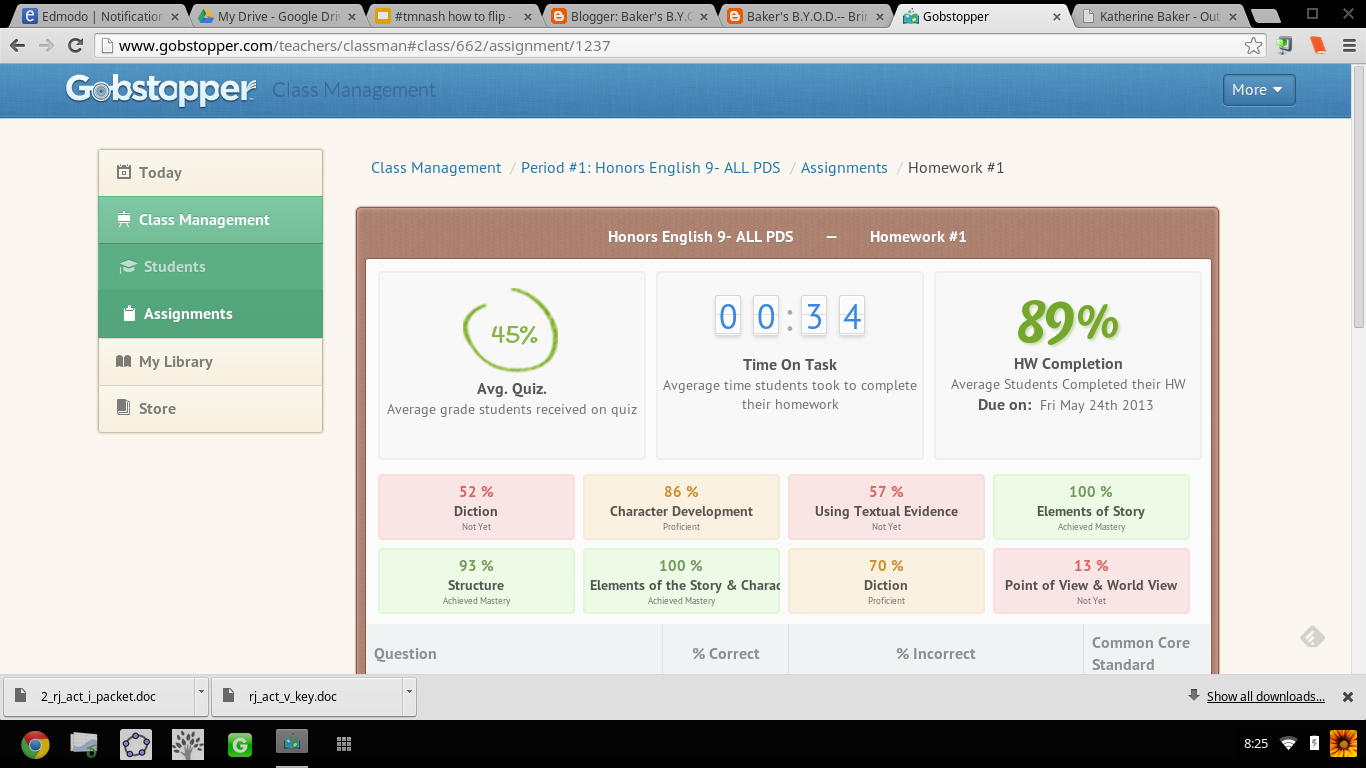
I can't tell you how ridiculously THRILLED I was when an article on Gobstopper appeared in my Techcrunch feed on Feedly.  I almost dropped my phone. Gobstopper is an e-reader platform that allows teachers to input and customize annotations, resources, questions, and quizzes linked to the Common Core Standards directly into a public domain text, and provides the students with immediate feedback, and the teacher with analytic data on student and class performance. Canonical texts found on the public domain are available in Gobstopper for FREE. And pair Gobstopper texts with FREE public domain Librivox audiobook recordings of the texts and you will strike gold with digital reading instruction.

Seriously?!  YES!  JACK.... POT!!! Don't believe me? Try out the student demo.

AND THERE IS MORE....  Gobstopper also offers a summer reading program. Available texts are already embedded with annotations, quizzes, and questions. The content creation is already done; all the teacher has to do is assign the books. No wonder Gobstopper's name alludes to Charlie and the Chocolate Factory, because this is SWEET!

From Flowergirl to Dutchess


Appropriate, considering the themes of identity and transformation in the play, I first used Gobstopper with Shaw's Pygmalion. While on the public domain, Pygmalion was not listed as a text in the Gobstopper store, with an email request to Gobstopper support, the text was quickly added and I could begin customizing the "curriculet" with my own annotations and questions. The process was fairly simple: highlight the text, choose the option, enter the content.  Questions, annotations, and quizzes can be loaded anywhere in the text and the teacher can choose to have the corresponding excerpt highlighted as well as select the appropriate Common Core Curriculum Reading Standard for each question. For annotations, I embedded  screencasts I've created, links to Librivox recordings,YouTube videos, Google Forms, Google Docs, webpages, Edcanvas ... the list is never ending; anything living on the web can be linked in an annotation. Quizzes for each reading section were also easy to create. Students received their reading assignment and due dates, and I would check on their progress and accuracy.

In addition to Pygmalion, my students also read Romeo and Juliet via Gobstopper. My instruction for both texts though differed: Pygmalion was read independently out of class while we watched excerpts of My Fair Lady and West Side Story in class, and Romeo and Juliet was read synchronously as a whole class.

Prior to Gobstopper, the students were given a packet of worksheets and materials for understanding Shaw's play and we focused more so on projects that connected to the theme of the play as opposed to close textual analysis. I was never really sure if the students actually read, truly understood Shaw's play or just opted for reading the Sparknotes and viewing the film online. Pairing the Librivox recording of Pygmalion with the enhanced Gobstopper text, I had clear indicators for student performance and understanding. By hearing the text, they were able to better read along and understand, and with the Gobstopper curriculet, they could demonstrate understanding while reading instead of having to answer questions on a worksheet at the end of each act.


"Never was a story of more woe..."


For Romeo and Juliet, prior to using Gobstopper,  students read the text that I put in a Word doc with arrows and boxes pointing to what I wanted the students to know. Students would pick parts (aka me coerce students into volunteering). We'd read together in class; I'd  try to get students to act their parts, and stop every page and scene to go over the answers to the questions in the boxes, as well as explain to them the nuances and artistry of the language. While we got through the reading, it wasn't until that I would show the movie clips that students "got it" and understood the language. WHY? Because Shakespeare is meant to be performed not read statically sitting in an uncomfortable student desk, and seeing the actors' movements solidified understanding. While I would encourage students to act their parts out, what that really amounted to was them standing in the front of the room reading monotonously from the text. I was asking them to do too much at once: read, comprehend, and synthesize into a performance. We were also taking at least 1 week to get through each act. With 5 acts in R&J, that amounts to 5 weeks of reading-- in case you didn't know, the play is only 2 hours long....   5 weeks vs 2 hours: no wonder students couldn't remember the opening brawl scene when we finally got to end, we were reading slower than Friar John riding a donkey in the Zeffirelli version.

Flipping the reading of Romeo and Juliet using Gobstopper and Librivox, students read asynchronously in class. I signed out the mobile lab and a class set of headphones, and assigned an act a day. What was not finished in class was for homework. I reviewed the class report the day at the beginning of the next class and clarified any misunderstandings, then let them return to reading independently.  If a student had a question in class, I was able to speak to him/her one on one and address his/her concerns as needed. This process was much more successful then demanding students to be compliant and pay attention as we read together. No longer did I hear complaints of "you're going too fast!" or "can't we just move on already?!" Now that the reading of the play took only a week, we had time for creative projects that included group performances of chosen scenes and skyping with an author (that's for another blog post!).

Gobstopper allows me to efficiently and effectively flip reading instruction from synchronous and static instruction to asynchronous, supported, and student paced. By embedding instructional elements in the text and linking it to an audiobook, students can listen to people read who already understand the text and control the pace of their learning while reading. Independent and whole-class reading of complex texts while aligning with Common Core Standards is no longer a Sisyphean endeavor when using Gobstopper.

I like Gobstopper so much, I shared it at #EdCampPhilly. Photo credit: K.Jarrett


-----------------------------------------------------------------------------------------------------

UPDATE UPDATE UPDATE UPDATE as of 8/8/2013

I will be writing more about using Gobstopper in the very near future, but I couldn't wait to share this...

Curriculets are now share-able   Let me SHOW YOU!
Sign up/in to Gobstopper first, then click on this link, and you can see the curriculet I made for A Midsummer Night's Dream.

...AND, the feature I have been waiting for! Gobstopper is MOBILE!
That is some sweet candy to have in your pocket! 


Gobstopper employs some awesome people, too! I got to meet Jason, Sean, and Marika at EdmodoCon 2013. A highlight of my experience!

From Left to Right: Sean, Marika, and I at the EdmodoCon
after party.  Where's Jason? 


Saturday, April 20, 2013

#OdysseyExperts & Showcasing Student Work

In my last post, I discussed that academic writing needs to be put on display and showcased to motivate students to write well. Writing is meant to be read, not to be locked up in a folder in a file cabinet or later tossed in the trash after the grade received.  Students think that when they turn in the assignment and meet the teacher's due date, the writing is good & done.  My other posts address my frustrations with grading the "got it done" academic writing:


But what if teachers steered students in another direction and away from the impending due date? By telling students that their work will be published, instead of graded, they will (hopefully, fingers crossed) write a better final product than the "good enough, got it done" essay, and then once the essay has been written, peer edited, and then published, the teacher can go through the work and assess if the objectives of the assignment were met. While I'm not a fan of putting grades on student writing, I get it: teachers need to follow the rules or expectations of school districts and have grades in their grade book.  With the red-pen system students only see the negative and the grade, but by using a showcase approach, teachers can arrive at the same destination but in a more positive manner.  In a way, it is tricking the students to write better the first time than waiting for the grade on the paper.


Student Showcase: #OdysseyExperts


The Design

One of the Topic Pages with Links to Student Essays
Teaming up with Sam Patterson and using Google Sites, I created a place for my students to showcase their Odyssey essays and receive feedback from Sam's classes and anyone else who visits the site.  The process was fairly easy:

  1. Create the site.
  2. Organize the essays by topic.
  3. Embed each essays on subpages to the topic page.
  4. Create a Google Form for comments and embed the form on each essay page.
  5. Embed the spreadsheet on the comment page.
  6. Create a page for comments from Sam's classes and embed a shared folder.
  7. Share, share, share with my PLN.

The Feedback Display


Sam's classes had two options for submitting their feedback:


  • complete the form on a chosen essay page or 
  • save their comments document in a shared folder.  


Public Comments Spreadsheet
Only owners and collaborators on a Google Site may comment on the pages, so as a work around, I embedded the same form on each student subpage and created a public comment page where all the comments will appear.  I was initially going to do a comment form and spreadsheet for each student, but that meant 65 separate forms for each essay on the site, and the more I thought about it, the more sense it made to have a public comments page where the students would have to read through the comments to
find their own. The point of this project was to make student writing and feedback visible, so I want all students to see all essays and all comments.

Shared Folder of Collection of Comments
While the shared folder doesn't allow for complete visibility of feedback because my students will have to open each document in the shared folder to see all comments, students would still be able to see 1 or 2 other comments for other students because each of Sam's students wrote comments for more than 1 student on the document. In addition, some of Sam's students made videos and screencasts of commentary for my students. #EduAwesome!


After 14 years of teaching, I'm just tired of student writing being hidden and dying a death in a dusty folder in a locked file cabinet, and students thinking that the only relevant audience for their work is the teacher. I want the writing to breathe and live. By putting academic writing on display and allowing for interaction, students will see their work and the work of others and gain a better understanding of their potential and abilities for writing.


Please visit the #OdysseyExperts site, read, comment, and share. The students need to see that their writing is alive.