Showing posts with label assessment. Show all posts

Saturday, January 5, 2019

Quick Fix: Edmodo Quiz Timed Out

Edmodo is the hub of my virtual classroom, and the Quiz feature has been a time saver: from quick quizzes to final exams, Edmodo Quiz is my go-to assessment tool because all questions and quizzes are banked, the quiz feature has versatile security features, and feedback is delivered in a timely fashion to students. If you want to learn more about creating Edmodo quizzes, check out this post. But what do teachers do in the moment when students do not complete an Edmodo Quiz in the assigned time?

Before we even address the solution, let me provide some preventative measures:

  • First, I train my students to answer all of the automatically scored questions first. This includes multiple choice, true/false, fill in the blank, and matching questions which Edmodo automatically scores when the students submit their quiz. Students can track their progress through the quiz by paying attention to the icons next to the list of question numbers. When students return to their quiz results, they will be able to see their correct/incorrect answers, so there is not an opportunity to finish the automatically scored questions later.
  • Second, when setting the time limit for the quiz, I always build in extra time. For example, my class period is 43 minutes, so I set an Edmodo Quiz that is expected to take the entire period to at least 60 minutes. 
  • Third, if the students need to finish typed-response questions, I direct them to type in the words NOT FINISHED in the response box. This small step will come in handy later when it comes time to score the responses.
By teaching students test-prep skills and allowing for some wiggle room, I can mitigate issues.
But, what do teachers do if the preventative measures did not work? Here is what I recommend when students get timed out of an Edmodo Quiz:


  1. Reset the Quiz:  this requires the least amount of work for the teacher.  With a quick click, teachers can reset student quizzes easily. Students restart the quiz from scratch as all of their previous answers have been deleted. 
  2. Typed Responses Only: this requires more work on the teacher's part and dependent on the types of questions asked because students will be able to see the correct/incorrect answers for automatically scored responses when they view their quiz results. If the student needs to finish typed responses, the teacher allows the student to view his/her results and can either finish writing their response on paper or a Google Form. The teacher can then either grade the responses on paper by hand or copy/paste responses from the form's Google Sheet and copy/paste answers to the comment area of that question on the student's quiz.


When we concluded our film study unit of West Side Story, my 9th grade Honors students were assigned to complete a summative test using the Edmodo Quiz feature.  This "quiz" is a doozy and worth a substantial amount of the marking period grade: students are asked to complete 27 automatically scored questions and three typed responses that ask them to analyze and synthesize information into a cohesive and concise paragraph response. I anticipated that students would spend about 10 minutes on the automatically scored responses (20 seconds per question, if that) and about 10 minutes per typed response for 30 minutes total on that section.

As first period started taking the test, I realized that some students were taking much longer than 10 minutes on their typed responses. Now, I could have been a stickler and said to the straggler students that they must finish in the class period and they will only be graded on what they complete, but I prefer to assess my students' understanding and not their time management skills in this case.

So, as we neared the end of the class period, I reminded students to answer all of the automatically scored questions and to type NOT FINISHED at the end of any responses that were incomplete or in the response box for any typed-response questions that were not started. At the end of the period, students submitted their test and moved on to their next class. Students who did not finish were directed to return to my room to complete their test during their studyhall period or after school.

So that students can complete their typed-response questions, I created a Google Form.


When students returned to my room, I opened the results for the test so that students could copy/paste from the responses that they had partially completed to the Google Form if needed.


By typing in NOT FINISHED, I knew to not grade the response just yet and to check the Google Sheet for the students response. I then copy/pasted the completed response from the Sheet to the comments area on the Edmodo Quiz question.


By having students complete their responses via a Google Form, I can sort their responses alphabetically and by class period on the Google Sheet. As I transferred students' responses from the Google Sheet to the comments area on the Edmodo Quiz question, I would change the color of the students' name on the Sheet to denote that I had completed the action.


As long as a student typed something in the response box, I would be able to complete the above listed actions and score the response without issue. I copy/pasted the students response to the comments area, typed in my scoring comments under their response, and updated the scoring box with the score.


The only snafu with this process is when a student leaves the answer response area blank. Edmodo will automatically score this as incorrect and not allow the teacher to adjust the score with partial credit.


While I can still copy/paste from the Sheet to the comment area of that question, I will need to manually adjust the final score of the quiz in my district gradebook.

While this fix for allowing students to finish Edmodo Quizzes beyond the assigned time may seem multi-faceted, it is fairly quick and allows me to authentically assess my students' understanding without their scores being comprised for poor time management skills.  The hope is, that while some students may initially struggle with time management, with continued practice students will become more adept at composing responses in the time allotted.


Sunday, December 9, 2018

Groupwork Protocols for Blended & Flipped Learning

I am inspired by Catlin Tucker and her Station Rotation model, but in a 43-minute period, I struggle with how to effectively implement the rotation piece with my ninth grade students. Every second in our 43-minute period is precious. No matter how well I train my students, the transition time for station rotation is problematic. So I thought, "What if the stations rotate to the students?" And with that, my Group Agenda Protocol was born!


Protocols & Procedures


This protocol for a class routine is designed to promote student accountability and efficacy, shifting the role of the teacher from the “sage on the stage” who is tethered to the front board to the “architect of learning” who creates structure for learning to occur and the “guide on the side” who facilitates student learning by circulating through the room as students work. While similar in design to a station-based model, students do not move from their seats, but rather complete tasks listed on the agenda in a set amount of time.


Set-up Quick Steps:
  1. Set up the room. 
  2. Determine the agenda and copy/paste the chosen agenda format to a new document and fill in with appropriate information. 
  3. Print agendas and organize materials for each group. 

The teacher sets up the room to create four groups of six students for a 24-student class or five groups of six in a 30-student class. Students may choose their group or the teacher may assign students to a group.

Each table configuration is identified by a number, taping a sign to the wall near the group. The agenda and group roles are printed and placed in a basket or bin on each table. Materials needed for the class period are also placed in the bin/basket.

The group roles are designed to maximize student accountability and to allow for every student to participate within a group of 6 students. If there are fewer or more than 6 students in a group, they can double up on responsibilities/roles.


The Group Agendas

There are three versions of agendas that can be customized as needed with specific directions, links, and tasks. To add additional tasks to the agendas below, simply insert a new row into the table for v.1 or a new column (then merge cells to get rid of extra spaces) in the task area for v.2 and v.3 agendas. It is recommended that you keep an ongoing document on which you compile the agenda for each day. This document can be shared with students and administrators. To see an example of a month’s worth of agendas following v.1 format click here, and to see examples of v.2 and v.3, click here.

Agenda v.1 is designed with all groups completing the same tasks at the same time in a 43 minute period. Think of this as a common playlist of tasks. The class period begins with a Do Now, bell-ringer activity, then progresses through three tasks, and concludes with an exit ticket. During the class period, the teacher circulates through the room, helping students and groups as needed.

The number of tasks can be increased when following Agenda v.1, but be mindful of the decrease in time for each additional task. One way to manage tasks is to break up a big assignment or a worksheet into smaller chunks. For example, a four page packet of activities could be separated into four tasks, one page per task. This will allow students to practice pacing and makes a large assignment seem less intimidating for struggling learners.

Agenda v.2 is designed with all groups completing tasks via a rotating schedule so that the teacher can meet with each group at a designated time to check work or give a mini-lesson to the group. The class period begins with a quick Do-Now and then progresses through 4 non-sequential tasks of equal duration. The 4 tasks are completed in 8 minutes each, but can be completed in any order. Each group rotates through tasks using the provided sequence listed on the agenda. The period concludes with a 3 minute Exit Ticket.

Agenda v.3 is designed with a rotating schedule of 3 non-sequential tasks of varying duration (2 short tasks, 1 longer task). The 2-1 duration tasks are completed in two 8 minute blocks and one 16 minute block. One of the 8 minute tasks is spent meeting with the teacher. Each group rotates through tasks using the provided sequence listed on the agenda. The period concludes with a 3 minute Exit Ticket.

When following v.2 and v.3 of this group protocol, it is recommended that the number of groups be kept at four so as to maximize the amount of time the teacher visits each group. Included with the agenda templates is a version of Agendas v.2 and v.3, designed for groups of 5. If the number of groups and tasks are increased to five, then the time for each task and the time the teacher has to meet with each group is decreased from 8 minutes to 6 minutes per in a 43 minute class period. This may affect the quality of the meeting with the group, the work students are completing and may impact the type of tasks they are directed to complete in such a short time.

All Do Nows and Exit Tickets should be recorded in a student’s notebook, serving as an ongoing record of activity. The class tasks can be completed in the students’ notebooks or on teacher-provided handouts or digital files as appropriate.

To minimize the time spent by the teacher accounting for student completion of work, the Quality Controller should be recording the progress of each group member throughout the period on the provided chart located under the agenda, noting the completion of each task by each group member. Rather than collecting all papers for each group member and handing the papers to the teacher, students should keep evidence of the task completion in their notebook, which can be produced upon request.

At the end of the period, the Agenda page is turned in to the teacher. The Agenda is kept on file as documentation of student participation and behavior. The teacher can award participation points to each student based on the number of tasks completed. For example, if Biff Bifferson only completed 3 out of 5 tasks, a grade of 3 out of 5 can be recorded in the gradebook for that day’s participation. The teacher can follow up with each student and verify the authenticity and accuracy of the completion of work in a quick and efficient manner. If the student makes up the INC assignments, the teacher can easily update the gradebook.

Folks who attended FlipTech East Coast and Rewire conferences got to experience the Group Agenda Protocol first hand. Below are the slides for the session.

The Group Agenda Protocol is a method for maximizing the precious time we have in class and for promoting student efficacy and autonomy in a structured learning environment.


Saturday, November 1, 2014

Flipped Learning Podcast: Tools for Assessment

I had a great conversation with Troy Cockrum and Joan Brown about tech tools for assessment on the Flipped Learning Network's Podcast. I look at edtech as a vehicle for learning and a way to leverage the workload for teachers.

Check out the conversation:


Tuesday, August 12, 2014

#Flipclass Workflow

With the start of the new school year looming, a favorite topic of discussion among #flipclass teachers is workflow.  Rookies want to know how to make flipping work with class procedures, and veterans are always tweaking what they do. Edmodo, Curriculet, and Google Drive are essential to productive workflow in my class.

Essentially, this is what I do:

  • Organize students into classes on Edmodo with all resources, agendas, links to edtech tools, assignments, and quizzes are completed in Edmodo.
  • Students go to Curriculet for reading texts.
  • Students use Google Docs for typing up essays and other assignments.


Edmodo

Edmodo is my online classroom space. Everything that I do face to face with students is also completed via Edmodo.  From posting the daily agenda to taking quizzes to connecting with others, everything is done in Edmodo as you can see from the list below and public folder of classroom examples.  

I create a main classroom group for each level I teach because I want to promote the online PLN experience.  So all of my Honors 9 students are in one group regardless of period and all of my English 12 students are in another group. Students interact with others that they may see in class or merely pass in the the hall. When I name my groups I always use the following naming convention:  School Year & Level.  For example, 2013-14 English 9 or 2014-15 Honors English 9. 

  • The daily agenda is posted as a Note with any attachments needed. I always date it and put a heading in all caps as well as a numbered list of activities for the day. I type up my lesson plans in a Google Calendar which is posted on my class website, and merely copy/paste from my plans to create the daily agenda.  Click here to see a sample.
  • All work is turned in via Edmodo Assignments.  Whether it is a final project or an online activity or a photo of a paper worksheet, students turn in their work on Edmodo because the assignment is automatically added to Edmodo's gradebook or Progress area which keeps a spreadsheet record of all assignments assigned to that group. This spreadsheet is my working gradebook and replaces the students' three-ring binder. Students still keep a notebook using any method they choose, but I no longer have to do paper-notebook checks.  When parents, counselors, or administrators have a question about a student's performance, I have a record of the student's work at my fingertips.  I can also see the student's performance in relation to other classmates. I transfer by hand scores to my district's gradebook as applicable.
  • Preparing for digital assessments, students complete quick Edmodo Snapshot assignments. Snapshot provides students with standards-aligned assessments for math and ELA. I can quickly choose the standards I want to assess and assign the questions to my students.  Edmodo takes care of the rest from selecting the passage to writing the questions. I set the due date and track student progress, assigning later Snapshots to address deficiencies. Snapshot will be a weekly automatic assignment for my students in the coming school year. 
  • Students access Edmodo apps for automated tasks or projects. The No Red Ink Edmodo app is added to my Edmodo groups so that I can quickly assign students grammar tasks without having the students log in to another site or make more work for me.  Students also have access to other apps such as Powtoon, Pixton, Audioboo, and Dogo News for other online projects. I often ask my student to "Show Me" what they know using any online tool. 
  • Students communicate and peer review in Edmodo small groups.  I break up each main classroom group into smaller sub groups.  I just go right down the roster and select students in alphabetical order.  The small groups then becomes a place to share work that is turned in or complete online small group tasks.  I may ask students to find a resource about parallel structure and post it to their small group or have them share copies of essays for peer review.  By posting in small groups, we are keeping the main classroom page relatively clean.
  • Students are added to other main groups throughout the year. I will create other Edmodo groups for collaborating with others or delivering content in an asynchronous manner. When collaborating with other teachers and students across the country or globe, I (or the collaborating teacher) will create a new main group to which we add our students for sharing their work or completing collaborative tasks.  I'm excited to try out a Writer's Corner group with California teacher Beth Oing and Maine teacher Natalee Stotz.  This group will be an informal space for students to share whatever they are writing for peer review and feedback.  For delivering content in an asynchronous manner, I will create a separate group for each unit.  Check out this post on how I gamified The Odyssey using Edmodo. 

Curriculet

Curriculet is my go-to tool for reading instruction.  From uploading my own documents or articles found on the web to reading canonical texts to preparing students for PARCC assessment, Curriculet is essential to tracking my students' reading progress online. I've successfully flipped reading Romeo and Juliet and A Tale of Two Cities with my students. We've also read Great Expectations, Pygmalion, and current event articles related to the Great Depression and The Olympics. With Curriculet's premium library of contemporary texts being released this Fall, I'm excited to get my students reading more.

To use Curriculet, I create classes and give my students the classroom code.  I'm not worried about my students having too many log ins because they click on the "Sign in with Google" button since we are a Google Apps for Education school. Their Google credentials can be used to create and sign into a Curriculet account.  I assign an entire text to my classes and post a reminder in Edmodo for students to access Curriculet.  The students read the text at home or in school on smartphones, tablets, Chromebooks, or computers, answering questions and quizzes embedded in the text to check their understanding.  To see the student view, watch this quick video.


I use Curriculet's data analytics for formative assessment-- my students are allowed to make mistakes without too much penalty.  I take a look at their time on task and their accuracy for answering the questions and quizzes and give the students' a holistic score in my gradebook.  Using the OSU rubric, students receive Outstanding (100%) if they completed the task in an average amount of time and with an accuracy rate over 88%.  Students receive a score of Satisfactory (88%) if their accuracy was in the range of 78-87%, and Unsatisfactory (75%) if they completed the reading too quickly (ie. they clicked through the questions instead of reading) and scored below 78% on questions and quizzes. All summative assessments are completed in Edmodo as either an Edmodo Assignment or Edmodo Quiz. I allow students to have Curriculet open in another browser window while completing the summative assessments.

To see behind the scenes in my Curriculet account, view this video.


Curriculet is also available as an app in Edmodo, but since many of my students have smartphones as part of my district's BYOD initiative and Edmodo apps are only accessible on computers and iPads, I do not utilize the Edmodo app version of Curriculet at this time. For elementary schools or 1:1 iPad districts, I would recommend accessing Curriculet through Edmodo.


Google Drive

Google Docs has replaced Microsoft Word in my classroom. While I still access files I created in Word or PowerPoint, my students primarily create documents and slides using Google Apps.  We will have access to Microsoft 365 this year, but the simplicity and versatility of Google Apps have won my students over.  I needed a word processing option for students on smartphones and Google Drive fulfills the need. Students can complete notes, Do Now activities, quick writes or other journal writing on their smartphones through the Google Drive apps. 

We are a Google Apps for Education school, so the workflow is seamless. Students have accounts already created through school, so getting started is easy. Even though student Google Docs are shared with me, I still have my students turn in the link to their document in an Edmodo assignment.  Again, I keep a record of all things in Edmodo.  I'm excited to see what Google Classroom will do in terms of streamlining sharing documents with students, but in the meantime, this is how I used Google Drive with my students.

  • For assignments, I used Autocrat and Google Forms to deliver individual documents to students. Learn more by reading these posts: A Gaggle of Google Docs and Creating Certificates with Autocrat.
  • Daily directions, assignments, or Do Now activities are on Google Slides with the link to each presentation posted in Edmodo. Information is nicely chunked on each slide and it is easier for students to read than a lengthy Google Doc assignment.

Instructional Design

Edmodo is the hub of my classroom with Curriculet and Google Apps forming the spokes of our wheel of learning.  

The daily schedule may vary, but essentially I follow this routine in our 43 minute class periods:
  • 5 mins. Do Now Activity and review of answers-- as students walk into class they get started
  • 3 mins. recap of objectives and timeline
  • 25 mins. asynchronous activities or group work
  • 5 mins. wrap up 

This is my general plan per week:
  • Tuesday: introduce a new concept
  • Wednesday thru Thursday: work asynchronously or in groups applying the new concepts
  • Friday: whole class teacher-led activity reviewing and synthesizing  the material
  • Monday: assessment on the previous week's content

Last year I was 1:1 with the Chromebook cart on Mondays, so I liked having students take Edmodo quizzes or finish up individual digital work on Mondays because we had guaranteed access.  Sometimes I could get the cart mid-week, but it was never a guarantee as I shared the cart with four other teachers (each teacher taking a different day). So our mid to end of week activities featured BYOD, paper, and face to face tasks. While I do not let technology drive the learning in my class, technology is a vehicle for learning so our access to technology does factor in to our schedule.


I'm interested to read what others are doing with their students. So please reply with your questions, comments about #flipclass workflow methods.

Saturday, February 8, 2014

Edmodo Quizzes: Tips & Tricks

Edmodo's quiz feature is a versatile tool that saves teachers time. Whether used for quick informational checks or unit tests, the quiz feature enables teachers to assign formative and summative assessments with ease.  I use Edmodo Quizzes for assessing students' knowledge acquisition, practicing PARCC related digital literacy skills, and demonstrating students' application of knowledge learned through out the marking period. I will never grade a multiple choice quiz/test by hand ever again, and Edmodo quizzes provide a paperless way for me to easily read and score open ended, paragraph responses.

Formative Chunks

When my students are learning large amounts of information such as vocabulary words or types of literary
devices, I break the list up into smaller chunks and assign quick, no more than 8 questions quizzes. Leading up to the final test, students take one quick quiz per day and get immediate feedback on what they know and do not know. I will use multiple choice, fill-in-the-blank or matching type questions for my quick quizzes.


A note about fill-in-the-blank, you may run into issues with misspellings or students not providing the exact phrase/word. I don't mind encountering the errors/issues on the quick quizzes because I want students to learn from their mistakes and understand why they didn't get the correct answer. For quick quizzes, I usually do not use the short answer format because I want students to receive immediate feedback rather than wait for me to score their answer.


Summative Assessments

Summative unit tests can easily be given using Edmodo's quiz feature. I prefer to use the multiple choice and short answer formats because it avoids any issues with fill-in-the-blanks or matching and requires students to focus on the content of the assessment.

I can also link resources to specific quiz questions to assess high-level thinking skills.  On the summative test for our drama unit, I linked pictures of specific scenes from West Side Story, Romeo and Juliet, and Pygmalion and during our Odyssey unit, I included images from Odysseus' journey added to questions so that students had a colorful visual to refer to. For assessing visual analysis skills, Edmodo quizzes are much more effective than paper tests that included black and white  photocopied images.

My summative tests are open resources (book, notebook, web, etc), but my students quickly learn that they must know the material prior to the test because time is paramount. I purposely design tests with time in mind; students should spend approximately 30 seconds on multiple choice questions. If students are organized and prepared beforehand, they can quickly locate an answer they can't remember with out wasting too much time. While my summative tests do assess content knowledge, I'm also assessing and reinforcing organization and time management skills.


Time Management for Teachers 

Short Answer Response as First Question
To help speed up your grading time, when writing the Edmodo quiz, put your open-ended, paragraph response questions as the first questions on your quiz and then follow with your multiple choice, true/false, matching questions. I then select "randomize questions" so that the short answers are not usually the first questions the students encounter. How does this speed up my grading time? Well, when I open up each student's test responses, I have few clicks to get to the short answer responses I have to score.


When the short answer is last, I must click on MORE then
scroll down to last one to review responses.

At this time, students can take quizzes on either computers, Chromebooks, or iPads, but they cannot take a quiz on a smartphone or other personal device.  However, teachers CAN grade responses on any device. I've scored short answer responses while on my smartphone, iPad, Chromebook, home laptop, and school computer.


Edmodo also banks all questions that teachers create. When I want to create a new quiz, I can easily load questions from previous quizzes by searching using keywords. So I can reuse questions from my formative quick quizzes and include them on summative tests.


Edmodo Quiz is All I Need

Despite the plethora of online quiz tools available on the web, Edmodo is my go-to quiz creator: all quizzes are organized in the "Progress" area (gradebook), there is easy to see data analytics available, and, best of all, it saves me time creating and scoring assessments. While quizzes and tests are not my only method of assessing students, Edmodo makes it easy to do so when needed.

Thursday, May 30, 2013

May this Gobstopper (Now Called Curriculet) be Ever Lasting!


UPDATE AS OF 1/15/14:  
The company Gobstopper has changed its name to Curriculet, but this update hasn't changed how I use Curriculet with my students. The stories and information in the below post still hold true despite the change in company name.


While I've written quite a bit about assessing writing (ad nauseum) via digital means, reading instruction and assessment have remained a primarily paper-based enterprise in my class. While students can create projects, take quizzes, write responses digitally via BYOD and 1:1 using Google forms and docs, I've been missing a digital method for close reading of texts in my bag of instructional tricks. I've tried incorporating e-texts, PDF's, Google doc versions of texts and encouraged my students to use the Kindle Cloud Reader app on their devices and home computers, but I've been lacking a method for reading to be interactive as a whole class. I could not figure out a way to accomplish close textual analysis in an efficient and digital manner...  UNTIL NOW!


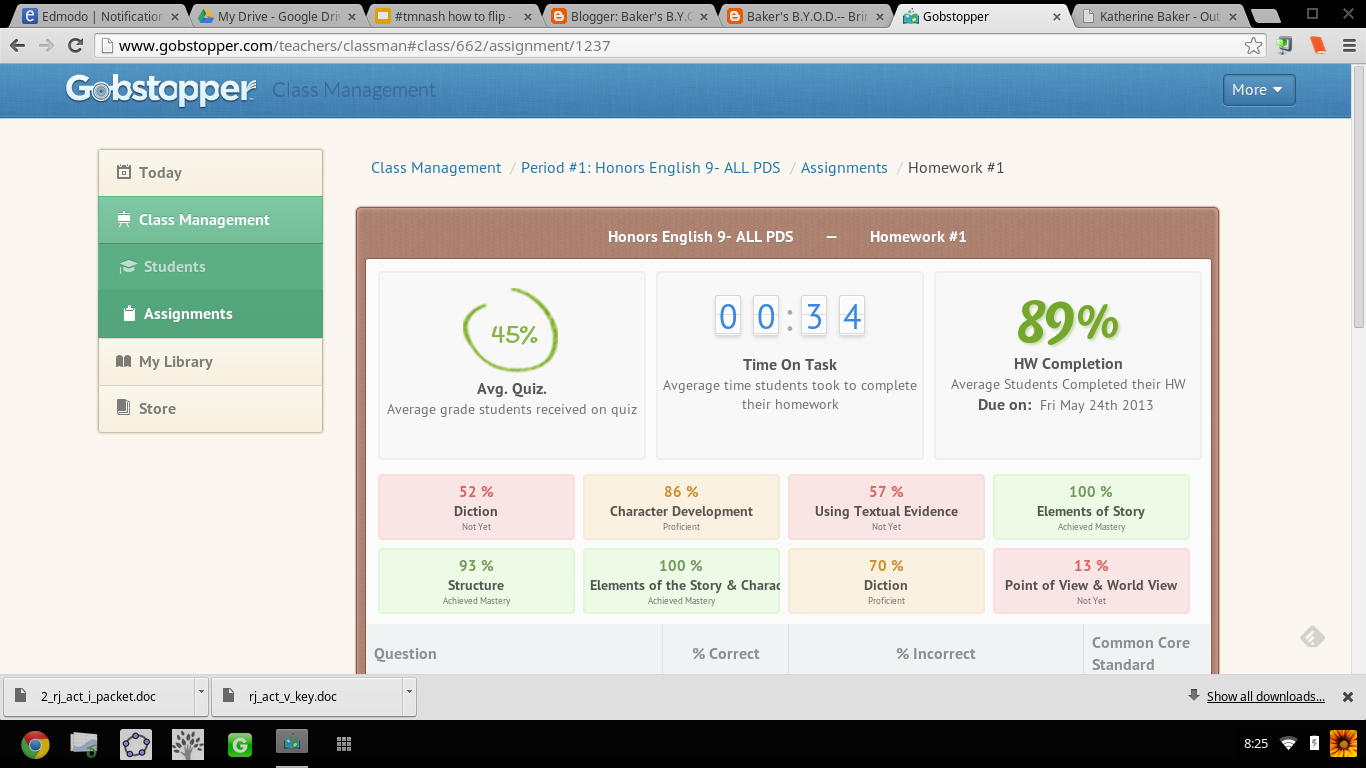
I can't tell you how ridiculously THRILLED I was when an article on Gobstopper appeared in my Techcrunch feed on Feedly.  I almost dropped my phone. Gobstopper is an e-reader platform that allows teachers to input and customize annotations, resources, questions, and quizzes linked to the Common Core Standards directly into a public domain text, and provides the students with immediate feedback, and the teacher with analytic data on student and class performance. Canonical texts found on the public domain are available in Gobstopper for FREE. And pair Gobstopper texts with FREE public domain Librivox audiobook recordings of the texts and you will strike gold with digital reading instruction.

Seriously?!  YES!  JACK.... POT!!! Don't believe me? Try out the student demo.

AND THERE IS MORE....  Gobstopper also offers a summer reading program. Available texts are already embedded with annotations, quizzes, and questions. The content creation is already done; all the teacher has to do is assign the books. No wonder Gobstopper's name alludes to Charlie and the Chocolate Factory, because this is SWEET!

From Flowergirl to Dutchess


Appropriate, considering the themes of identity and transformation in the play, I first used Gobstopper with Shaw's Pygmalion. While on the public domain, Pygmalion was not listed as a text in the Gobstopper store, with an email request to Gobstopper support, the text was quickly added and I could begin customizing the "curriculet" with my own annotations and questions. The process was fairly simple: highlight the text, choose the option, enter the content.  Questions, annotations, and quizzes can be loaded anywhere in the text and the teacher can choose to have the corresponding excerpt highlighted as well as select the appropriate Common Core Curriculum Reading Standard for each question. For annotations, I embedded  screencasts I've created, links to Librivox recordings,YouTube videos, Google Forms, Google Docs, webpages, Edcanvas ... the list is never ending; anything living on the web can be linked in an annotation. Quizzes for each reading section were also easy to create. Students received their reading assignment and due dates, and I would check on their progress and accuracy.

In addition to Pygmalion, my students also read Romeo and Juliet via Gobstopper. My instruction for both texts though differed: Pygmalion was read independently out of class while we watched excerpts of My Fair Lady and West Side Story in class, and Romeo and Juliet was read synchronously as a whole class.

Prior to Gobstopper, the students were given a packet of worksheets and materials for understanding Shaw's play and we focused more so on projects that connected to the theme of the play as opposed to close textual analysis. I was never really sure if the students actually read, truly understood Shaw's play or just opted for reading the Sparknotes and viewing the film online. Pairing the Librivox recording of Pygmalion with the enhanced Gobstopper text, I had clear indicators for student performance and understanding. By hearing the text, they were able to better read along and understand, and with the Gobstopper curriculet, they could demonstrate understanding while reading instead of having to answer questions on a worksheet at the end of each act.


"Never was a story of more woe..."


For Romeo and Juliet, prior to using Gobstopper,  students read the text that I put in a Word doc with arrows and boxes pointing to what I wanted the students to know. Students would pick parts (aka me coerce students into volunteering). We'd read together in class; I'd  try to get students to act their parts, and stop every page and scene to go over the answers to the questions in the boxes, as well as explain to them the nuances and artistry of the language. While we got through the reading, it wasn't until that I would show the movie clips that students "got it" and understood the language. WHY? Because Shakespeare is meant to be performed not read statically sitting in an uncomfortable student desk, and seeing the actors' movements solidified understanding. While I would encourage students to act their parts out, what that really amounted to was them standing in the front of the room reading monotonously from the text. I was asking them to do too much at once: read, comprehend, and synthesize into a performance. We were also taking at least 1 week to get through each act. With 5 acts in R&J, that amounts to 5 weeks of reading-- in case you didn't know, the play is only 2 hours long....   5 weeks vs 2 hours: no wonder students couldn't remember the opening brawl scene when we finally got to end, we were reading slower than Friar John riding a donkey in the Zeffirelli version.

Flipping the reading of Romeo and Juliet using Gobstopper and Librivox, students read asynchronously in class. I signed out the mobile lab and a class set of headphones, and assigned an act a day. What was not finished in class was for homework. I reviewed the class report the day at the beginning of the next class and clarified any misunderstandings, then let them return to reading independently.  If a student had a question in class, I was able to speak to him/her one on one and address his/her concerns as needed. This process was much more successful then demanding students to be compliant and pay attention as we read together. No longer did I hear complaints of "you're going too fast!" or "can't we just move on already?!" Now that the reading of the play took only a week, we had time for creative projects that included group performances of chosen scenes and skyping with an author (that's for another blog post!).

Gobstopper allows me to efficiently and effectively flip reading instruction from synchronous and static instruction to asynchronous, supported, and student paced. By embedding instructional elements in the text and linking it to an audiobook, students can listen to people read who already understand the text and control the pace of their learning while reading. Independent and whole-class reading of complex texts while aligning with Common Core Standards is no longer a Sisyphean endeavor when using Gobstopper.

I like Gobstopper so much, I shared it at #EdCampPhilly. Photo credit: K.Jarrett


-----------------------------------------------------------------------------------------------------

UPDATE UPDATE UPDATE UPDATE as of 8/8/2013

I will be writing more about using Gobstopper in the very near future, but I couldn't wait to share this...

Curriculets are now share-able   Let me SHOW YOU!
Sign up/in to Gobstopper first, then click on this link, and you can see the curriculet I made for A Midsummer Night's Dream.

...AND, the feature I have been waiting for! Gobstopper is MOBILE!
That is some sweet candy to have in your pocket! 


Gobstopper employs some awesome people, too! I got to meet Jason, Sean, and Marika at EdmodoCon 2013. A highlight of my experience!

From Left to Right: Sean, Marika, and I at the EdmodoCon
after party.  Where's Jason? 


Thursday, April 25, 2013

Voice Comments on Google Docs!

Check out this video, fellow teacher Carolyn P. and I made introducing Voice Comments as a cool tool for the 21st Century. Primarily used for the teacher to record voice comments on a student's Google doc, I anticipate that the capabilities will expand to include use for peer editing with classmates, and, as you will hear, use for classes that require audio.  Major props to Sam Patterson for sharing this tool with me! Just search the Chrome Web Store for Voice Comments, connect the app to your Drive, and begin using.


I am very excited to use this tool for providing students feedback on their writing.  The process is much quicker than red penning or creating screencasts of each doc, and I like that comments are linked directly to the document instead of using an MP3 voice recorder app to email a voice message to a student.

This tool is ridiculously easy to use and set up, and as an English teacher who has lots of writing to grade and critique, I'm ecstatic to use it.... wait, did I just say I'm ecstatic to grade?! This must be a cool tool!

Enjoy!

Saturday, April 6, 2013

Writing about Grading Writing (Again)

I'm constantly writing about the dilemmas of student writing and how to grade student academic writing in an efficient and effective manner. This is probably borderline obsessive... but, I am the type of learner who when faced with an issue/problem/question, obsesses until ... ...  ....


Options for Grading Writing:

  1. Traditional: teacher does all the grading and marking up of students' writing. 
  2. Progressive:  students peer edit and self assess using guided structure provided by teacher
  3. Techie Traditional: teacher uses Google forms with the Autocrat, Doctopus, and  Goobric scripts, as well as other online rubric tools to assess student work.
  4. Techie Progressive:  teacher designs the rubric and assessment process on a Google form using the Autocrat script and the students peer edit each other.
  5. Ungraded: the teacher does not grade the writing.

Options #1-3 require time and effort in class and by the teacher.  I have happily peer edited on paper with my students, but there was just too much paper and it took up time in class.

Option #4 can be completed in and out of class, but it takes time to set up the forms, feedback docs, and scripts. BIG HUGE THANKS to Cheryl, Karl, Troy & all the Twitter peeps (Again & AGAIN) for walking me through creating this process, and the creator of the Autocrat script, Andrew Stillman, for answering my gazillion questions. I'm working on ways to better streamline the process (and not split my infinitives), but trust me, it is well worth the effort to guide students through troubleshooting their writing.

But, Option #5 I'm stealing (again) from Cheryl Morris. :-)


Un-grading Student Writing


In our #ElaFlip Hangout talking about assessing writing, Cheryl stated that she tries to detach grades from student writing. I forgot to ask if she was talking about creative writing or academic writing, but should it matter? 


Art & Academic Writing


Picture from J. Kronenber'g's Blog Post "I Can't Explain  It"
I completely agree with not scoring creative writing. I have never been comfortable putting a grade on creativity and therefore have never sought out teaching a creative writing course-- it is art and art is subjective: one critic might give Ellsworth Kelly's Blue Panel an A+ and another might give it an F. The simplest question in assessing the art is, "Does it hold meaning for me as the viewer?" The same subjective scoring can be used on student creative pieces.

I know, I know, some will say, rubrics make the scoring objective, but really? Rubrics turn writing into objects that sit on shelves. Rubrics are limiting!   Students only strive to hit the points on the rubric and not beyond.  They become complacent when they get the grade, and whose grade is it when the teacher designed the rubric?

I know, I know, I could get my ninth grade students to design the rubric with me, but they are just learning how to write, so do they know what to even put on the rubric? And me leading them for what to put on the rubric is still me, the teacher, controlling the rubric. I could use my O-S-U rubric (again) or use standards based grading and score for mastery, but does the grade on the paper push the student to continue writing? No! As Cheryl and the other ELA flippers (Andrew, Katie, Dave, & many more) will agree, as soon as a student receives the grade, he/she thinks the process is done. The point should be about keeping students writing until ...  ... ...

I fondly remember the yearly high school trip to The Metropolitan Museum of Art in NYC, and every time we flew through the exhibits just to sit in front of that blue panel and "critique" it.  My naive teenage friends and I would mimic high brow folks and comment in horrendously fake British accents on the composition, scale, and other fancy art terms, nicknaming it, "The Blue Rhombus of Life". Granted, our obsession with this painting was seemingly in a joking manner, but the fact remains that painting is still hanging in Gallery 915.

"I have worked to free shape from its ground, and then to work the shape so that it has a definite relationship to the space around it; so that it has a clarity and a measure within itself of its parts (angles, curves, edges and mass); and so that, with color and tonality, the shape finds its own space and always demands its freedom and separateness."- Ellsworth Kelly

But, this got me thinking: is this why I've had so much trouble scoring student academic writing? Every method I have used, revolves around my expectations: how well did the student follow my directions, display the knowledge I taught, and use the conventions the students have been taught throughout their academic career? I can lead the students through trouble shooting and revising their essays. I can score them on participation  meeting checkpoints, and being held accountable for the process, but do I, the teacher, really have to put a final grade on the essay?

During the #ELAFlip hangout, Katie Reagan explained that her students peer edit with other classes and students not at her school.  Getting students out of their comfort zone certainly motivated them to perform. What about an even greater audience on the web?  What about publishing their work for a bigger audience than my two hazel eyes to see? Wouldn't that "grade" the piece? It is so simple:  Is the writing ready for publication and to be "hung in a gallery"? And wouldn't that prospect motivate the student to perform well? Isn't that better than any grade I could put on the page or in my gradebook?

To adapt Kelly's words, writing is also about playing with the "color and tonality" of words so that words take shape and have a "definite relationship" that has "clarity and measure". Creative writing is an obvious form of art, and academic writing should also be considered no less an art, but many teachers and students drown in the red ink and forget the art of academic writing.

So, stop grading and focus on crafting, molding, and painting with words. 

Turn your student writers into artists.


Post Script:  Check out my next post, #OdysseyExperts, because I put into practice my ideas about showcasing writing.


Monday, December 10, 2012

Integrating Technology in the Classroom

Using Screencast-O-Matic and Windows Live Movie Maker, here is a "quick" tour of how I integrate technology in my classroom.  Be sure to check out the complete list of projects and resources by clicking on the Integrating Technology tab.


Tuesday, November 20, 2012

How to (Not) Fill a Blank White Page

Working with Ms. Morris, Mr. Lindgren-Streicher, and Mr. Thomasson back in August and similar in concept to Google's 20% time projects, the Blank White Page Project was conceived as a way to connect students and teachers through questioning and self-directed learning. While we are implementing this within the confines of the continental US, this project could be adapted to include classrooms around the globe.

The Process

  1. The class discusses types of questions and students make a list of questions they have always wondered about. The questions should be open-ended and require research and creativity to answer. 
  2. One of the teachers in the group creates a Google form for recording and a Google site for housing the questions. 
  3. Students go to the BWP site and record their questions.
  4. The teacher moves the questions entered by his/her students on the Google form to the various categories on the BWP site.
  5. Students return to the site and peruse the questions, choosing one to answer. 
  6. Students create "an answer" to the question, share it with the teacher, and the teacher posts it to the site. Answers can be in any form as long as they address the question.

Students can complete the BWP project individually or in groups comprised of members from their own school or elsewhere. Using Edmodo, Twitter (#BWP12), Skype or Google Hangouts, students can collaborate on creating and sharing answers. This process can be continually repeated throughout the year and additional teachers and classes can be added to the site. Additional participants could be found via networking on Twitter with other educators-- just pop into a #flipclass chat on Monday nights-- or via posting a request to one of the communities on Edmodo. I've met teachers online from all over the country, Canada, and Australia, many of whom are interested in connecting their classes.


Grading

Since this is project based learning, students could be scored with rubrics on the use of technology and creativity and effort in answering the chosen question. Self evaluation and reflection is also an important piece of the assessment process.  Students could also be additionally evaluated on their communication skills and ability to collaborate. The objective is for students to take ownership of their learning, so they should "own" the grade, not the teacher.


----------------------------------------------------------------------------------------

MY Implementation Issues


This has really been bothering me. I was so excited to begin this project (and I STILL AM excited to continue it), but I have met with some set-backs this year that have impeded the process and participation. I'm very frustrated by these set backs and not being able to better connect with the other teachers and classes.

  1. "Hey guys, wait for me!" Not all schools are on the same schedule. My collaborative colleagues began classes in August, and my school year did not begin until after Labor Day in September. I was the last one in the group to get my students started. Between mandatory diagnostic testing and getting the school year rolling, I wasn't able to get started on BWP until mid-September, a full month and a half behind the other participants. 
  2. "We can't get in the computer lab today."  While we have computer labs, media centers, and now a solid wi-fi infrastructure for BYOD in my district, we are not as far along with integrating technology on a daily basis in the classroom as compared to a 1:1 district. I am bound by scheduling constraints and access to the computers themselves. We have 6 computer and mobile labs for 2000+ students right now and students' home access is inconsistent.
  3. "What's a Google Site?"  I may be a MS Word wizard, but I haven't earned my wings yet flying through the cloud.  I didn't learn about Google Sites and how to create Google Forms until this summer and, other than using Microsoft programs, my students have also had limited exposure to technology in the classroom. This September was the first time many of my students have filled out a Google Form. My district is on the cusp of emerging from a ground-based school to one in the clouds as more teachers integrate web 2.0 tools in the classroom, and (after much delay) we are finally becoming a Google school and students will have their own Google Drive and access to collaborative apps. We are all learning as we go! 
  4. "We got walloped by a hurricane."  Seriously, walloped. I was all set three weeks ago to get students started on answering questions for BWP, and then we got hit by Hurricane Sandy and school was closed for two weeks to be an evacuation shelter for our regional community. Numerous teachers and students were and currently are displaced and the past week has been about the recovery efforts and supporting the community. I can't complain about a change in plans considering the circumstances. 


Thinking Ahead


For any collaborative project that extends beyond the bounds of the physical classroom, teachers need to consider the following logistics: 

  • Infrastructure: Does the school/classroom have the ability to connect to others? Does the school have available technology for completing the project and staying in contact?
  • Timing: How will the school calendars and schedules hinder communication and the process?  What are the timelines for the project?
  • Participants: Are all participants on the same page? Do all have the same expectations? Are all participants able to give the same level of commitment?  

If I've had issues on a national-scale, these could be compounded when applied to a global project. It is important to be proactive and prevent issues from occurring so that the project will be a success. I want the BWP to be a success because I know that it is a valuable self-directed project for my students, as well as myself. So, after much delay, we are ready to move ahead.


We all have so much to learn! 


"Be patient toward all that is unsolved in your heart and try to love the questions themselves. Do not now seek the answers, which cannot be given you because your would not be able to live them. And the point is to live everything. Live the questions." 
- Rainer Maria Rilke


Friday, November 16, 2012

CSI: Salinas

Teaching students to infer and formulate arguments can easily be in context of a novel.  Using Steinbeck's Of Mice & Men, students can analyze the text to create an outline for a mock trial for either George or Lennie.  The final project can be completed on paper, using word processing skills and completed using a student's BYOD device.

A student's smartphone or tablet does not have to just be used for a special occasion in the classroom. I encourage my students to use their device daily for note taking, recording ideas, reflecting, and researching. For this assignment, students will use their device throughout the process and to create the final products.


Collecting Witness Statements


This project requires students to examine the story from various viewpoints and use textual evidence to support the perspective.  Students begin by collecting witness statements from ALL characters mentioned in the story:  The Boss, the various ranch hands and even the quickly mentioned Girl in the Red Dress. On paper, students would complete the chart and cite page numbers to reference statements. Students need to consider what each character knows and how their viewpoint is different from the reader's perspective.  Not all characters know all events.  After all witness statements have been collected, students would organize the characters into lists by who likes George or Lennie.


Collecting Physical Evidence

Students also need to examine the setting in various scenes to collect physical evidence that can be manipulated to support their case. The evidence can't be disregarded or changed, but it can be used to support viewpoints. This piece of the project is very important for students to formulate their arguments because there are certain things they cannot get around.  For example, (spoiler alert!) the cause of death for Lennie can't be changed. Students can't get around the location of the bullet wound and state that George was attacked by Lennie and shot him in a different spot. The self-defense angle for George will have to account for the ballistics evidence as shown in the story. Lennie never handles the luger so his finger prints cannot suddenly appear on the gun.

Additionally, students can manipulate the crime scene. For example, Curley's Wife dies in the barn, but the defense team for Lennie could state that she fell from the hayloft and died as a result of her injuries. The prosecution could refute this claim with the physical evidence of hay, fibers, puppy fur, etc found on Lennie's and Curley's Wife's clothing. We know from Crooks' statements that Curley's Wife is always in the barn, poking around where she shouldn't be and even threatens Crooks in Chapter 4. It is conceivable for the defense team that CW was in the barn, wearing her little red mules, and met with an accidental death. Although, the prosecution for Lennie's case should bring up the evidence of CW's smeared make up being on Lennie's hand (which readers know got there when he "reprimanded" her for yelling).


Select a Case & Position

After witness testimonies and evidence have been collected, students need to decide which case and position they want to argue.  There are four possibilities:

I tell the students that truth doesn't really exist; truth is just a bunch of people agreeing to see things the same way. The point of this project is in the process and the ability to support the case. I've watched enough CSI and Law & Order to know about circumstantial evidence and proving reasonable doubt, and I've done week-long mock trials in class where students are assigned roles, but there's always those few students who don't get into character and invalidate the activity. I've changed this over the years to just a persuasive-argumentative assignment to preserve the integrity and prevent the three-ring circus. The objective is to have the students examine all of the  evidence and witness statements prior to selecting a case, so that students will realize the best argument instead of picking a side and trying to support it and then start over when they realize they don't have enough evidence to support their position. 

Prosecuting George for the death of Lennie is easy. There's enough evidence to prove that he did it between the lack of signs of a struggle, the ballistics evidence, and motive. George constantly belittles Lennie (as Candy overheard) and there's witnesses who can attest that George has been manipulating Lennie. The Boss will even state that George has been stealing Lennie's pay. Sympathetic readers will shout, "But Lennie can't take care of himself! George has to!" But all that matters is PERCEPTION: to a jury George can seem manipulative, controlling, and heck, with his new best friends, Slim & Candy, what does he need Lennie for? 


Defending George is another viable option because he can be portrayed as a hero: the Girl in the Red Dress from the town of Weed will testify that George saved her life by beating that big lug over the head with a fence picket. Even the pugnacious Curley will state that is was George who pulled his hand from the clutches of Lennie's vice grip. But, there is that ballistics evidence to overcome: shooting someone in the back of the head usually isn't done in self-defense...

Defending Lennie is difficult. One could try the insanity plea, but throughout the novel, there are examples of Lennie knowing right from wrong, and there are are the numerous times where he threatens violence. Sympathetic readers will shout, "But Lennie only gets violent when the things he loves are threatened! He doesn't mean it!" But to a jury, the PERCEPTION is that Lennie is a menace to society who kills mice, puppies, and pretty women. Ouch.

We've all read enough school uniform essays to know that the easier side to choose is in support of uniforms, and school uniforms in this day and age is a dud topic. Students like reading OMM and that connection enhances this activity. They see George and Lennie as real people instead of some nebulous persuasive essay topic, which makes this activity so valuable. 


Another valuable lesson is in organization: Once students have made a selection, they organize their information into an outline. To facilitate the process, students fill in the blanks on the provided template to create a rough draft and then use the draft to type up a final copy.  


The Final Product


Students type up an outline for their case and is an individual grade assessing ability to follow directions, craft a legitimate argument and demonstrate understanding of outline format.  Students would peer edit each other's outlines using the provided checklist.

For the BYOD component and to make up for not doing an actual mock-trial, students would work in groups comprised of people with the same court case and position. Students would create a digital portfolio of crime scene photographs, videos of witness' testimonies, and/or scenes from the mock trial.  The final group portfolio would be posted on Edmodo and as part of their online participation grade, students would comment on each of the groups' portfolios. Students would complete self evaluation forms using a checklist and OSU rubric.

I don't have student examples created just yet because we start our OMM unit next week and this project is for the end of the unit, but I am recruiting former students to create some sample witness videos  They will be posted in the next few days.


Thursday, November 15, 2012

Beware of Teachers Speaking About Greeks

I am a fanatic about Homer's Odyssey and all things related to the epic poem. I am such a fanatic that I convinced my colleagues the past 4 years to let me give a 2-day lecture to the entire 9th grade on background information associated with the Trojan War.  I cram 10 years of war and mythology into two 45 minute periods (repeated 7 times for the various class periods).  It is an epic task that I love. I may be the sage on the stage, but I use engaging story-telling techniques so that students can practice auditory processing. For the visual learners, my lecture is supplemented with a PowerPoint presentation and complimentary handouts.

For those students who are absent and those who want to review the presentation at home or on devices in class, I created a video version of the PPT with enhanced notes that students can pause and rewind to gain understanding.  


After the 2-day lecture has concluded, students return to their respective classrooms and complete review activities of the material via review sheets on paper and on Edmodo and group Socrative Space Races. All of this culminates in a multiple choice test taken on Edmodo on the characters and plot of the Trojan War. Once students have demonstrated understanding of the material, study of the text of The Odyssey begins.


Monday, October 22, 2012

Heroes & Big Huge Labs (I'm not talking about Brody)

Both my 9th grade Honors students and my one section of 12th grade general-level students start the year off studying the Hero's Journey concept and connect it to literature. The freshmen work with their summer reading books (The Hobbit  by J.R.R. Tolkien and Abarat by Clive Barker) and the seniors apply the concept to Beowulf. For both sets of students, they are at the cusp of a new beginning: the freshmen need to be called to action and learn how to think for themselves, and the seniors need to be pushed into thinking about being out in the abyss of the real world beyond the school.

For independent reading, two weeks ago, I assigned my 9th grade Honors students the novel Dragonsong by Anne McCaffrey and the seniors Grendel by John Gardner. For the freshmen, I posted resources to facilitate their understanding of the novel on Edmodo and stated that there will be a Hero's Journey Unit Test that will assess students' understanding of the Hero's Journey concept and their application of the concept to the two summer reading novels and Dragonsong.  I told the students, "Do what you know to do when reading a novel.  All your past and present English teachers have modeled how to study a novel. Now this is your call to adventure to show that you know how to apply the same process." That's it. I got the usual questions...

"What will be on the test?" 
         "What do I write down?"
"Will you be collecting the stuff that is on Edmodo?"
       "Will you be grading this?"

Essentially, they wanted to play the game of school:  do what the teacher tells the students to do.  They wanted to be lead instead of becoming leaders.  I refused to give in. Any student question was answered with an additional question.

I wasn't as tortuous for the seniors. I gave them a handout on paper with questions organized by topic (setting, theme, character, etc) instead of by chapter and told them they had 12 days to finish the novel (essentially a chapter a day). Trying to sound like a college professor, I said, "Get it done. Period."

I did want to check on the students and make sure that they were reading, but I didn't want to do it in the traditional manner (despite giving a traditional test later) and just give a quiz assessing reading comprehension, and I did want to use higher-level thinking skills without it turning into a huge project. So, when introduced to Big Huge Labs in my MAIT class, I thought, "Ah-ha! This is how I will check and get students to synthesize!"

Big Huge Labs has nothing to do with dogs (as far as I know) or my therapy dog, Brody, but it is a FREE, useful site for creating quick digital projects. More like a personal photography laboratory, users can upload pictures to create motivational posters, trading cards, magazine covers, mosaics  and just about any photo-based project. Assessments for reading do not necessarily need to be a "Gotcha" traditional quiz that assesses comprehension. Quick digital projects such as these will show whether students have "gotten it."

For grading, students could do peer assessment using a checklist and OSU rubric or the teacher could assess using the OSU rubric, evaluating the use of the text, the choice of image, and the overall presentation of the card or motivational poster.    

The freshmen were assigned to create trading cards based on the characters in Dragonsong and the seniors created a motivational poster for either "Beowulf" or Grendel.  Students doing a keyword Google Image search found relevant pictures, pulled information from the text and synthesized it into the trading card or motivational poster as applicable.

Comparing two cards on the same character, I know one paid more attention than the other while reading. I also can guess based on the character chosen and the description how far the student read into the text.


This one above has spelling errors and a poor choice in the picture.


The not-so academic seniors made some phenomenal and easy posters on "Beowulf" and Grendel. Students were able to quickly and adeptly show they understood concepts in the two stories. Students can customize the colors, fonts, and borders of the text and picture.  Notice, that while two students used the same picture, the feel of the end product is unique to each. This project can also provide a quick glimmer into the personality of the student with the choices he/she makes.