Showing posts with label feedback. Show all posts

Saturday, February 8, 2014

Edmodo Quizzes: Tips & Tricks

Edmodo's quiz feature is a versatile tool that saves teachers time. Whether used for quick informational checks or unit tests, the quiz feature enables teachers to assign formative and summative assessments with ease.  I use Edmodo Quizzes for assessing students' knowledge acquisition, practicing PARCC related digital literacy skills, and demonstrating students' application of knowledge learned through out the marking period. I will never grade a multiple choice quiz/test by hand ever again, and Edmodo quizzes provide a paperless way for me to easily read and score open ended, paragraph responses.

Formative Chunks

When my students are learning large amounts of information such as vocabulary words or types of literary
devices, I break the list up into smaller chunks and assign quick, no more than 8 questions quizzes. Leading up to the final test, students take one quick quiz per day and get immediate feedback on what they know and do not know. I will use multiple choice, fill-in-the-blank or matching type questions for my quick quizzes.


A note about fill-in-the-blank, you may run into issues with misspellings or students not providing the exact phrase/word. I don't mind encountering the errors/issues on the quick quizzes because I want students to learn from their mistakes and understand why they didn't get the correct answer. For quick quizzes, I usually do not use the short answer format because I want students to receive immediate feedback rather than wait for me to score their answer.


Summative Assessments

Summative unit tests can easily be given using Edmodo's quiz feature. I prefer to use the multiple choice and short answer formats because it avoids any issues with fill-in-the-blanks or matching and requires students to focus on the content of the assessment.

I can also link resources to specific quiz questions to assess high-level thinking skills.  On the summative test for our drama unit, I linked pictures of specific scenes from West Side Story, Romeo and Juliet, and Pygmalion and during our Odyssey unit, I included images from Odysseus' journey added to questions so that students had a colorful visual to refer to. For assessing visual analysis skills, Edmodo quizzes are much more effective than paper tests that included black and white  photocopied images.

My summative tests are open resources (book, notebook, web, etc), but my students quickly learn that they must know the material prior to the test because time is paramount. I purposely design tests with time in mind; students should spend approximately 30 seconds on multiple choice questions. If students are organized and prepared beforehand, they can quickly locate an answer they can't remember with out wasting too much time. While my summative tests do assess content knowledge, I'm also assessing and reinforcing organization and time management skills.


Time Management for Teachers 

Short Answer Response as First Question
To help speed up your grading time, when writing the Edmodo quiz, put your open-ended, paragraph response questions as the first questions on your quiz and then follow with your multiple choice, true/false, matching questions. I then select "randomize questions" so that the short answers are not usually the first questions the students encounter. How does this speed up my grading time? Well, when I open up each student's test responses, I have few clicks to get to the short answer responses I have to score.


When the short answer is last, I must click on MORE then
scroll down to last one to review responses.

At this time, students can take quizzes on either computers, Chromebooks, or iPads, but they cannot take a quiz on a smartphone or other personal device.  However, teachers CAN grade responses on any device. I've scored short answer responses while on my smartphone, iPad, Chromebook, home laptop, and school computer.


Edmodo also banks all questions that teachers create. When I want to create a new quiz, I can easily load questions from previous quizzes by searching using keywords. So I can reuse questions from my formative quick quizzes and include them on summative tests.


Edmodo Quiz is All I Need

Despite the plethora of online quiz tools available on the web, Edmodo is my go-to quiz creator: all quizzes are organized in the "Progress" area (gradebook), there is easy to see data analytics available, and, best of all, it saves me time creating and scoring assessments. While quizzes and tests are not my only method of assessing students, Edmodo makes it easy to do so when needed.

Sunday, December 22, 2013

Create Certificates with Autocrat

Autocrat is a versatile mail merge script created by Andrew Stillman that can be used to generate and send documents to recipients.  You can send letters, assignments, grades & comments, lesson plans, and more with Autocrat. Big thanks to Cheryl Morris for teaching me about Autocrat for assignment delivery!

General Steps:
1. Create master template Google document that includes the mail merge tags: <<  >>
2. Create Google Form for entering the information that will be merged.
3. Install and run the script on the response spreadsheet.


For teachers, sports teams, clubs, and administrators, Autocrat can be used to create and send certificates as needed. With just a few minutes of set-up, you can have a method for quickly generating certificates and have a record of all items organized on a spreadsheet.

Think of all the ways you could use this to promote positive interactions and recognize accomplishments!

  • Perfect Attendance 
  • Honor Roll Certificate
  • Free Homework Pass
  • Athlete of the Week 
  • Student of the Week 
Share your ideas!!!!

I created a screencast demonstrating the process for certificate creation.


Thursday, May 30, 2013

May this Gobstopper (Now Called Curriculet) be Ever Lasting!


UPDATE AS OF 1/15/14:  
The company Gobstopper has changed its name to Curriculet, but this update hasn't changed how I use Curriculet with my students. The stories and information in the below post still hold true despite the change in company name.


While I've written quite a bit about assessing writing (ad nauseum) via digital means, reading instruction and assessment have remained a primarily paper-based enterprise in my class. While students can create projects, take quizzes, write responses digitally via BYOD and 1:1 using Google forms and docs, I've been missing a digital method for close reading of texts in my bag of instructional tricks. I've tried incorporating e-texts, PDF's, Google doc versions of texts and encouraged my students to use the Kindle Cloud Reader app on their devices and home computers, but I've been lacking a method for reading to be interactive as a whole class. I could not figure out a way to accomplish close textual analysis in an efficient and digital manner...  UNTIL NOW!


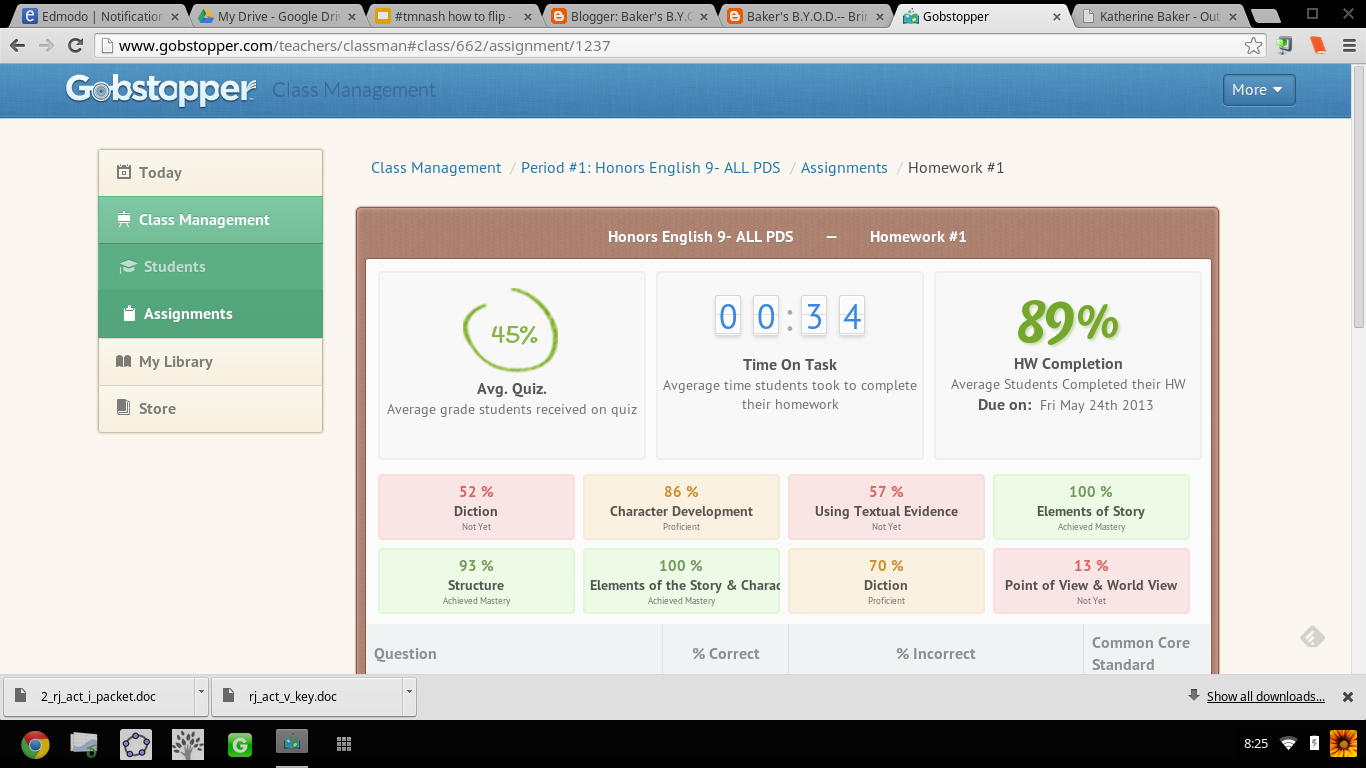
I can't tell you how ridiculously THRILLED I was when an article on Gobstopper appeared in my Techcrunch feed on Feedly.  I almost dropped my phone. Gobstopper is an e-reader platform that allows teachers to input and customize annotations, resources, questions, and quizzes linked to the Common Core Standards directly into a public domain text, and provides the students with immediate feedback, and the teacher with analytic data on student and class performance. Canonical texts found on the public domain are available in Gobstopper for FREE. And pair Gobstopper texts with FREE public domain Librivox audiobook recordings of the texts and you will strike gold with digital reading instruction.

Seriously?!  YES!  JACK.... POT!!! Don't believe me? Try out the student demo.

AND THERE IS MORE....  Gobstopper also offers a summer reading program. Available texts are already embedded with annotations, quizzes, and questions. The content creation is already done; all the teacher has to do is assign the books. No wonder Gobstopper's name alludes to Charlie and the Chocolate Factory, because this is SWEET!

From Flowergirl to Dutchess


Appropriate, considering the themes of identity and transformation in the play, I first used Gobstopper with Shaw's Pygmalion. While on the public domain, Pygmalion was not listed as a text in the Gobstopper store, with an email request to Gobstopper support, the text was quickly added and I could begin customizing the "curriculet" with my own annotations and questions. The process was fairly simple: highlight the text, choose the option, enter the content.  Questions, annotations, and quizzes can be loaded anywhere in the text and the teacher can choose to have the corresponding excerpt highlighted as well as select the appropriate Common Core Curriculum Reading Standard for each question. For annotations, I embedded  screencasts I've created, links to Librivox recordings,YouTube videos, Google Forms, Google Docs, webpages, Edcanvas ... the list is never ending; anything living on the web can be linked in an annotation. Quizzes for each reading section were also easy to create. Students received their reading assignment and due dates, and I would check on their progress and accuracy.

In addition to Pygmalion, my students also read Romeo and Juliet via Gobstopper. My instruction for both texts though differed: Pygmalion was read independently out of class while we watched excerpts of My Fair Lady and West Side Story in class, and Romeo and Juliet was read synchronously as a whole class.

Prior to Gobstopper, the students were given a packet of worksheets and materials for understanding Shaw's play and we focused more so on projects that connected to the theme of the play as opposed to close textual analysis. I was never really sure if the students actually read, truly understood Shaw's play or just opted for reading the Sparknotes and viewing the film online. Pairing the Librivox recording of Pygmalion with the enhanced Gobstopper text, I had clear indicators for student performance and understanding. By hearing the text, they were able to better read along and understand, and with the Gobstopper curriculet, they could demonstrate understanding while reading instead of having to answer questions on a worksheet at the end of each act.


"Never was a story of more woe..."


For Romeo and Juliet, prior to using Gobstopper,  students read the text that I put in a Word doc with arrows and boxes pointing to what I wanted the students to know. Students would pick parts (aka me coerce students into volunteering). We'd read together in class; I'd  try to get students to act their parts, and stop every page and scene to go over the answers to the questions in the boxes, as well as explain to them the nuances and artistry of the language. While we got through the reading, it wasn't until that I would show the movie clips that students "got it" and understood the language. WHY? Because Shakespeare is meant to be performed not read statically sitting in an uncomfortable student desk, and seeing the actors' movements solidified understanding. While I would encourage students to act their parts out, what that really amounted to was them standing in the front of the room reading monotonously from the text. I was asking them to do too much at once: read, comprehend, and synthesize into a performance. We were also taking at least 1 week to get through each act. With 5 acts in R&J, that amounts to 5 weeks of reading-- in case you didn't know, the play is only 2 hours long....   5 weeks vs 2 hours: no wonder students couldn't remember the opening brawl scene when we finally got to end, we were reading slower than Friar John riding a donkey in the Zeffirelli version.

Flipping the reading of Romeo and Juliet using Gobstopper and Librivox, students read asynchronously in class. I signed out the mobile lab and a class set of headphones, and assigned an act a day. What was not finished in class was for homework. I reviewed the class report the day at the beginning of the next class and clarified any misunderstandings, then let them return to reading independently.  If a student had a question in class, I was able to speak to him/her one on one and address his/her concerns as needed. This process was much more successful then demanding students to be compliant and pay attention as we read together. No longer did I hear complaints of "you're going too fast!" or "can't we just move on already?!" Now that the reading of the play took only a week, we had time for creative projects that included group performances of chosen scenes and skyping with an author (that's for another blog post!).

Gobstopper allows me to efficiently and effectively flip reading instruction from synchronous and static instruction to asynchronous, supported, and student paced. By embedding instructional elements in the text and linking it to an audiobook, students can listen to people read who already understand the text and control the pace of their learning while reading. Independent and whole-class reading of complex texts while aligning with Common Core Standards is no longer a Sisyphean endeavor when using Gobstopper.

I like Gobstopper so much, I shared it at #EdCampPhilly. Photo credit: K.Jarrett


-----------------------------------------------------------------------------------------------------

UPDATE UPDATE UPDATE UPDATE as of 8/8/2013

I will be writing more about using Gobstopper in the very near future, but I couldn't wait to share this...

Curriculets are now share-able   Let me SHOW YOU!
Sign up/in to Gobstopper first, then click on this link, and you can see the curriculet I made for A Midsummer Night's Dream.

...AND, the feature I have been waiting for! Gobstopper is MOBILE!
That is some sweet candy to have in your pocket! 


Gobstopper employs some awesome people, too! I got to meet Jason, Sean, and Marika at EdmodoCon 2013. A highlight of my experience!

From Left to Right: Sean, Marika, and I at the EdmodoCon
after party.  Where's Jason? 


Saturday, April 20, 2013

#OdysseyExperts & Showcasing Student Work

In my last post, I discussed that academic writing needs to be put on display and showcased to motivate students to write well. Writing is meant to be read, not to be locked up in a folder in a file cabinet or later tossed in the trash after the grade received.  Students think that when they turn in the assignment and meet the teacher's due date, the writing is good & done.  My other posts address my frustrations with grading the "got it done" academic writing:


But what if teachers steered students in another direction and away from the impending due date? By telling students that their work will be published, instead of graded, they will (hopefully, fingers crossed) write a better final product than the "good enough, got it done" essay, and then once the essay has been written, peer edited, and then published, the teacher can go through the work and assess if the objectives of the assignment were met. While I'm not a fan of putting grades on student writing, I get it: teachers need to follow the rules or expectations of school districts and have grades in their grade book.  With the red-pen system students only see the negative and the grade, but by using a showcase approach, teachers can arrive at the same destination but in a more positive manner.  In a way, it is tricking the students to write better the first time than waiting for the grade on the paper.


Student Showcase: #OdysseyExperts


The Design

One of the Topic Pages with Links to Student Essays
Teaming up with Sam Patterson and using Google Sites, I created a place for my students to showcase their Odyssey essays and receive feedback from Sam's classes and anyone else who visits the site.  The process was fairly easy:

  1. Create the site.
  2. Organize the essays by topic.
  3. Embed each essays on subpages to the topic page.
  4. Create a Google Form for comments and embed the form on each essay page.
  5. Embed the spreadsheet on the comment page.
  6. Create a page for comments from Sam's classes and embed a shared folder.
  7. Share, share, share with my PLN.

The Feedback Display


Sam's classes had two options for submitting their feedback:


  • complete the form on a chosen essay page or 
  • save their comments document in a shared folder.  


Public Comments Spreadsheet
Only owners and collaborators on a Google Site may comment on the pages, so as a work around, I embedded the same form on each student subpage and created a public comment page where all the comments will appear.  I was initially going to do a comment form and spreadsheet for each student, but that meant 65 separate forms for each essay on the site, and the more I thought about it, the more sense it made to have a public comments page where the students would have to read through the comments to
find their own. The point of this project was to make student writing and feedback visible, so I want all students to see all essays and all comments.

Shared Folder of Collection of Comments
While the shared folder doesn't allow for complete visibility of feedback because my students will have to open each document in the shared folder to see all comments, students would still be able to see 1 or 2 other comments for other students because each of Sam's students wrote comments for more than 1 student on the document. In addition, some of Sam's students made videos and screencasts of commentary for my students. #EduAwesome!


After 14 years of teaching, I'm just tired of student writing being hidden and dying a death in a dusty folder in a locked file cabinet, and students thinking that the only relevant audience for their work is the teacher. I want the writing to breathe and live. By putting academic writing on display and allowing for interaction, students will see their work and the work of others and gain a better understanding of their potential and abilities for writing.


Please visit the #OdysseyExperts site, read, comment, and share. The students need to see that their writing is alive. 


Saturday, April 6, 2013

Writing about Grading Writing (Again)

I'm constantly writing about the dilemmas of student writing and how to grade student academic writing in an efficient and effective manner. This is probably borderline obsessive... but, I am the type of learner who when faced with an issue/problem/question, obsesses until ... ...  ....


Options for Grading Writing:

  1. Traditional: teacher does all the grading and marking up of students' writing. 
  2. Progressive:  students peer edit and self assess using guided structure provided by teacher
  3. Techie Traditional: teacher uses Google forms with the Autocrat, Doctopus, and  Goobric scripts, as well as other online rubric tools to assess student work.
  4. Techie Progressive:  teacher designs the rubric and assessment process on a Google form using the Autocrat script and the students peer edit each other.
  5. Ungraded: the teacher does not grade the writing.

Options #1-3 require time and effort in class and by the teacher.  I have happily peer edited on paper with my students, but there was just too much paper and it took up time in class.

Option #4 can be completed in and out of class, but it takes time to set up the forms, feedback docs, and scripts. BIG HUGE THANKS to Cheryl, Karl, Troy & all the Twitter peeps (Again & AGAIN) for walking me through creating this process, and the creator of the Autocrat script, Andrew Stillman, for answering my gazillion questions. I'm working on ways to better streamline the process (and not split my infinitives), but trust me, it is well worth the effort to guide students through troubleshooting their writing.

But, Option #5 I'm stealing (again) from Cheryl Morris. :-)


Un-grading Student Writing


In our #ElaFlip Hangout talking about assessing writing, Cheryl stated that she tries to detach grades from student writing. I forgot to ask if she was talking about creative writing or academic writing, but should it matter? 


Art & Academic Writing


Picture from J. Kronenber'g's Blog Post "I Can't Explain  It"
I completely agree with not scoring creative writing. I have never been comfortable putting a grade on creativity and therefore have never sought out teaching a creative writing course-- it is art and art is subjective: one critic might give Ellsworth Kelly's Blue Panel an A+ and another might give it an F. The simplest question in assessing the art is, "Does it hold meaning for me as the viewer?" The same subjective scoring can be used on student creative pieces.

I know, I know, some will say, rubrics make the scoring objective, but really? Rubrics turn writing into objects that sit on shelves. Rubrics are limiting!   Students only strive to hit the points on the rubric and not beyond.  They become complacent when they get the grade, and whose grade is it when the teacher designed the rubric?

I know, I know, I could get my ninth grade students to design the rubric with me, but they are just learning how to write, so do they know what to even put on the rubric? And me leading them for what to put on the rubric is still me, the teacher, controlling the rubric. I could use my O-S-U rubric (again) or use standards based grading and score for mastery, but does the grade on the paper push the student to continue writing? No! As Cheryl and the other ELA flippers (Andrew, Katie, Dave, & many more) will agree, as soon as a student receives the grade, he/she thinks the process is done. The point should be about keeping students writing until ...  ... ...

I fondly remember the yearly high school trip to The Metropolitan Museum of Art in NYC, and every time we flew through the exhibits just to sit in front of that blue panel and "critique" it.  My naive teenage friends and I would mimic high brow folks and comment in horrendously fake British accents on the composition, scale, and other fancy art terms, nicknaming it, "The Blue Rhombus of Life". Granted, our obsession with this painting was seemingly in a joking manner, but the fact remains that painting is still hanging in Gallery 915.

"I have worked to free shape from its ground, and then to work the shape so that it has a definite relationship to the space around it; so that it has a clarity and a measure within itself of its parts (angles, curves, edges and mass); and so that, with color and tonality, the shape finds its own space and always demands its freedom and separateness."- Ellsworth Kelly

But, this got me thinking: is this why I've had so much trouble scoring student academic writing? Every method I have used, revolves around my expectations: how well did the student follow my directions, display the knowledge I taught, and use the conventions the students have been taught throughout their academic career? I can lead the students through trouble shooting and revising their essays. I can score them on participation  meeting checkpoints, and being held accountable for the process, but do I, the teacher, really have to put a final grade on the essay?

During the #ELAFlip hangout, Katie Reagan explained that her students peer edit with other classes and students not at her school.  Getting students out of their comfort zone certainly motivated them to perform. What about an even greater audience on the web?  What about publishing their work for a bigger audience than my two hazel eyes to see? Wouldn't that "grade" the piece? It is so simple:  Is the writing ready for publication and to be "hung in a gallery"? And wouldn't that prospect motivate the student to perform well? Isn't that better than any grade I could put on the page or in my gradebook?

To adapt Kelly's words, writing is also about playing with the "color and tonality" of words so that words take shape and have a "definite relationship" that has "clarity and measure". Creative writing is an obvious form of art, and academic writing should also be considered no less an art, but many teachers and students drown in the red ink and forget the art of academic writing.

So, stop grading and focus on crafting, molding, and painting with words. 

Turn your student writers into artists.


Post Script:  Check out my next post, #OdysseyExperts, because I put into practice my ideas about showcasing writing.