Wednesday, August 14, 2013

EdmodoCon Guest Post #2: N. Dale

Our 2nd guest blog post in the series is by Nira Dale, a 9th grade English teacher in Florence, Alabama, and a very active member of the Language Arts community on Edmodo. You can follow Mrs. Dale's educational adventures on her very impressive blog: Mrs. Dale is a whiz with implementing tech tools in her classroom. Take a look at what she learned during EdmodoCon 2013.


from EdmodoCon 2013


  1. Create CCSS Edmodo quizzes that strategically tie standards to each question for even more comprehensive feedback.(Stibaly Johnson)
  2. Navigate and utilize the Common Core Consortium website.(Stibaly Johnson)
  3. Attempt to "Meyerize" my English class--Not sure exactly how yet...But I'm determined... (Kim McMonagle)
  4. Flip the learning inside out by assigning my students a block of time to create "30 sec. Lessons" (Patrick Fogarty)
  5. Organize my lessons and relative resources into eTexts --iBook Author (Patrick Fogarty)
  6. BACK CHANNELING (Edmodocon.)
  7. "Let students digitize their work samples by having them take a picture of their written work for assessment.( Kate Baker/ Liz Calderwood)
  8. Use Mp3 apps for students who are not as comfortable with video presentations. Audio podcast allow students to focus mainly on speaking and listening--CCSS :-) (Kate Baker/ Liz Calderwood)
  9. Set a goal to go paperless! (Melissa Butler/ Kate Baker)
  10. Have students create a fictitious commercial in a project-based learning activity to support their conclusions/ stand on the given issue--Make it very real-world. (Bijal Damani)
  11. COLLABORATION STATIONS~ Use physical space and available devices for "collaboration stations" (Denise Yamashita)

I hope to apply these strategies as soon as my school year begins.

--Nira Dale English 9


Mrs. Dale also curated on her site session videos from EdmodoCon. For impatient participants (read: me) anxiously waiting for the release of the archives, Mrs. Dale's videos were very helpful! I'm so impressed with Nira Dale that I gave her a shout out during EdmodoCon. 


Nira ROCKS, so be sure to connect with her!


If you would like to contribute and share a EdmodoCon 2013 post, please submit!


Monday, August 12, 2013

EdmodoCon Guest Post #1: L. Monge

Our first EdmodoCon Guest Post is brought to us by Laura Monge from Rancho Palos Verde, California. Laura is starting her 27th year of teaching and is obviously excited by all this crazy tech stuff. Looking forward to going paperless, Laura will be piloting a BYOD 1:1 iPad 4/5 combo classroom this year. Like what you see? Laura will be presenting at CUE in Napa in October!  Way to go, Laura Monge!


Yesterday I woke up about quarter to 7 in the morning, opened my emails, and saw this reminder that Edmodocon would be starting at 7:00 a.m. Since this was my first time experiencing Edmodocon, I had zero expectation or thoughts about what it would entail.


I tuned in right from the start of the live stream program, still in my pjs. Little did I know what I was in for...the day was filled with some of the most amazing speakers!  Some were educators, some technology specialists in their school districts, some Edmodo staff. These people speaking were from all over the world, and Edmodo had flown them in for the event.

As each person shared the ways they had utilized the Edmodo site with their students, a code was given out to the audience to join that person's Edmodo page, with all the videos, ideas and handouts included on that page. In real time, we, the audience, commented and asked questions on the Edmodo page and on the live stream.  It was a real collaboration!

I watched the presentations on my iPad. I took notes on my iPhone as each speaker shared their amazing ideas for using Edmodo in the classroom. Although I used Edmodo last year with my students for communication, sharing videos, and flipping the classroom, there are polls, assignments, quizzes, school planner features I need to add to my repertoire.

I will be making an iMovie of what I learned and saw yesterday! Amazing!

I had to do it! Had to make an iMovie synthesizing the massive amount of innovative information shared yesterday at Edmodocon! Here it is!


Thank you, Laura for attending EdmodoCon 2013 and sharing your experience! You can connect with Laura on Google+ and at her blog, Laura Monge's Blog Page.

If you would like to contribute and share a EdmodoCon 2013 post, please submit!


Friday, August 9, 2013

COMING ATTRACTIONS! Edmodocon Recaps! Guest Posts!

I am so awed, overwhelmed, and overjoyed with presenting at Edmodocon 2013 and meeting phenomenal, inspiring educators.  Let me just say, I am BEAMING and get GOOSEBUMPS every time I talk about it with my home PLN.


 It was just...yeah... No words, just beaming smiles and goosebumps. Mind has been blown and Baker can't talk--as Liz and anyone else who has worked with me can attest, this is a miracle!


Screenshot of Liz & I at EdmodoCon. Photo Credit: N. Dale
As soon as I can process this and find the words,  I will be writing a series of blog posts on Edmodocon and the presentation Liz Calderwood and I gave.


In the meantime, I'd like to put a call out to all you wonderful and amazing readers...


For those of you who attended the conference, virtually or in person, please share your experiences as a guest post on my blog. I'd love to hear from you, the audience, about your experience with Edmodocon!  Great take-aways? Favorites? Recaps? Share, share share! Your submission can be in written, audio, or video form. 

Just complete the form below and provide a link to where I can find your submission and I will copy/paste into a post here. For those of you who don't have your own blog or are unsure, this is super easy because you don't have to worry about design: I'll do that for you! And if you already published it on your blog, I don't mind! Posts will go up ASAP. You keep 'em coming, I'll keep posting them! My only stipulation is that you demonstrate appropriate and professional digital citizenship. #JustSayin'

There is one very important thing that was evident during Edmodocon that I can put into words right now:


Using Edmodo as a management and communication system has transformed my teaching, learning, and connectivity, but it is the PEOPLE who created, maintain, and use Edmodo that make all this magic happen. The tool is leverage to lift the load of learning. No matter the tool you use, it is the PEOPLE who matter most.

Thank you to Edmodo and all the educators, students, administrators, and support staff who use Edmodo. If you thought I was fired up before, just wait and see what I'm going to do to next. Radiating, blazing, Edu-awesomeness! I hope you will join me, because...

 We make each other better, together.


Saturday, July 20, 2013

#EdcampHOME is Where the Heart is... for Learning

EdcampHOME demonstrated the power of organized mulitple Google Hangouts and educators' desire to learn. In the 3+ hours of the un-conference, I can honestly say I did not move from my seat. Despite all the amenities at home & ability to multi-task with housework, I sat glued to my spot the entire time. I did not want to miss one second of the action. And I was sad to see the organizers' GHO end.

I remember attending my first Edcamp in November and being awed by the session board: its masking taped grid on a cement block school wall and the giant post it notes used for session creation; the organizers on laptops furiously copying the schedule to a Google spreadsheet. Seeing the big session board for the first time showed me the power of messy, home grown, do-it-yourself professional development. I had been trained for years that teaching and learning was neatly and purposely sequenced in lesson plans and prepackaged by professional third-party developers....by the way, I always had the hardest time writing lesson plans because I felt like I was predicting the future and the students' demeanor (some days just aren't made for group work) and mandated professional development workshops were never my thing either because I like to pursue things on my terms, but I digress... That big huge wall of post it notes at EdcampNJ became a symbol for my epiphany to intentionally pursue my own professional development and my colleagues to do the same. As William Ernest Henley wrote in his poem, Invictus, "I am the master of my fate. I am the captain of my soul" or this case, my education.

When I saw EdcampHome first popped up on my Twitter feed, I did not hesitate to register, but I couldn't help but wonder if the power of the session board would be lost online-- boy, was I wrong. The website design and organization and using http://en.linoit.com/ for brainstorming sessions was mesmerizing to see-- the sticky notes appeared and covered and covered and covered each other. And despite the time it took to get the sessions organized, it was evident the participants had much they wanted to learn. As we all know and experienced today, learning is messy and we learn more from facing an obstacle, adjusting and adapting. To quote that English proverb, "A smooth sea never made a skilled mariner."

I did have a few frustrating moments when trying to sign up for the first session and not being able to do so on the log jammed Google doc (Karl saved the day!), but unfortunately the session didn't get going due to technical difficulties on the moderator's end. I was bummed to miss out on discussing class blogging, but I hope to connect with Elizabeth Buckhold via Twitter and can learn from her. Getting my Elizabeths mixed up, I did pop into the Global Collaboration Hangout with Elizabeth Goold for the last 5 minutes of session 1. Not realizing I wasn't where I intended to be, I launched right in chatting with the other ladies in the room and probably confused Elizabeth Goold with my explanation of why I was late. But my error was really a gain once I realized that now I can add 2 more Elizabeth's to my PLN.

I moderated session 2, talking about Creating Digital Workstations for Readers Workshop with Markette Pierce and Steph Hardinger which evolved into a conversation about digital tools for the English classroom. Can't complain about that! I hope to connect with these ladies more! Here's our conversation:


Wrapping up the day, I took the lead for contributing first for the SmackDown sharing one of my favorite tools for the English classroom, Gobstopper. During TeachMeetNJ in August of 2012, when I first heard the word "smackdown," I didn't think it was very complimentary: I had visions of people bad mouthing apps and really smacking others down, little did I know that it was a quickfire way to share resources. EdcampHome's smackdown really became a lifting experience with the participants sharing their initial trepidation about [Google] hanging out in an unconference and praising the organizers, David, Kelly, Shawn, and Karl for creating such a homey event. I'm awed by the experience and to be part of something that will revolutionize professional development.

Thanks again!


Friday, July 19, 2013

#EdcampHome Promo

On Saturday, July 20th from 12-3 pm EST, the very first EdcampHome will be held.  You DO NOT want to miss this FREE professional development event.

You can attend in your PJ's, bathing suit, or other attire via Google Hangouts and/or watching the live action on the EdcampHOME site. Everyone can participate via the backchannel following #EdcampHOME on Twitter.


For those of you not familiar with the Edcamp Foundation...

About the Edcamp Foundation 
The Edcamp Foundation is a Delaware non-profit, which was started to promote organic, participant-driven professional development for K-12 educators worldwide. The foundation’s mission is to support free edcamp unconferences for educators to exchange ideas and learn together. Edcamps offer educators the opportunity to share their experiences and their professional expertise in a collaborative, interactive learning environment. 
Edcamps are organized and attended by passionate, tech-savvy educators who are eager to explore, discover and share new teaching strategies, tools and education technologies. From eight Edcamps in year one, Edcamps now number over 200 a year, in cities all around the nation and the world. One of the staple features of an Edcamp is the “Web2.0 Smackdown,” a lightning round of resource sharing among attendees.


I've had the pleasure of attending EdcampNJ 2012 and attending/presenting at EdcampPhilly 2013. Tomorrow, for EdcampHOME, I'll be one of many to help moderate a session and get in on the action. Major accolades need to be given to the EdcampHome organizers, David Theriault, Kelly Kermode, Shawn White, and Karl Lindgren-Streicher for their forward thinking and innovative design. I'm awed by the work they've put into this so far.

From building the session board to the concluding smackdown, this organic "homemade" professional development is created by educators for educators. So set up camp, stoke your fire, and fill your cup for learning with EdcampHome.


Sunday, July 14, 2013

Enough Time for Two

So it is summer time and I'm supposed to have lots of time to do lots of things: blog, write content, create presentations, read, catch up on laundry, organize closets, clean those not regularly cleaned areas, watch movies, go on vacation...   As I'm sure for many of us, there is struggle between devoting enough time to work, home, and self.  So rather than wallowing in not enough time (here's a conundrum: how can I wallow when there is no time to wallow?), here are two tools to help organize our time while on the computer--whether it be at home or work.

Task Timer


This nifty tool can be found in the Chrome Web Store and allows users to create a list of tasks with time goals in hours.  Create your list and set your time, then hit the icon to start recording the time spent completing the task.  For those of us who multi-task, multiple tasks can be timed at the same time (say that 10 times fast). Current features include task descriptions, progress bars, desktop notifications, pie charts, and CSV exporting. This tool could be used by teachers for in-class monitoring of time spent on aspects of a lesson as well as keeping track of how much time spent on housework at home. Just type in the task, click start, do what you have to do, then hit stop when done. By taking inventory of how long tasks take, we may find that certain tasks can be truncated to free up time for others.


Web Timer


Web Timer is aptly named for this Chrome extension keeps track of the time spent on the tab you are actively using. Features include a pie chart for visualizing data, stops counting if idle for more than 30 seconds, easily share stats with others. For time management, students and teachers could use this in class for keeping track of time spent on a particular website, and for those of you who are Pinners, this extension can track your time spent on Pinterest--although ignorance may be bliss in this case. Wanting to keep to a schedule while working online, this extension is very useful.


Out of Time 

While I would have liked to find and post more tools, I'm out of time! I only had 30 minutes to get a post out and both of these tools kept me to my schedule by allowing me to see how much time I wanted to spend and actually spent. Time to log off and get outside! 

Let him who would enjoy a good future waste none of his present.


What are your favorite time management tips, apps, and extensions?

Sunday, June 30, 2013

Edcanvas: The Art of Curating

One of my favorite tools for curating resources is Edcanvas. Over the summer, I've started creating "canvases" for each of the novels and topics I teach organizing links, documents, videos, and pictures as tiles on a grid.  Edcanvas has a very versatile free version and a paid version for collaboration and audio features. In addition, users can search the gallery for canvases created by others.

Blank Canvas


Edcanvas makes it ridiculously easy to find content by having search features as part of their interface, and by a simple click and drag, content is added to or moved around on the canvas.  The search features are easy to use for finding resources on the web, and with connections to Dropbox, Google Drive, Flickr, YouTube, Educreations, Gooru, adding your already created content to a canvas requires no artistic talent. Simple as finger painting!


Visual Appeal


As a visual learner and one who forgets I have things when they are put away out of sight,  Edcanvas is more appealing than LiveBinders for curation.  Choosing either color coding or plain black, each tile has a heading and brief description that is customizable.  Users can also choose from five layout templates for the canvas. While I can hide, I mean store, tons of content in the tabs of a LiveBinder, I think quality is more important than quantity in terms of how much I store. Canvases can be expanded and could have an infinite layout, but there isn't a need to go that big.  Items are embedded in the canvas and open when clicked on without having to go to a separate page. With YouTube videos automatically embedded, viewers can get away from the distractions and possible-inappropriateness in the YouTube comments. Each of my canvases are titled specifically for the content, and I like seeing everything cleanly laid out and can click on a tile to open.


Educational Uses


While I haven't used it yet since school is out of session, Edcanvas also has a quiz feature that can be added as a tile to each canvas.  I like the idea of using this as a formative assessment to check for understanding of the content.


Teachers can share resources or students could create projects on a topic. With multiple options for sharing via social media and QR codes and embedding in Edmodo and created webpages, Edcanvas is ideal for sharing with other educators and students in 1:1 and BYOD classrooms.


Sample Canvases

Demonstrating the options for sharing, take a look at three I've created... I got more in my gallery, and so will you, too. Once you start using Edcanvas, you will be an artist of visual curation!


Inspired by Romeo & Juliet


Odyssey Review

Reading Strategies


Friday, June 21, 2013

Edmodocon 2013

I am so thrilled to share this news!

My best buddy and partner in crime, Liz Calderwood, and I are presenting at Edmodocon 2013 this summer!  We are one of 15 presenters chosen for this global, virtual and free conference.

Our session is titled Classroom Gymnastics: How to Use Edmodo for BYOD, 1:1 (When you can be), Paperless, and Flipped Learning. I hope you will join us online on August 7th, 2013 and view all the presentations.

Registration is now OPEN, so please reserve your spot! Did I mention it is FREE????

THANKS!

Thursday, May 30, 2013

May this Gobstopper (Now Called Curriculet) be Ever Lasting!


UPDATE AS OF 1/15/14:  
The company Gobstopper has changed its name to Curriculet, but this update hasn't changed how I use Curriculet with my students. The stories and information in the below post still hold true despite the change in company name.


While I've written quite a bit about assessing writing (ad nauseum) via digital means, reading instruction and assessment have remained a primarily paper-based enterprise in my class. While students can create projects, take quizzes, write responses digitally via BYOD and 1:1 using Google forms and docs, I've been missing a digital method for close reading of texts in my bag of instructional tricks. I've tried incorporating e-texts, PDF's, Google doc versions of texts and encouraged my students to use the Kindle Cloud Reader app on their devices and home computers, but I've been lacking a method for reading to be interactive as a whole class. I could not figure out a way to accomplish close textual analysis in an efficient and digital manner...  UNTIL NOW!


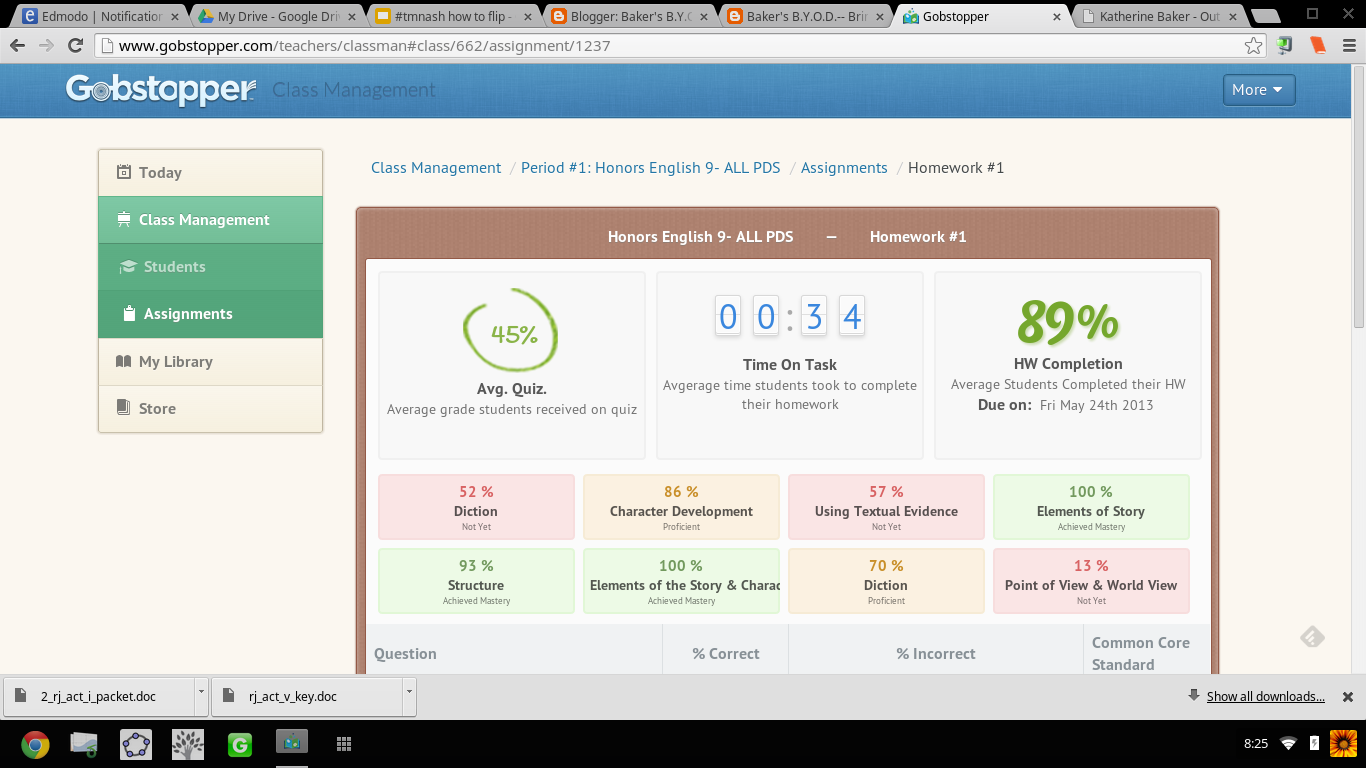
I can't tell you how ridiculously THRILLED I was when an article on Gobstopper appeared in my Techcrunch feed on Feedly.  I almost dropped my phone. Gobstopper is an e-reader platform that allows teachers to input and customize annotations, resources, questions, and quizzes linked to the Common Core Standards directly into a public domain text, and provides the students with immediate feedback, and the teacher with analytic data on student and class performance. Canonical texts found on the public domain are available in Gobstopper for FREE. And pair Gobstopper texts with FREE public domain Librivox audiobook recordings of the texts and you will strike gold with digital reading instruction.

Seriously?!  YES!  JACK.... POT!!! Don't believe me? Try out the student demo.

AND THERE IS MORE....  Gobstopper also offers a summer reading program. Available texts are already embedded with annotations, quizzes, and questions. The content creation is already done; all the teacher has to do is assign the books. No wonder Gobstopper's name alludes to Charlie and the Chocolate Factory, because this is SWEET!

From Flowergirl to Dutchess


Appropriate, considering the themes of identity and transformation in the play, I first used Gobstopper with Shaw's Pygmalion. While on the public domain, Pygmalion was not listed as a text in the Gobstopper store, with an email request to Gobstopper support, the text was quickly added and I could begin customizing the "curriculet" with my own annotations and questions. The process was fairly simple: highlight the text, choose the option, enter the content.  Questions, annotations, and quizzes can be loaded anywhere in the text and the teacher can choose to have the corresponding excerpt highlighted as well as select the appropriate Common Core Curriculum Reading Standard for each question. For annotations, I embedded  screencasts I've created, links to Librivox recordings,YouTube videos, Google Forms, Google Docs, webpages, Edcanvas ... the list is never ending; anything living on the web can be linked in an annotation. Quizzes for each reading section were also easy to create. Students received their reading assignment and due dates, and I would check on their progress and accuracy.

In addition to Pygmalion, my students also read Romeo and Juliet via Gobstopper. My instruction for both texts though differed: Pygmalion was read independently out of class while we watched excerpts of My Fair Lady and West Side Story in class, and Romeo and Juliet was read synchronously as a whole class.

Prior to Gobstopper, the students were given a packet of worksheets and materials for understanding Shaw's play and we focused more so on projects that connected to the theme of the play as opposed to close textual analysis. I was never really sure if the students actually read, truly understood Shaw's play or just opted for reading the Sparknotes and viewing the film online. Pairing the Librivox recording of Pygmalion with the enhanced Gobstopper text, I had clear indicators for student performance and understanding. By hearing the text, they were able to better read along and understand, and with the Gobstopper curriculet, they could demonstrate understanding while reading instead of having to answer questions on a worksheet at the end of each act.


"Never was a story of more woe..."


For Romeo and Juliet, prior to using Gobstopper,  students read the text that I put in a Word doc with arrows and boxes pointing to what I wanted the students to know. Students would pick parts (aka me coerce students into volunteering). We'd read together in class; I'd  try to get students to act their parts, and stop every page and scene to go over the answers to the questions in the boxes, as well as explain to them the nuances and artistry of the language. While we got through the reading, it wasn't until that I would show the movie clips that students "got it" and understood the language. WHY? Because Shakespeare is meant to be performed not read statically sitting in an uncomfortable student desk, and seeing the actors' movements solidified understanding. While I would encourage students to act their parts out, what that really amounted to was them standing in the front of the room reading monotonously from the text. I was asking them to do too much at once: read, comprehend, and synthesize into a performance. We were also taking at least 1 week to get through each act. With 5 acts in R&J, that amounts to 5 weeks of reading-- in case you didn't know, the play is only 2 hours long....   5 weeks vs 2 hours: no wonder students couldn't remember the opening brawl scene when we finally got to end, we were reading slower than Friar John riding a donkey in the Zeffirelli version.

Flipping the reading of Romeo and Juliet using Gobstopper and Librivox, students read asynchronously in class. I signed out the mobile lab and a class set of headphones, and assigned an act a day. What was not finished in class was for homework. I reviewed the class report the day at the beginning of the next class and clarified any misunderstandings, then let them return to reading independently.  If a student had a question in class, I was able to speak to him/her one on one and address his/her concerns as needed. This process was much more successful then demanding students to be compliant and pay attention as we read together. No longer did I hear complaints of "you're going too fast!" or "can't we just move on already?!" Now that the reading of the play took only a week, we had time for creative projects that included group performances of chosen scenes and skyping with an author (that's for another blog post!).

Gobstopper allows me to efficiently and effectively flip reading instruction from synchronous and static instruction to asynchronous, supported, and student paced. By embedding instructional elements in the text and linking it to an audiobook, students can listen to people read who already understand the text and control the pace of their learning while reading. Independent and whole-class reading of complex texts while aligning with Common Core Standards is no longer a Sisyphean endeavor when using Gobstopper.

I like Gobstopper so much, I shared it at #EdCampPhilly. Photo credit: K.Jarrett


-----------------------------------------------------------------------------------------------------

UPDATE UPDATE UPDATE UPDATE as of 8/8/2013

I will be writing more about using Gobstopper in the very near future, but I couldn't wait to share this...

Curriculets are now share-able   Let me SHOW YOU!
Sign up/in to Gobstopper first, then click on this link, and you can see the curriculet I made for A Midsummer Night's Dream.

...AND, the feature I have been waiting for! Gobstopper is MOBILE!
That is some sweet candy to have in your pocket! 


Gobstopper employs some awesome people, too! I got to meet Jason, Sean, and Marika at EdmodoCon 2013. A highlight of my experience!

From Left to Right: Sean, Marika, and I at the EdmodoCon
after party.  Where's Jason? 


Thursday, May 23, 2013

Happy Birthday Blog!


My blog turns one-year old today!


21,263 page views


Thank you to all who have read my blog this year!

I know I haven't posted much lately, but I have a list of topics to write about once I get through the end of the school year. Please continue reading and sharing my posts!

Coming Attractions:


And in case you missed them, here are some of my favorite posts...