Monday, May 6, 2013

The Existentialism of Candy Crush

So, I've been playing a lot of Candy Crush lately.... yeah, that addicting Facebook game.... yup, that one... I know I shouldn't admit it, but... there is some relevancy. While I usually write about technology in the classroom, I think it's appropriate considering the events of the past two weeks to talk about how seemingly silly games serve an important purpose.

I've been playing a lot of Candy Crush as a distraction. I don't want to focus on or exist in the moment, so I will use Candy Crush as a way to check out. But the more I look at the design of the game, and the more I look at how the game board is laid out, I realized that it is a metaphor for life. Now I'm sure the creators of Candy Crush are not as philosophical as I am about their game, but bear with me.

When I look at the design of it, each level is a little square puzzle, connected by a track,  and as each puzzle is solved, I then move on the track to the next level. Some levels are easier to pass than others and, I'll admit, there have been a few levels that I got stuck on. When faced with this "adversity,"  I could have given up.  I could have thrown my phone.  I could have researched cheat codes. I could have whined and cried,  lamenting my misfortune.  I could have paid for an upgrade.  Instead, I relied on the generosity of friends (ie. free lives and extra moves) and just kept persisting until I got to the next level, knowing that eventually I could beat it.

But isn't this what we do our own lives? When faced with the difficulty, we keep persisting and trying, accepting help from others, until we finally get through the moment and on to the next, and while I was using Candy Crush as a distraction for the moment, it helped to give me a break or some quiet "un-contemplation",  because I do not want to think about the moment I've just been in.  Descartes says, "I think, therefore I am;" I use Candy Crush to not think, so I can just be. After a few minutes break, I can get back into the real game of life. 

This makes me wonder about students who persist in playing games in class on their device. What are their reasons for playing?  Do they need a break, too? Can they realize when it is time to put the game down and return on their own with out my harping? How can my classroom be a place where they do not need the distraction or break? 

Sunday, April 28, 2013

Talking Squirrels & Ninjas: Silly Technology Use

While browsing through the Language Arts community on Edmodo, I came across a post by Kalina Noelle, who shared a simple and easy newspaper clipping generator, and Mrs. Osborne who replied with another site with even more newspaper templatesCool!

While the newspaper clipping tool is very useful for creating story starters or fake articles about content studied in class, I also came across something even cooler on the site and generator blog:

Talking Squirrels. Really?!

Create your own Animation

Who doesn't love talking, googly-eyed squirrels, owlstomatoes, cats or flowers!? Not me!

And it gets even better! Shut up!  

How about some ninjas and wizards writing messages?! No way!


Use them for eye-catching quick reminders for class or just plain ol' silliness to jazz up boring content on a class webpage. Awesome!


Thursday, April 25, 2013

Voice Comments on Google Docs!

Check out this video, fellow teacher Carolyn P. and I made introducing Voice Comments as a cool tool for the 21st Century. Primarily used for the teacher to record voice comments on a student's Google doc, I anticipate that the capabilities will expand to include use for peer editing with classmates, and, as you will hear, use for classes that require audio.  Major props to Sam Patterson for sharing this tool with me! Just search the Chrome Web Store for Voice Comments, connect the app to your Drive, and begin using.


I am very excited to use this tool for providing students feedback on their writing.  The process is much quicker than red penning or creating screencasts of each doc, and I like that comments are linked directly to the document instead of using an MP3 voice recorder app to email a voice message to a student.

This tool is ridiculously easy to use and set up, and as an English teacher who has lots of writing to grade and critique, I'm ecstatic to use it.... wait, did I just say I'm ecstatic to grade?! This must be a cool tool!

Enjoy!

Saturday, April 20, 2013

#OdysseyExperts & Showcasing Student Work

In my last post, I discussed that academic writing needs to be put on display and showcased to motivate students to write well. Writing is meant to be read, not to be locked up in a folder in a file cabinet or later tossed in the trash after the grade received.  Students think that when they turn in the assignment and meet the teacher's due date, the writing is good & done.  My other posts address my frustrations with grading the "got it done" academic writing:


But what if teachers steered students in another direction and away from the impending due date? By telling students that their work will be published, instead of graded, they will (hopefully, fingers crossed) write a better final product than the "good enough, got it done" essay, and then once the essay has been written, peer edited, and then published, the teacher can go through the work and assess if the objectives of the assignment were met. While I'm not a fan of putting grades on student writing, I get it: teachers need to follow the rules or expectations of school districts and have grades in their grade book.  With the red-pen system students only see the negative and the grade, but by using a showcase approach, teachers can arrive at the same destination but in a more positive manner.  In a way, it is tricking the students to write better the first time than waiting for the grade on the paper.


Student Showcase: #OdysseyExperts


The Design

One of the Topic Pages with Links to Student Essays
Teaming up with Sam Patterson and using Google Sites, I created a place for my students to showcase their Odyssey essays and receive feedback from Sam's classes and anyone else who visits the site.  The process was fairly easy:

  1. Create the site.
  2. Organize the essays by topic.
  3. Embed each essays on subpages to the topic page.
  4. Create a Google Form for comments and embed the form on each essay page.
  5. Embed the spreadsheet on the comment page.
  6. Create a page for comments from Sam's classes and embed a shared folder.
  7. Share, share, share with my PLN.

The Feedback Display


Sam's classes had two options for submitting their feedback:


  • complete the form on a chosen essay page or 
  • save their comments document in a shared folder.  


Public Comments Spreadsheet
Only owners and collaborators on a Google Site may comment on the pages, so as a work around, I embedded the same form on each student subpage and created a public comment page where all the comments will appear.  I was initially going to do a comment form and spreadsheet for each student, but that meant 65 separate forms for each essay on the site, and the more I thought about it, the more sense it made to have a public comments page where the students would have to read through the comments to
find their own. The point of this project was to make student writing and feedback visible, so I want all students to see all essays and all comments.

Shared Folder of Collection of Comments
While the shared folder doesn't allow for complete visibility of feedback because my students will have to open each document in the shared folder to see all comments, students would still be able to see 1 or 2 other comments for other students because each of Sam's students wrote comments for more than 1 student on the document. In addition, some of Sam's students made videos and screencasts of commentary for my students. #EduAwesome!


After 14 years of teaching, I'm just tired of student writing being hidden and dying a death in a dusty folder in a locked file cabinet, and students thinking that the only relevant audience for their work is the teacher. I want the writing to breathe and live. By putting academic writing on display and allowing for interaction, students will see their work and the work of others and gain a better understanding of their potential and abilities for writing.


Please visit the #OdysseyExperts site, read, comment, and share. The students need to see that their writing is alive. 


Saturday, April 6, 2013

Writing about Grading Writing (Again)

I'm constantly writing about the dilemmas of student writing and how to grade student academic writing in an efficient and effective manner. This is probably borderline obsessive... but, I am the type of learner who when faced with an issue/problem/question, obsesses until ... ...  ....


Options for Grading Writing:

  1. Traditional: teacher does all the grading and marking up of students' writing. 
  2. Progressive:  students peer edit and self assess using guided structure provided by teacher
  3. Techie Traditional: teacher uses Google forms with the Autocrat, Doctopus, and  Goobric scripts, as well as other online rubric tools to assess student work.
  4. Techie Progressive:  teacher designs the rubric and assessment process on a Google form using the Autocrat script and the students peer edit each other.
  5. Ungraded: the teacher does not grade the writing.

Options #1-3 require time and effort in class and by the teacher.  I have happily peer edited on paper with my students, but there was just too much paper and it took up time in class.

Option #4 can be completed in and out of class, but it takes time to set up the forms, feedback docs, and scripts. BIG HUGE THANKS to Cheryl, Karl, Troy & all the Twitter peeps (Again & AGAIN) for walking me through creating this process, and the creator of the Autocrat script, Andrew Stillman, for answering my gazillion questions. I'm working on ways to better streamline the process (and not split my infinitives), but trust me, it is well worth the effort to guide students through troubleshooting their writing.

But, Option #5 I'm stealing (again) from Cheryl Morris. :-)


Un-grading Student Writing


In our #ElaFlip Hangout talking about assessing writing, Cheryl stated that she tries to detach grades from student writing. I forgot to ask if she was talking about creative writing or academic writing, but should it matter? 


Art & Academic Writing


Picture from J. Kronenber'g's Blog Post "I Can't Explain  It"
I completely agree with not scoring creative writing. I have never been comfortable putting a grade on creativity and therefore have never sought out teaching a creative writing course-- it is art and art is subjective: one critic might give Ellsworth Kelly's Blue Panel an A+ and another might give it an F. The simplest question in assessing the art is, "Does it hold meaning for me as the viewer?" The same subjective scoring can be used on student creative pieces.

I know, I know, some will say, rubrics make the scoring objective, but really? Rubrics turn writing into objects that sit on shelves. Rubrics are limiting!   Students only strive to hit the points on the rubric and not beyond.  They become complacent when they get the grade, and whose grade is it when the teacher designed the rubric?

I know, I know, I could get my ninth grade students to design the rubric with me, but they are just learning how to write, so do they know what to even put on the rubric? And me leading them for what to put on the rubric is still me, the teacher, controlling the rubric. I could use my O-S-U rubric (again) or use standards based grading and score for mastery, but does the grade on the paper push the student to continue writing? No! As Cheryl and the other ELA flippers (Andrew, Katie, Dave, & many more) will agree, as soon as a student receives the grade, he/she thinks the process is done. The point should be about keeping students writing until ...  ... ...

I fondly remember the yearly high school trip to The Metropolitan Museum of Art in NYC, and every time we flew through the exhibits just to sit in front of that blue panel and "critique" it.  My naive teenage friends and I would mimic high brow folks and comment in horrendously fake British accents on the composition, scale, and other fancy art terms, nicknaming it, "The Blue Rhombus of Life". Granted, our obsession with this painting was seemingly in a joking manner, but the fact remains that painting is still hanging in Gallery 915.

"I have worked to free shape from its ground, and then to work the shape so that it has a definite relationship to the space around it; so that it has a clarity and a measure within itself of its parts (angles, curves, edges and mass); and so that, with color and tonality, the shape finds its own space and always demands its freedom and separateness."- Ellsworth Kelly

But, this got me thinking: is this why I've had so much trouble scoring student academic writing? Every method I have used, revolves around my expectations: how well did the student follow my directions, display the knowledge I taught, and use the conventions the students have been taught throughout their academic career? I can lead the students through trouble shooting and revising their essays. I can score them on participation  meeting checkpoints, and being held accountable for the process, but do I, the teacher, really have to put a final grade on the essay?

During the #ELAFlip hangout, Katie Reagan explained that her students peer edit with other classes and students not at her school.  Getting students out of their comfort zone certainly motivated them to perform. What about an even greater audience on the web?  What about publishing their work for a bigger audience than my two hazel eyes to see? Wouldn't that "grade" the piece? It is so simple:  Is the writing ready for publication and to be "hung in a gallery"? And wouldn't that prospect motivate the student to perform well? Isn't that better than any grade I could put on the page or in my gradebook?

To adapt Kelly's words, writing is also about playing with the "color and tonality" of words so that words take shape and have a "definite relationship" that has "clarity and measure". Creative writing is an obvious form of art, and academic writing should also be considered no less an art, but many teachers and students drown in the red ink and forget the art of academic writing.

So, stop grading and focus on crafting, molding, and painting with words. 

Turn your student writers into artists.


Post Script:  Check out my next post, #OdysseyExperts, because I put into practice my ideas about showcasing writing.


Wednesday, April 3, 2013

Online Mentoring via Edmodo & Google

In December, Dean Shareski, professor at the University of Regina in Saskatchewan, Canada, put a call out on Twitter for teachers who would be willing to pair with his pre-service student teachers for a virtual mentoring project. While I've mentored pre-service teachers in person (and in New Jersey), doing so online was new for me, and I jumped on the opportunity. Using Edmodo for the virtual classroom space, teachers and students connected from 1,972 miles away.


SRHS to University of Regina = 1,972 mi, approximately 30 hrs driving

I've had the privilege and honor to work with Jozette Sherstabitoff the past few months. Joz connected with students on Edmodo and worked with them on collaborative Google Docs. Joz and I communicated via Edmodo, Gmail and Google Hangouts.  I have thoroughly enjoyed working together, but what is more important are her thoughts on the experience....


Mentoring

My mentoring teacher, Kate, asked me to write a guest post for her blog. Check out Kate’s blog @ http://kbakerbyodlit.blogspot.ca/.
When I first entered into this mentoring program, I was a little hesitant. First off, I am a middle years person and Kate teaches senior English. I was a little intimated to start, not knowing what I could offer her. However, as the semester progressed, I realized that the difference between our teaching levels did not necessarily matter. I was still able to learn many new things that can be applied to my level of teaching.
Here are some reflections on what we have done and what we have learned.
What have Kate and I been doing this semester?
  • Commenting on assignments in Edmodo
  • Commenting on papers in Google Docs
  • Having a Google Hangout with the students
  • Making a video for students to watch
  • Creating a quiz on Edmodo for students to complete after watching my video
What are the benefits of being mentored?
  • Learning new tools. The biggest thing I took out of mentoring is Edmodo. Edmodo is like an online classroom, where Kate can upload videos, assignments and quizzes. It is a great way to have students collaborate online and outside of the classroom. Edmodo is also great for reducing paper use!
    • I can use Edmodo in the middle years just the same way Kate uses it at the senior level. I could upload videos for students to watch during class and after class. Assessments can be taken online just the same as at the senior level.
  • Learning new teaching styles. I was exposed to the flip classroom idea through Kate. I have heard about the idea before and was able to see some models throughout her class. The exposure will benefit me in the future if it is a style I choose to adopt.
  • Learning new assessment techniques. Kate got me thinking about assessment in general and the styles I use.
    • The assessment she uses can be applied to middle years level. For example, Kate uses a rubric called OSU (outstanding, satisfactory, unsatisfactory) and gives students a mark from it. The rubric can be used to assess at the middle years level.
The main benefit of being mentored is the thinking that happens! Kate always had me thinking about what I would do differently, what I like, and what I do not like about her class and education in general.
What are the benefits of being a mentor?
  • Reflecting on assignments. Kate keeps me updated on the learning that is happening in her classroom. While telling me what is being taught, I believe she is able to reflect upon the significance of their tasks.
  • Getting another opinion. Kate explains what the students are doing and how she is assessing them. When Kate tells me about the assignments and assessments she is able to ask my opinion, what I would do differently, what I like, etc. Kate is able to see a different perspective through my answers, and justify her own reasons by explaining what she does to me.
  • Another set of eyes on her students. Kate asked me what I thought about her student’s online identity. Having another aspiring teacher look over student work is a pure benefit for the students. They have another proof reader to help them be successful.
The main benefit of being a mentor is the reflection that happens. I think Kate is able to reflect on her teaching by showing me what she does.
I would like to thank Kate for the experience she has given me. I enjoyed her, and her students very much. Thank you for taking me in!!! :)


In addition, check out our Google Hangout discussing technology integration in the classroom.


Be sure to follow Jozette Sherstabitoff on Twitter @jshersty and read about her other adventures in teaching on her blog http://misssherstabitoff.wordpress.com/
And as a culminating project for the teachers and students involved in this mentoring experience, Dean Shareski organized a virtual lip dub of Chris Hadfield and the Barenaked Ladies'  song, "Is Somebody Singing." Take a look at the locations of the participants. Pretty darn cool.


video


Thanks again to Joz & Dean for this opportunity, and Edmodo and Google for making it happen!  

Monday, March 11, 2013

Poetic Voices via BYOD

Lacking time and energy (and talent perhaps),  I haven't written poetry in awhileUsing the Blogger app, I "wrote" this with the voice recorder keyboard on my Samsung Galaxy S3 phone. The voice recorder is close, but not exact (I was also on my Bluetooth ear piece while cooking dinner dictating this piece--multitasking as always). I didn't say the word "whiskey" but evidently my phone heard it (subliminal? subconscious?). I actually like the serendipity in this-- even if it lacks a certain sophistication.


I believe in
my crown.... my crown
and max... big and little things
Micro little the day in the micro com patterns illusions
everything is interconnected
and whiskey we see
here is repeated on the microwave
a land, the star, system is like a microcosm
the ass an electron
we are what we are and everything is
read the rhyme
understand in all things

For the Classroom: BYOD Voice Poems


For a fun (according to an English teacher) poetic activity, have students compose poems by using the voice keyboard on a Google doc.  

  1. Working in pairs or alone, open the Google doc on the phone and speak into the phone. 
  2. Another student (or the poet) could edit the Google doc using a computer or netbook by inserting line breaks and punctuation (and potentially cleaning up any curses--although the Galaxy S3 will use * for letters in certain curses--go ahead test it out yourself!)
  3. Use text tools and images for an artistic flair.
  4. Discuss the "hidden meaning" in the poems-- students love to question the validity of a teacher's insight into a poem, now they can be the author and determine the depth in which the poem should be analyzed.


Sunday, February 24, 2013

It is Not a Project to Get Students Talking: Two Tools

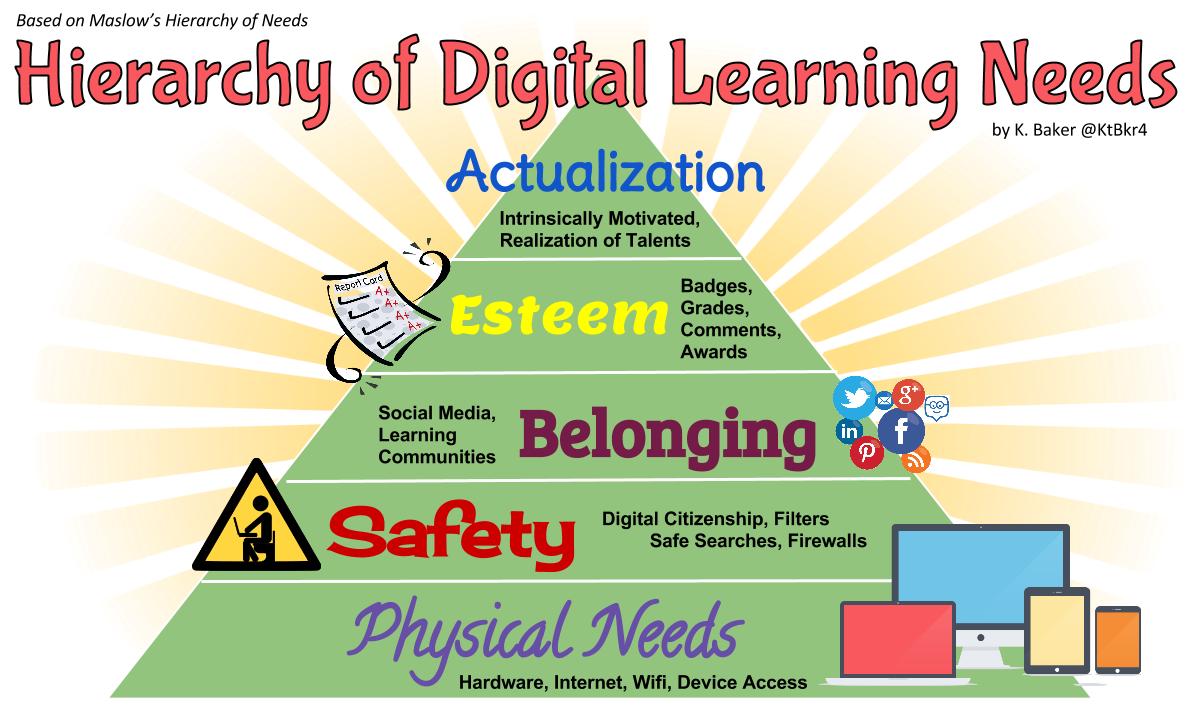
Teaching 150 high school students, there are bound to be some who get lost in the crowd, lack confidence, or distracted by personal technology usage, but with the following tools and techniques, the quiet students can have their voices heard, the text-ers can be academically occupied, and all learners can be engaged by using technology that taps into students' behavior and aligns with Maslow's Hierarchy of NeedsHumanism, and  Social Learning Theories.


TodaysMeet.com


I really have to thank Cheryl Morris for introducing me to this simple tool last summer and providing me with ideas that I've put into action this school year.  TodaysMeet.com is a website that allows a person to create a closed chatroom that only those with the URL can join.  A la Twitter with it's 140 characters per message, the teacher creates the name of the room and provides the students with the URL address. Students type in the URL in their web browser and enter their names in to join the room. The chatroom or backchannel can be accessed on a computer, tablet, or smartphone, and puts students' texting talents to work.

Caveat: Expect some shenanigans the first time using the backchannel as students move through Maslow's Heirarchy of Needs and engage in social learning and digital citizenship. I've had students enter false names and type ridiculous messages, but once they get settled, they can move from the realm of ridiculousness, needing the attention of others, enter the sphere of learning to understand and engage with the content, and finally, make connections with other students in a self actualized and transcendent manner.

Uses:
  1. For informal class discussions and viewing activities, allow students to speak aloud and/or communicate via the backchannel depending on their comfort level with speaking aloud in class. A moderator can monitor the the backchannel and interject in the verbal discussion as needed.
  2. In structured Socratic Seminars, students in the outer circle communicate via TodaysMeet, while those in the inner circle speak aloud.  
  3. While watching video clips in class, post questions and comments  to the backchannel instead of stopping the film every 30 seconds (like I do, or did before TodaysMeet) to point out visual nuances or comment on the action.  
  4. During class presentations, students can ask questions and provide constructive criticism without interrupting the speaker or waiting until the end of the presentation.
To allow students to revisit the conversation as needed, download and save the transcript and then upload it to Edmodo or other LMS, or email a copy to all participants. Students can also save their own copy of the transcript directly from the site. Here is a transcript of a Socratic Seminar on Steinbeck's Of Mice and Men.


As seen in the transcript of December's Socratic Seminar on Steinbeck, students practiced interpersonal, listening, and critical thinking skills.  As they became vested in the activity,  the students were quick to point out those who dominated the conversation and others who provided thoughtful responses.  The entire conversation was student-centered, and all I had to do was monitor and provide guidance as needed.


During our viewing this week of the first 30 minutess of The Odyssey staring Armand Assante, I posted questions to the TodaysMeet chat room, as well as gave them a handout with the questions printed. Since this was the first time using TodaysMeet during a film, I scaffolded the process and anchored the new activity with something familiar.

During my pd 7 class, one of my "deskflowers" (like a wallflower, but sitting in a desk, of course) bloomed for all to see, providing intelligent comments and smart answers to the questions I posed and was recognized by another student for her contributions. Despite the typos, this was the first time Nikki really heard Alyssa "speak" in class and Alyssa was recognized for participation in class. Pretty darn cool, especially if you knew Alyssa's back story.


Now, as expected, they were sharing answers via the backchannel, but the recognition of Alyssa's contributions by Nikki could not have been written in any lesson plan.  By providing the students an opportunity to communicate, we are also providing them an opportunity to make interpersonal connections that otherwise would not have occurred.


Google Hangouts


One of my go-to Google guys, Troy Cockrum, told me to not be afraid to Hangout by myself, and he was right. And my ELA-flip-coach Cheryl Morris, who I have mentioned here so much that I should just rename this blog "Putting Cheryl's EduAwesome Ideas Into Practice," provided me with the opportunity to do just that.  Working with Cheryl and the other #CoLab flippers from the Flipped Learning Journal on a series of video discussions of John Green's The Fault in Our Stars, I snatched up the opportunity to record a discussion with a quiet student who wows me with her nerdfighter prowess and a video with another student who's own life connected with the characters in Green's novel.

Gabbie won't speak up in a room of her classmates, but after school on Friday, we recorded an 11 minute conversation using On Air Google Hangout where she couldn't stop talking about the author and all she knew about the story. Using the Google effects as an ice-breaker while we filmed and simultaneously projected the video on the front screen (as well as live posting to YouTube), Gabbie was able to face her fear of "public" speaking.  With more practice, hopefully Gabbie will realize just how valuable her contributions can be and that she should not hide in a crowd.


On Saturday, I had the pleasure of chatting with my former student Steven about Chapter 2 of The Fault in Our Stars and his own experience with cancer.  Again, this wasn't for a grade, but to show how fictional stories resonate in own lives and to give one student the opportunity to share his story with others.


You may have noticed that the style of the video differs despite using the same tool.  For Gabbie's video, I opened a Live, On Air Google Hangout with no other participants and flipped my web camera around to capture us sitting in the desks. We were technically hanging out by ourselves online, and Gabbie's buddy, Amber, played cameraman by changing the effects and starting/stopping the broadcast. For Steven's video, we did a regular Live, On Air Google Hangout and chatted back and forth for 15 mins, then with a little editing magic using Camtasia, Cheryl inserted titles and cut the conversation to 6 minutes for me (Thank you, again!). Google Hangout is a useful tool that I am just beginning to realize its applications in and out of the classroom, and I have just barely begun to delve into the world of video editing. Oh, what I want to learn to do!

Coincidentally, if you are interested in getting in on the discussion, The Atlantic is doing an organized Twitter chat on The Fault in Our Stars and you can view the rest of the Flipped Learning Journal's book discussion videos on YouTube.


Why do they work?


Both TodaysMeet and Google Hangout appeal to visual and kinesthetic learners and social learning proponents.   The visual learners can see the conversation in the backchannel, as well as see the movie like nature of the Google Hangout when not actively participating in the video.  Kinesthetic learners are busy exercising their fingers when using TodaysMeet, and, as an active participant in a Google Hangout, the learner is a movie star whether it be on a desktop computer, laptop, tablet, or smartphone. The students work collaboratively to understand the material and practice interpersonal skills.

The longevity of both of these tools in found in what they provide at no cost to users whether in the classroom or not. Both allow for synchronous communication no matter the location or context of the participants. Todaysmeet can be used during business meetings/presentations-- just imagine Mad Men (if they had computers or smartphones) backchanneling during a pitch!-- and, while I like the serendipity of Twitter and opening the chat to the world wide web,  since schools and/or businesses many need closed and secure communication, TodaysMeet is a more viable option than chatting using Twitter. With archiving using YouTube, Google Hangouts allow for a variety of connections, including hanging out with President Obama. Politics aside, if the President uses Google Hangout as a modern version of Roosevelt's Fireside Chats, then why not apply this tool in the classroom?

By using technology that appeals to student behaviors and needs, we can give all students a voice and opportunity to be in the spotlight.


References

Saturday, February 9, 2013

YouToo can be a Movie Producer on YouTube


While I have used YouTube for housing my screencasts and sharing videos related to class, there are new editing features that YouTube has enabled to enhance presentations that include adding notes, thought bubbles, pauses, and background music, as well as enhancing the visual aspects of the video. I've been wanting to test out the new features, so I used an existing PPT and quickly created something that I can immediately use in my classroom.
Every year, at the start of our Greek Mythology Unit, I give a 2-day presentation on the causes and effects of The Trojan War to the entire 9th grade so that students can practice listening skills, view storytelling techniques being modeled, and aquire an epic amount of information in a short amount of time. All 500+ students go to the library during their English class period (about 50-100 students for 7 periods), and they listen to me tell stories accompanied by a PPT for two days in a row. I condense 10+ years of war and mythology into a combined 86 minutes. The poor students are bombarded with crazy Greek names and interweaving story lines, and it is an epic task to comprehend the info, so I thought having access to the PPT via an embedded YouTube video in Edmodo could facilitate student understanding and would provide students an opportunity to acquire any missed information. 
I saved the existing PPT as a video (with no audio) and uploaded the video to YouTube. I didn't want to record my narration because the video would be way too long for students to view at home, and the likelihood of me getting 90 minutes worth of narration correct in as few takes as possible was slim (also finding 90 mins alone to do the narration would require divine intervention).
So, using the new YouTube tools, I added background music to jazz up the PPT by searching in YouTube for a free song that matched the length of my video (about 8:30 minutes) and would appeal to high school listeners. Then, I inserted a pause using the new YouTube feature to stop some of the slides from transitioning too quickly. I didn't bother playing with the notes or thought bubbles features for this PPT, but I plan on playing with these features in future presentations.  Once done with the enhancements, I re-saved the video in YouTube (no additional uploading).


I give YouTube a 4/5 stars for these enhancements.  It was very easy to search and insert the background music. When I created my screencast tour of how I intergrate technology in the classroom, I searched Amazon for free music to upload and add to my screencast. I actually used 2 different songs three times to get the length I needed. If I had known then about the background music feature in YouTube, I would absolutely have used it and saved myself about an hour of extra work in Windows Movie Maker. It took longer for the video to re-save/process than for me to find and insert the song--but total time, 5 mins! Yeah, baby!  And inserting the pauses to even out the slide transitions was also super easy. I did have to click around to figure out what to do, so a 4/5 is well merited.
I can see using these features to create customized and (somewhat) interactive videos for regular and flipped classrooms. Using the note or thought bubble feature, I could direct students to answer questions on an accompanying form or worksheet as I'm sure many of the flipped teachers have already done and the pause feature would provide time for students to record their answers.  It would be really really cool if the questions could be in the video itself and have the Google form and video completely integrated, but for someone who is just getting started with video production, YouTube makes the process easy.

Sunday, January 20, 2013

On Edmodo Global Connections Just a Post Away


While I use Twitter consistently for informal professional development and connecting with other educators, the opportunities for making connections on Edmodo are greatly increased. Unlike Twitter where one has to find and follow others (I follow 982, but only about 550 follow me), the communities on Edmodo provide areas for thousands of educators to congregate and post.  

Ask and you shall receive... just post and wait for a reply!


Global Connections can easily be made on Edmodo with one post.


I was scrolling through the latest posts (today) on Edmodo and came across this post in the Language Arts community from a teacher who was sharing a link to his students' projects. And as you can see from my replies, I seized the opportunity to get my students involved. Mr. McEnaney's students are of the same age as mine and my students have read To Kill a Mocking Bird and have studied other concepts and texts related to discrimination. Little did I know that it would take them "across the pond" for Mr. McEnaney's class is located just off the coast of Scotland.

My students have been sharing their work with their classmates via small groups on Edmodo, but I thought, what a simple idea to share student work with a larger audience and gain additional feedback by posting to the communities page on Edmodo. And imagine how the student authors will feel seeing the comments! Positive reinforcement from thousands of miles away! You too can provide feedback, just follow the link and leave some comments!  AND, what if this starts a chain reaction, and you have your students comment too?! Crazy cool!

To track my students' comments on, I created a screencast using Screencast-O-Matic showing how to comment on a project and copy-paste the web url and then I created an assignment on Edmodo. To complete the assignment  students must choose two projects, post a comment, copy-paste the web url of the project page and write a reflection on the process and connecting to students globally when they turn in the assignment on Edmodo. Since this is our first foray into the wilds of global connecting, accountability is needed. Will I grade this as an assignment for points? Probably not, but it will factor into their overall participation grade on Edmodo (FYI: graded holistically using the infamous OSU rubric). I hope this activity would springboard them to finding other blogs to follow on a consistent basis.

To further our writing practice in the classroom, I'd like to get my students blogging, but I am unsure of the logistics and ways to manage 150 individual blogs. I'm not ready yet to dive into that project without some more investigation and modeling from others, but in the meantime, by having my students apply skills they have learned in their Edmodo small groups, they can get an easy introduction to blogging by commenting on others'.