My first answer is that social media provides the venue for people to get connected. Twitter without a doubt is my number one tool for finding people to talk to about educational topics. While the 140 characters is limiting, Twitter is where we start to talk and the conversations are later expanded via email or in Voxer groups. I don't know how I collaborated before Twitter and Voxer. Being a connected educator to the ever-flowing stream keeps me energized and constantly thinking, "What if...?" because I know there is someone out there on Twitter and Voxer who will help me answer that question.
Thinking about other social media tools, Facebook is primarily where I connect with family and local educators, but little collaboration takes place. But Facebook is a good place to share, share, share! Although, Kate Messner & company's Teachers Write online summer camp through a closed Facebook group is sparking creative writing for teachers. And while I haven't used Instagram much for educational purposes, it too is primarily for documenting and sharing. YouTube, like Instagram, is an area to showcase collaboration, but not necessarily kindle it. And while Pinterest will keep me occupied for hours pinning things, I wonder how it could be better suited for collaboration instead of mere archiving.
So to get the collaborative connections going and see how Pinterest can foster collaboration, I have a task for you! Pick something from my Teaching Board and in the comments to this post reply with an idea of how we can make the item better.
In discussions with Lindsay Stephenson, another ELA teacher who is implementing standards-based learning with her students, we've been trying to figure out methods for efficiently tracking student progress and alignment with the standards. Neither one of us is keen on the look of spreadsheets. Neither one of us wants to use another learning management system. Also, we don't have to create the standards-based tasks if we can use tools that generate and score tasks for us. We love Google Forms, so why not stick with what we know and love?
To track formative student learning and alignment with the standards, I created this Google Form:
My students will be completing practice (aka formative) standards-based learning tasks in Curriculet and Edmodo. Every Curriculet text has questions tagged with a Common Core ELA Standard and each Curriculet-USA Today news article is tagged with one specific standard. With the Curriculet-USA Today subscription, my students can select the articles to read and enter in their scores on the above Google Form. With Edmodo Snapshot, I can select specific standards and a number of questions for students to answers. Students can then enter in their scores on the Google Form shown above. While I can see the students' performance in the teacher dashboard for both Curriculet and Edmodo Snapshot, I want my students to take responsibility for their learning. So, by having the students enter in their scores and reflect on the assignment, they are learning accountability and practicing metacognitive thinking. The formative learning scores will not go into my district gradebook. I want the students to realize that the process of learning is important whether or not a score is factored into their marking period grade. The summative data will be entered on a separate Google Form and I will figure out a way to translate that data for my district gradebook.
To recap, here is my workflow for tracking standards-based learning with my freshmen:
Students complete formative learning tasks in Curriculet and Edmodo.
To document mastery of specific standards, students complete the summative tracking form and submit links to artifacts that demonstrate mastery of the standards.
I analyze the data and assign additional standards-based tasks throughout the rest of the course.
I can use a mail merge add-on to generate reports of student performance for parents and administrators.
I took a look at Jumprope and Mastery Connect, but I'm concerned about making more work for myself by using other platforms (as well as the cost!). I want to work smarter, not harder, and not be like Alice falling down the rabbit hole learning a new and managing a new-to-me assessment platform. I already use Edmodo, Google Classroom, Curriculet, and my district's gradebook program Genesis. I don't want another platform. And I took a look at Tom's spreadsheets: WOW! Prior to Google Classroom, Tom would have each of his students create a copy and share it back with him. I could adapt Tom's spreadsheets and have Google Classroom create an editable copy for each student to fill out throughout the marking period. More on this to come....
This got me thinking: what if I devise a way that students self-evaluate themselves and provide evidence of meeting the standards? My students are trained to peer and self-evaluate using Google Forms, so why can't I adapt that process so that students will make a standards-based portfolio that documents how they have met the Common Core ELA Standards?
If students are doing the data entry, I can save myself time and ensure that they are part of the process. Here is my thought: What if I create a Google Form for students to select the standard and provide a link to the artifact that meets that standard? My high school is a Google Apps for Education school, so my students are completing their tasks predominately in Google Drive. As long as their learning outcomes live on the web, they can provide a link to the item. The Google Form will be used for the entire school year and all entries will be located on one spreadsheet that I can sort.
So here is the form I created to track students' summative outcomes in meeting the Common Core ELA Standards:
On the spreadsheet of responses, I could use "Summary of Responses" to see the auto-generated pie charts and graphs of data or I can color the spreadsheet to analyze the data. Other subject area teachers could use this same method to track summative student performance. What do you think?
After connecting at #flipcon15 with Hassan and Amanda, I was invited to join the SBL Mini PLN Voxer group to discuss all things related to standards-based learning/grading as I contemplate making the shift from traditional grades to the SGB model. Why, might you ask? Because I am dissatisfied with the 100-point scale and ABCDF grading systems. I do not feel as if the traditional model of grading provides an accurate depiction of student performance. Grades should not be the focus of learning. Grades are a symbol of student performance.
There, I said it. I have slandered the traditional grading system.
Students earn points for completing assignments and their marking period grade is calculated by dividing the number of points earned by the total points possible and then converting the decimal to a percentage on the 100-point scale. Some teachers will also weigh specific assignment types which complicate the grade calculation.
How is completing 70% of something almost failing? When does someone do zero work? And what really is the difference between 98% and 97% or 82% and 83% overall? How can educators accurately assess and symbolize student performance?
The SBL Mini PLN Voxer group discussed some of these issues in a Google Hangout today....
All of this has me thinking about HOW to manage and assess via a standards-based model. My experience with tracking SBL/SBG is limited. I've written up specific lessons, benchmark assessments, and culminating assessments that are tagged with Common Core ELA Standards, and I've created a 12-week SBL curriculum unit for my most recent graduate class. When my students read via Curriculet, questions are tagged with specific Common Core ELA Standards. I also have students complete Edmodo Snapshots that target specific ELA Common Core Standards.
This is a 12-week standards based unit plan I created based on the theme of leadership and legacy.
From a lesson and unit planning standpoint, I'm good, but I lack a method for tracking student progress via the standards throughout the marking period and school year. I use Edmodo's Progress area to track assignments turn in via Edmodo as a working-gradebook with some of the assignment scores transferred to my district gradebook. While the Edmodo Progress area is sufficient for managing online assignments, I don't have one spot where I can collate alignment with the standards. I want to create some sort of Google Form and Spreadsheet to track the standards assessed because I don't want to put the formative data in my district gradebook. I'd like the standards-based data to guide me in lesson planning and authentically assessing students' skills. The spreadsheet should provide me with a big picture view of student performance and assignments.
I also wonder about using a specific rubric for standards-based assignments. Hassan, Amanda, and others assess using a 4-point rubric:
4 = Exemplary
3 = Proficient
2 = Approaches the Standard
1 = Does not meet standard
This scaled rubric is similar to my OSU rubric:
O = Outstanding 100%
S = Satisfactory 87%
U = Unsatisfactory 74%
I do not give half scores: students are outstanding or they are not. I will not enable students with a false sense of accomplishment by protecting their egos with a S+.
When the 4 point rubric is used for a culminating PASS/FAIL grade for the marking period, it is easy to use this rubric for each standards-based assignment, but when I try to fit this into a numeric-points-grading system that my district uses, I'm stumped. I could use the 4 point or OSU rubrics to track formative learning. Formative assessment shouldn't be put in the summative gradebook, but I do need a way to track student progress and monitor their performance overall. I'm also thinking about how I can modify my peer evaluation rubrics for standards-based grading. I want a way to see the big picture of standards based learning in one spot.
If you have any ideas on how to manage the collection of data for standards-based learning or have a template you wouldn't mind sharing, please share in the comments!
Whenever I run into students during the summer months, I always ask them, "Have you done your summer reading yet?" As an English teacher, it is an obligatory question. But summer reading doesn't have to be a chore or a snore.
Summertime is my opportunity to catch up on my reading. As much as I like to read for entertainment, I can't squeeze it in during the school year. I've become a binge reader: devouring 100s of pages in a single sitting during holidays, breaks, and summer. Two Christmases ago, I finished the first Game of Thrones book in 24 hours because I could not put it down. This summer I'm binging on the escapism of historical fiction and sci-fi/fantasy.
If I keep up my current pace of finishing a book ever 2-3 days, I should be able to cross off the titles on my list during the last month of my summer break. When I shared the titles I've read this summer via Facebook, my husband (who is not a reader) jokingly asked if I read, The Housekeeper. I have not! Nor have I read the other books in the series: The Laundress and Dishwasher Diaries. There isn't any time to clean when I have so many books to read!
What books are on your list? Please comment with your suggestions for fiction and nonfiction texts-- keep me reading so I can avoid cleaning!
All non-Honors track students are assigned to read the same book per grade during the summer. The titles were selected based on budgetary constraints. We have some copies that can be checked out by students and all of the titles can be read online via a free digital text or thru Curriculet's platform. On the first full school day, all students take a test on their assigned title and the score goes in the gradebook. Over years of trying to find the best way to manage a summer reading program, this was the easiest and least painful method. But, does summer reading have to be painful for students?
As the only 9th grade Honors English teacher in my district, I have complete control over the summer reading assignment and strategically assign texts and activities for completion. I purposely chose texts that would engage the students and align with concepts taught throughout the upcoming school year (see my Writing Map and Reading Map). My students read J.R.R. Tolkien's The Hobbit, Clive Barker's Abarat, and the school-assigned reading of John Steinbeck's The Pearl. Students are given paperback copies of Hobbit and Abarat, but are tasked with accessing a digital version of The Pearl. Abarat and Hobbit balance each other: both a long epic texts that follow Joseph Campbell's Hero's Journey steps, one with a female protagonist and the other feature a male protagonist. While reading, students are to keep a reader's response chart, noting their observations and connections to the text. I do not give a set number or length of entries because I want to see what the students will give me. When we return to school, students will take a quiz on each of the titles to check for understanding and I will award them completion points for the chart. We use the summer reading titles as a basis for learning about literary analysis and mentor texts for creative writing throughout the first marking period.
In addition to the fiction texts, my Honors students are also taking part in Curriculet's and USA Today's Summer Reading Challenge. Students are to select at least 10 articles (I assigned them at least 10, but they can read more than that number if they want to win prizes) and answer the questions embedded in the text. Each article is tagged with one Common Core Curriculum Standard and contains 3-4 questions that check for understanding using the lens of the standard. Before my students ever set foot in my classroom, I am getting to know them as they show me when, how, what they are reading in Curriculet. I can track their progress, see what articles they selected, and monitor their performance. I can see who is a procrastinator and who is an overachiever. I can use the data to create lessons that will bolster their weaknesses and meet their interests. Students are motivated to read can also win prizes: folks who read at least 3 articles in a day are entered into the daily drawing to win a pair of Beats Headphones; those who read 3 articles a day for a number of days during a week are entered in a weekly drawing for an Apple Watch. And there are district prizes too! One of my incoming freshmen won one of the daily prizes last week:
All of this makes me wonder about the value of summer reading. Is it for pleasure? Is it for an assignment? Is it to win prizes? I'm curious to know how you or your district handles summer reading. Let us know in the comments!
I learned about Battle Deck at #flipcon15 during a hilarious segment where participants gave an off-the-cuff-presentation on the theme of Flipping the Prom using a never-before-seen-but-preselected-by-the-game-master slide deck. You'll have to view the archives of #flipcon15 to get the jokes (#nooksandcrannies), but seriously this is a really neat activity. Each player has 2 mins to give a presentation on pre-decided theme using a never before seen slidedeck. Then the class votes on who gave the best presentation.
FUN!!!!! #battledeck face off game 2 min presentations with slides that have never been seen before. vote on best presentation #flipcon15
Battle Deck is also known as PowerPoint Karaoke and similar to PechaKutcha both of which I have no experience in doing. So I wonder how to bring this in to my classroom. Thanks to Stacy and Ken for resources below.
I envision BattleDeck as a review activity for a unit or as an activity during our mini-unit on speeches. During our American Dream Unit, my freshmen read Of Mice and Men andThe Declaration of Independenceand read/view Obama's 2nd Inaugural Address, Steve Job's 2005 commencement speech at Stanford, and Ashton Kutcher's 2013 acceptance speech at the Teen Choice Awards in Curriculet. For each text, we discuss how the American Dream is defined and how the characters/speaker achieved the dream. We also, in the case of the speeches and historical documents, examine the rhetoric and structure of the speech and how the speech/document was tailored to a specific audience. I could incorporate Battle Deck as a way for my students to practice public speaking. While Battle Deck could devolve into a rip-roaring roll on the floor laughing moment, we could also use it to practice the delivery of a serious speech on a specific theme.
What ideas do you have for including Battle Deck in your class? Comment and let us know!
My edubuddies Sam Patterson and Cheryl Morris were featured in an Edutopia article, "6 Reasons Why Puppets Will Change Your Classroom Forever." I've known about Sam and Cheryl's puppet proclivity for years and have listened attentively as they shared their experiences with puppets in the classroom. I recognize the sound pedagogy and rationale for using puppets with elementary and middle school students. As a high school teacher, I'll be honest, I'm a bit skeptical about making and using puppets with my high school kids. They already think what we do is nuts, so puppets... I don't know... but I am willing to explore the notion. If it will help my students, I am for it.
I have never made a puppet before, so under Cheryl and Andrew's tutelage at #Flipcon15, I embraced my inner child and jumped at the change to make my own. Here's what I experienced:
Making puppets is good for eye-hand coordination, fine motor skills, and spatial understanding as I sewed, cut, and glued the materials. I also thought about safety as I tried not to burn myself repeatedly with the hot glue gun.
Making puppets helps with socialization. Akin to a quilting circle, the group of us at #Flipcon15 chatted away as we sewed and glued. I had to wait patiently for my turn with the glue gun or the scissors. When I didn't understand how to attach the mouth to the body, I asked for help and clarification.
Making puppets gets me thinking about character and identity as I selected from the supplies and made purposeful selections concerning color and shape of the parts of the puppet. What will the gender of my puppet be? Will it be humanoid or animalistic? Will it have a happy or grumpy personality? Is the puppet a representation of me or will it have its own identity?
As you can see from the pictures we had quite a good time making our puppets.
When I came home from Flipcon15, my daughters were immediately enthralled with my puppet named Gertie. My youngest daughter who is in 2nd grade got Gertie talking right away and they became fast friends. Whereas my oldest daughter who is going into 4th grade is a voracious reader, my youngest daughter who is going into 2nd grade hasn't become a bookworm yet. I wonder if there is a bit of delay because we didn't realize she needed glasses until she was going into kindergarten--while she is an excellent talker and a smart cookie, reading has been a weakness. I mentioned to my youngest daughter that she could read books with Gertie and even use the Kindle Fire to make videos with Gertie. And with that quick mention, magic started to happen....
Not only did both my daughters start making movies and reading with Gertie, they then asked if they could make their own puppets. So one trip to the local Michael's and a ridiculously hot-stay-indoors-summer day later, we were covering our kitchen island with puppet materials and trying to not run with scissors or burn ourselves with glue.
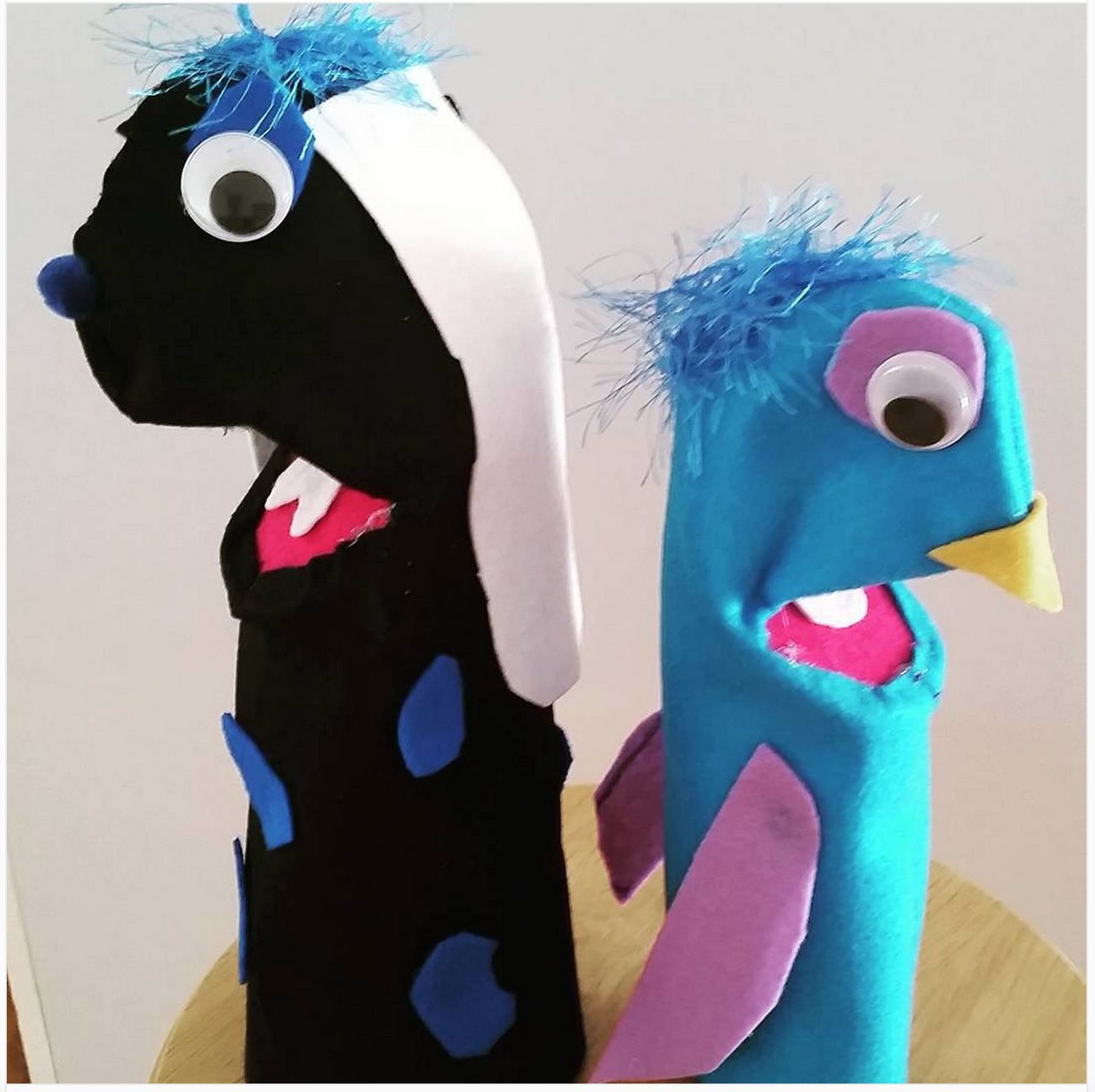
I was impressed with my oldest daughter's dexterity as she sewed her puppet's body. My youngest surprised me with her clear design. We chatted, took breaks, and I tried to not to burn myself with the hot glue gun. What I learned during the first time I made my puppet was reinforced as my daughters made their puppets. The result was a black with blue spots puppy puppet made by my youngest and a blue bird puppet made by my oldest daughter.
Meet Spot and Gooney Bird
"So, puppets, you say?" In the elementary and middle school classroom, the puppets can be a vehicle for practicing fine motor skills and, after the puppet has been created, the puppet can be a form of inspiration for storytelling or having a buddy to read with. In the high school classroom, I'm thinking the puppets can be a vehicle for getting students involved with peer instruction and working with younger grades.What if the high school students made puppets and wrote children's books that were read to an elementary class? What if the high school students taught the elementary students to make their own puppets? I'm also thinking I could incorporate puppet making into my freshmen classes' Create a Hero Project in the Fall or as part of our study of the myth and George Bernard Shaw's play, Pygmalion, in the Spring. Pygmalion centers on the themes of identity and control: are we who we are because we were made or molded by someone else? The same question can be applied to the puppets. I wonder how else I can use puppets with my students....
I'm very excited for Class Dojo's announcement introducing the group feature to the platform! As a teacher who has struggled with how to assess class participation and continually tweak how to manage group's workflow, now I have my answer!
I am very conscious about purposeful use of technology. I will not use a tool because it is bright and shiny. I envision using Class Dojo specifically for days that my students are working in groups, and I want to make sure my freshmen are staying on track and to reward the ones who don't need nudges in the right direction. When we are creating life-size Of Mice and Men characters for our Crime Scene Investigation project and my students are working in the room and hallway, I can use Class Dojo Groups to alert both students and parents to their collaborative work habits. When we do peer evaluation of writing assignments, I can reward students who demonstrate exemplary evaluation skills. I love the positive reinforcement focus that Class Dojo provides and the ability to keep both parents and students aware of student behavior while students are working instead of waiting for progress report time or the end of the marking period. So often the focus is on negative behavior as teachers call home or send an email. I greatly enjoy the ability to spotlight the POSITIVE!
Thank you Class Dojo for listening to teachers and continually making improvements! This reciprocal relationship exemplifies the the importance of teachers and edtech companies working together (reinforces teachers to keep talking because we know that you are listening!).
Take a look at Class Dojo's site for more info on Class Dojo Groups....
The word "collaboration" is thrown around so much that it should be the center square on a bingo board. Not that I am denouncing or mocking collaboration, on the contrary, I believe in the power of collaboration and think we can take systemic approach whether collaborating with folks across the country or the hallway.
What is the impetus for collaboration? I often think about what motivates people to do things. Maslow's Hierarchy of Needs is always floating around in my brain. If I'm hungry, my stomach needs to be filled, I am motivated to eat. If I'm confused by something, I'm motivated to ask a question and seek answers. If I don't know how to do something, I am motivated to find people to teach me. As a swim coach, I constantly think about motivating my swimmers through tough workouts or difficult meets. As a classroom teacher, I think about fostering intrinsic motivation in my students. As a colleague part of a large professional network, I see motivated folks abuzz with activity. I realized the impetus and motivation for anything in life comes down to one simple thing: fulfilling a need. Collaboration won't work if you don't feel the need for it to occur.
The first step with any collaboration is to find people to work with (duh!) and the purpose of the collaboration. Serendipitously, I've connected with like-minded folks on Twitter via #flipclass and we've collaborated on numerous projects: research projects, writing groups, and overall curriculum. We discussed community building during last night's #flipclass chat. The Flipped Learning Community is the most collaborative group of folks I have ever met and this got me thinking about why that was so:
Q2: How do your on-site local community-bldg experiences compare with your experiences here in #flipclass chat (or at flipcon)?
I think the #flipclass folks collaborate so well because we all have recognized a need to change. We weren't satisfied with how we were teaching and felt the need to evolve. I'm greatly over simplifying things in my response above and in this post, but part of the lack of collaboration locally may be due to others not having a need to change or understanding how to change. If there isn't a need, why do it?
About 10 years year ago, I collaborated with two other English teachers in my hall to craft a freshmen curriculum that would lay the groundwork for prepping students for the NJ-HSPA exam taken in 11th grade. The power of that paper-based collaboration was seen in our exemplary test scores (I know that isn't the only measure of success, but prior to the great digital data era we are in now, those scores were important). We saw a need and fulfilled it with collaboration. Now that HSPA is gone and PARCC is king (for now), we are recognizing the in-house need to collaborate and prep our students again. While I do collaborate with individual colleagues on lessons, I wish a standardized test wasn't our primary extrinsic motivation for large-scale collaboration. I want to collaborate so that we can be #BetterTogether-- the sum of all of our parts creating something greater than the whole.
Throughout the 2014-15 school year, I was able to collaborate at home with a new to my district English teacher who also taught senior English next door to one of the classrooms I used this year. My traveling schedule dictated that we collaborate online via email and Google Drive, creating lessons for the new-to-both-of-us senior English prep. Having taught senior English only for the first time 2 years ago, I did not feel like an expert in my craft and welcomed her ideas. We had similar teaching styles and enjoyed working digitally. Our collaboration was born out of a need to strengthen our understanding of the texts we were teaching to better engage our students. I greatly appreciated our collaboration and hope it will continue when I'm on the other side of the building teaching freshmen full time again.
So as we are moving more and more towards paperless learning, I have been thinking about how to craft a digital curriculum-- house all of those lessons and materials I create with colleagues. I presented on the technical aspects of collaboration for curriculum design at NCTE's Conference on English Leadership (CEL) in November 2014. While I've evolved many of my classroom activities and resources to a digital format, there has been little digital collaboration on a departmental level--other than emailing Word files back and forth or keeping an inventory of books via Google Sheets--with my colleagues in my building. The objective of my CEL session was to give other ELA educators easy to use tools and strategies for creating, sharing, and housing an archive of digital resources particular to their curriculum.
After looking through the slides below, I'd love to read about your strategies for collaboration. Heck, we could collaborate about collaboration!
Lindsay Cole and I led a session at #Flipcon15 on the great divide between grades and learning, entitled "The Grade Divide" (get the pun?). When we first wrote up our proposal for this session, we envisioned small group / roundtable discussions where participants shared their opinions and best practices with getting students to focus more on learning and less on the grades. When we learned that we were a featured session held in the large lecture hall being streamed to the virtual audience, we recognized that our original session format needed to shift.
When my students write, I constantly have them focusing on the Task, Audience, and Purpose (TAP) of the writing: What are you writing? Who are you writing for? Why are you writing this? The same questions apply to giving presentations. What are you presenting? Who are you presenting to? Why are you presenting? The answers to the TAP questions will drive the session format.
Lindsay and I knew that we did not want a "sit and get" type session, nor could roundtable discussions work in a lecture hall of static seating with a virtual audience viewing the live action in the room. We decided to try a talkshow style format: pose a question to the group, poll the physical and virtual audience for their general reaction, share our specific stories, and have audience members volunteer to share their stories as well.
The greatest fear for the talkshow style session is that no one will show up and no one will participate. As you can see from some of the tweets, people showed up AND participated. If you view the archive of our session, you'll see me dashing about with the handheld mic.
Would the education way work in business? 1 person controlling the process of 150 other people? #flipcon15@lindsaybcole@KtBkr4
In order to engage our audience, we took a different approach with our slidedeck, as well the session format. When thinking about how to design your slide deck, answering the TAP questions will determine the type of format for your session.
Lindsay and I realized that this session couldn't be "death by PowerPoint" with gobs of information on the slides. So to spark participants, each slide had a meme and guiding question. We were purposeful in our selection of memes--the meme had to work with the guiding question and be school appropriate. Additionally, to give us something to talk about and engage the audience, we added in polls and discussed the results. So the gist of our format was: poll audience, tell our stories, view the poll results, and have audience members tell their stories. By asking a poll we could have everyone participate and then focus in on specific folks to share their stories. What was the purpose of our session? Get people talking! We couldn't get them talking if we were having them read slides full of information.
Reflecting on the session, I think it went very well, although it was a bit rushed at the end. We could easily have stretched this 60 minute session into 90 minutes without editing the slidedeck. And as evident from the tweet below from flipped learning pioneer and band leader Aaron Sams, the virtual audience was having a very lively discussion. Our moderator, Dan Spencer, did a great job keeping Lindsay and I informed about the virtual audience, even stating at one point the stream was flowing so fast he could barely keep up. I'd like to figure out a better way--other than on Twitter-- for the virtual attendees to interact with the physical audience in the room. It would be cool to somehow have them share their stories via GHO during the session.
If you were in the audience for this session, what did you think? Anything Lindsay and I could have done differently/better? Whether or you were there or not, how do you create conference sessions that engage the audience?